Profile Structure
The general structure of a profile is like this:
examples/profile
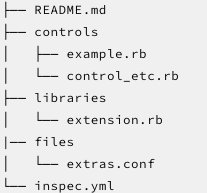
The description of the terms mentioned above is discussed below:
- inspec.yml: it is a required field that describes the profile description.
- controls: it is a required field. It is the directory where all the tests are located.
- libraries: it is an optional field. It is the directory where all the Chef InSpec resource extensions are located.
- files: it is an optional field. It is the directory that has additional files which a profile can access.
- README.md: it is used for explaining the profile, its scope as well as its usage.
inspec.yml
It is mandatory for each profile to have an inspec.yml, which defines the below-mentioned information:
- name: it is used to specify a name for the profile. Needs to be unique. It is a required field.
- title: it is used to specify a human-readable name for the profile.
- maintainer: it is used to specify the profile maintainer.
- copyright: it is used to specify the copyright holder.
- license: it is used to specify the license for the profile.
- summary: it is used to specify a one-line summary for the profile.
- version: it is used to specify the version of the profile.
- supports: it is used to specify a complete list of all the supported platform targets.
- inputs: it is used to define all the inputs in the form of a list that can be used in the controls.
Verify Profiles
The inspec check command can be used by the user to verify the implementation of the profile in a below-mentioned way:
inspec check examples/profile
Platform Support
To specify either one or more platforms for which a profile is targeting, the user can use the supports setting that is present in the inspec.yml. The following mentioned properties may be present in the list of supported platforms:
- platform-family: it is used to restrict to a particular platform family.
- platform-name: it is used to restrict to a particular platform name, it supports the use of asterisk wildcard.
- release: it is used to restrict to a particular platform version and is used along with the platform-name. It also supports the use of an asterisk wildcard.
- platform: it is used to restrict to either a platform-name or platform-family.
Generally, os-name and os-family are used due to compatibility purposes. Though, it is advised to all the users to change the os-name to platform-name and os-family to platform-family.
New families have been introduced since Chef InSpec 2.0 to help distinguish the cloud platforms. With the use of new families, platform family can be restricted to os, aws, azure, or gcp.
Like, if the user wants to target anything that is running Debian Linux, the below-mentioned is used:
name: ssh
supports:
  - platform-name: debian
Similarly, if the user wants to target only Ubuntu version 20.04, then the below-mentioned is used:
name: ssh
supports:
  - platform-name: ubuntu
    release: 20.04
Profile Dependencies
A Chef InSpec profile has the ability to bring in controls and custom resources from another Chef InSpec profile. It even has the capability to skip or even modify controls that are inherited from another profile.
Defining the Dependencies
For a profile to use controls from another profile, the to-be-included profile must be specified in the including profile's inspec.yml file inside the depends section. For every profile that has to be included, the location for the profile from where it is to be fetched and the name of the profile must also be included.
path
It defines a profile which is located on the disk. The path setting is generally used during the development of profiles and while debugging profiles.
depends:
- name: my-profile
  path: /absolute/path
- name: another
  path: ../relative/path
url
It is used to specify a profile which is located either at an HTTP or HTTPS-based URL. The profile should be accessible via HTTP GET operation and needs to be a valid profile archive.
depends:
- name: my-profile
  url: https://my.domain/path/to/profile.tgz
- name: profile-via-git
  url: https://github.com/myusername/myprofile-repo/archive/master.tar.gz
git
It is used to specify a profile which is located in a git repository, with an optional setting for branch, tag, commit, etc. The source location is converted into a URL upon resolution. Such a type of dependency supports version constraints via semantic versioning.
depends:
- name: git-profile
  git: http://url/to/repo
  branch: desired_branch
  tag: desired_version
  commit: pinned_commit
  version: semver_via_tags
  relative_path: relative/optional/path/to/profile
supermarket
It is used to specify a profile which is located in a cookbook which is hosted on Chef Supermarket. In this, the source location is translated into URL upon resolution.
Gem Dependencies
Any profile that needs to be installed and has ruby gem dependencies can be specified using gem_dependencies settings in the inspec.yml metadata file. For instance, if the user requires any ruby library in a custom resource which requires a specific gem to be installed, then the user can simply specify those gems in the metadata file. When the profile is run for the first time, the Chef InSpec will prompt the user to install the gems to ~/.inspec/gems. If the user wishes to skip the prompt and directly install the gems, then pass the –auto-install-gems option to the inspec exec.
Vendoring Dependencies
The inspec.yml file is read in order to source any profile dependencies whenever the user executes a local profile. It then further caches the dependencies locally and also generates an inspec.lock file.
If the user adds or updates the dependencies in inspec.yml, then the dependencies may be re-vendored, and the lock file will be updated with inspec vendor –overwrite.
Using controls from an Included Profile
The controls from the included profiles can be used once they are defined in the inspec.yml.
Including all controls from a Profile
With the help of include_controls command in a profile, all of the controls from the named profile get executed every time the included profile gets executed.

Every time my-app-profile gets executed, all my-baseline controls also get executed. Thereby, the following controls will be executed:
- myapp-1
- myapp-2
- myapp-3
- baseline-1
- baseline-2
Skipping Control from a Profile
If in case any one of the controls from the included profile doesn't apply to the current environment, then luckily, it is not mandatory to maintain a slightly-modified copy of the included profile just to delete a control. With the help of the skip_control the user can tell the Chef InSpec not to run a particular control
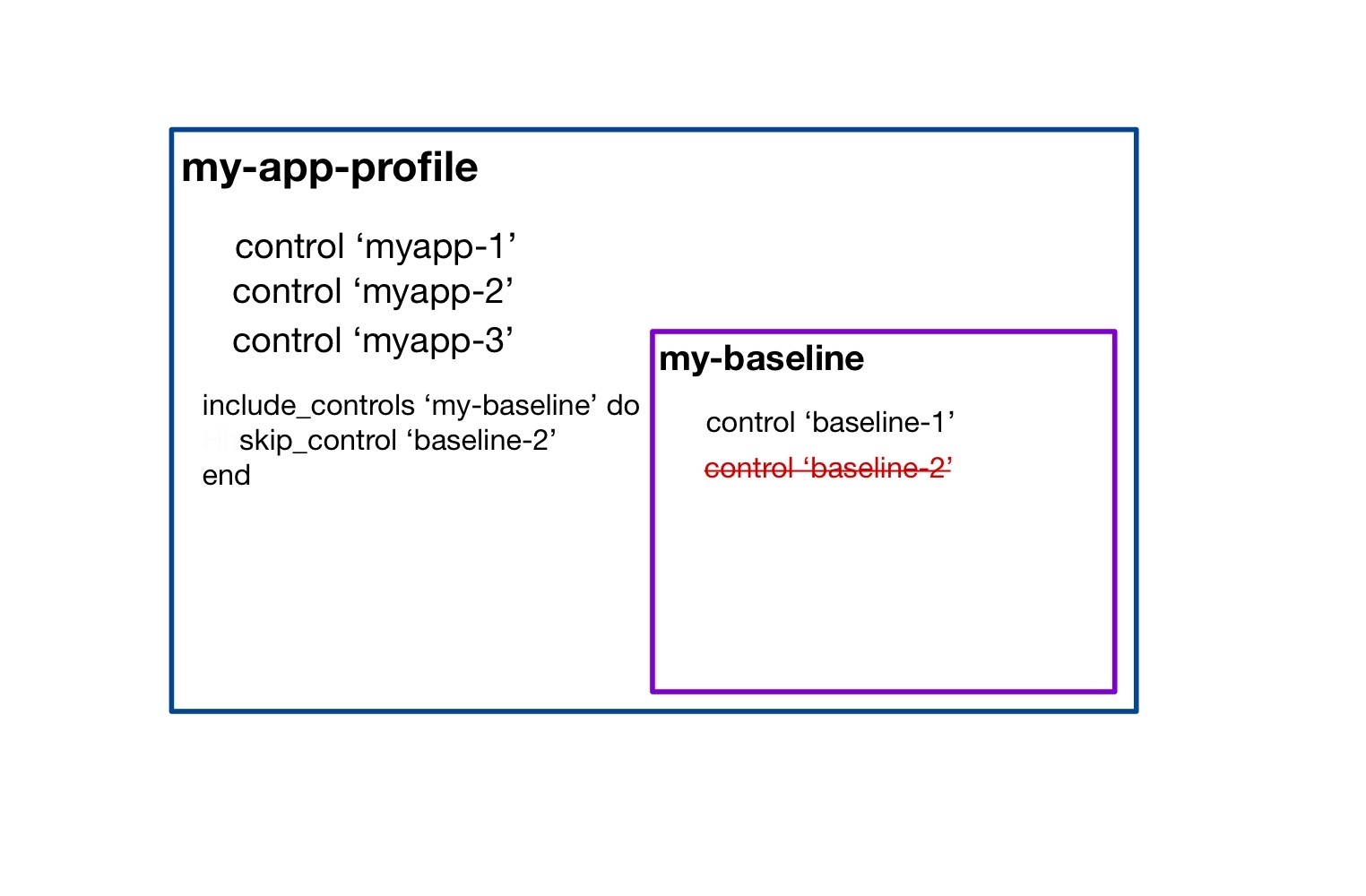
All of the controls from my-app-profile and my-baseline profile will get executed every time my-app-profile is executed except for control baseline-2 from the my-baseline profile.
Using Resources from an Included Profile
All of the custom resources from a listed dependency are available for the user to use in the profile by default. If any two of the dependencies provide a resource with the same name, then the user can use the require_resource DSL function to disambiguate the two:
require_resource(profile: 'my_dep', resource: 'my_res',
                  as: 'my_res2')
Check out most important Git Interview Questions here.
Frequently Asked Questions
Which command can be used to verify the implementation of a profile?
The inspec check command can be used to verify the implementation of a profile.
Can a profile inherit controls from another profile?
Yes, a profile can inherit controls from another profile.
Why is platform-family used?
The platform-family is used to restrict a specific platform family.
Conclusion
In this article, we have extensively discussed the various Profiles in Chef InSpec.
After reading about the various Profiles in Chef InSpec, are you not feeling excited to read/explore more articles on Configuration Management? Don't worry; Coding Ninjas has you covered. To learn about what ansible is, what is ansible YAML syntax and how errors are handled in the ansible playbook.
If you wish to enhance your skills in Data Structures and Algorithms, Competitive Programming, JavaScript, etc., you should check out our Guided path column at Coding Ninjas Studio. We at Coding Ninjas Studio organize many contests in which you can participate. You can also prepare for the contests and test your coding skills by giving the mock test series available. In case you have just started the learning process, and your dream is to crack major tech giants like Amazon, Microsoft, etc., then you should check out the most frequently asked problems and the interview experiences of your seniors that will surely help you in landing a job in your dream company.
Do upvote if you find the blogs helpful.
Happy Learning!









 1+ registered

