Power BI License Types
As mentioned above, there are three types of Licenses on can have in Power BI, and below are the detailed description of each.
Power BI free
Power BI's free edition is still a pretty powerful piece of software that allows you to connect to 50+ data sources, publish to the web, and export to Excel.
It is primarily used to familiarize yourself with Power BI and allows individual users to construct and publish dashboards and reports for their own usage. However, this is where its functionality is significantly limited since you cannot share those reports peer-to-peer, build App workspaces, or integrate APIs and controls.
If you wish to upgrade from the free version, the Pro edition for professionals is most likely what you're searching for. So, you can Upgrade from Free version to Pro by paying a fee of 10$ per user. Now let’s see what a Pro version can offer to us.
Power BI Pro
Power BI Pro provides a comprehensive set of services for professional customers that wish to make full use of the Power BI ecosystem.
The main difference between Free and Pro is that with Pro, you may share your data, reports, and dashboards with other Power BI Pro users. App workspaces can also be created. Power BI Free and Pro both have a 10 GB data storage limit, with individual files restricted at 1 GB.
It also allows you to connect to a variety of on-premises datasets and arrange automatic refresh for these datasets.
Some Salient features of Power BI Pro License:
1.On-premises data gateways
If your data is on-premises (rather in the cloud), you can connect to it and examine it.
2. Improved data refreshers
You can better plan data refreshes in Power BI Pro so that your team always receives the most recent version of your data.
3. Sharing and Collaboration
The essential aspect here is that if you want to share data, reports, and dashboards confidentially, Power BI Pro is way to go. It enables you to share data with specific co-workers or to publish enterprise-wide "content packs" and "apps" with row-level data protection. Power BI Free does not allow you to share or consume shared material. Unless you opt to upgrade to Power BI Premium, everyone with whom you want to share material must be issued a Power BI Pro license.
Well, this is all about the Pro version of Power BI, now let’s see what a Premium version can offer us.
Power BI Premium
What happens when you wish to grow and scale up the services and capabilities of Power BI Pro from a single user to numerous users, or at least an organization's worth of users?
Power BI Premium can help us with this.
As the name implies, this service is a premium solution meant to address and respond to the demands of a large number of people inside an organization who desire to utilize Power BI.
Power BI Premium is intended to handle the issues associated with big corporate deployments and workloads. It allows your organization to employ dedicated capacity and hardware instead of depending on Microsoft's shared capacity. You must give that capacity while also ensuring that you have enough for your report and analysis purpose.
Dedicated capacity refers to a set of resources dedicated for your organization's exclusive usage in Premium. It allows you to distribute dashboards, reports, and datasets to people across your business without purchasing per-user subscriptions.
It also provides continuous, predictable performance for the material housed in capacity. The basic cost is $4,995 a month, and we will inform you later when Premium is better and pays off.
Aside from capacity, there are autoscale options that respond to unforeseen capacity increases by automatically adding one virtual core at a time each 24-hour period as your organization's needs change. This is priced at $85 per virtual core every 24 hours.
If you size it correctly, this allows for a much greater scale and better performance.
Power BI Premium includes various features, which we shall discuss later, but the most important ones are as follows:
1.Larger Storage
Power BI Premium provides your firm with up to 100 TB of data storage to share.
2. Bigger datasets
Power BI Premium supports datasets of up to 50 GB in size.
3. Free user sharing access
Free users can consume shared dashboards if you utilize Power BI Premium.
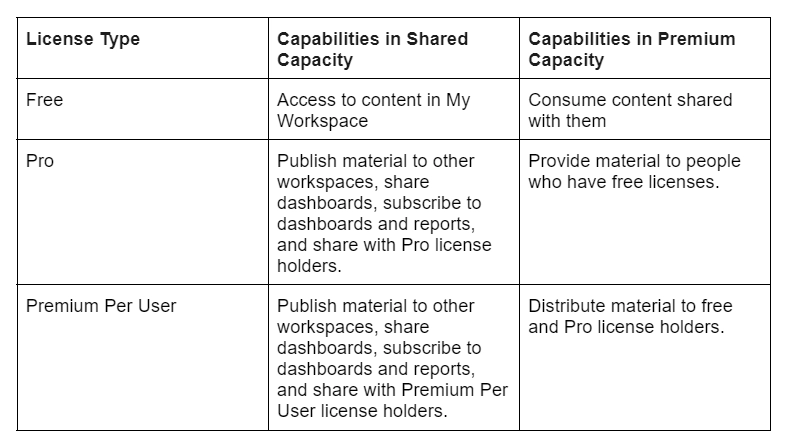
Flowchart
Pricing of Power BI License
Power BI Free: As the name implies, it is free!
Power BI Pro: costs $9.99 per user and includes access to all services and capabilities.
Per-user, Power BI Premium: $20 is a compromise for smaller firms who wish to use Premium license services but cannot afford the $5,000 requirement; it includes most Premium features except unrestricted distribution and multi-geo support.
Frequently Asked Questions
What is Power BI?
Power BI from Microsoft is a cloud-based business analytics application for analyzing and displaying data.
Power BI provides a platform for you to be productive and creative while working with reports and analytics. Extracting relevant information from data and producing visual reports is a multi-step process; let me walk you through the procedures.
How many types of Licenses does Power BI have?
There are three types of Power BI licenses.
Power BI Free, Power BI Pro, and Power BI Premium per user.
Explain Some Features of Power BI Pro?
Some features of Power BI Pro are an App for mobile devices,10 GB of storage space per user, Connect to over 100 data sources,8 data updates per day, Power to integrate Power BI graphics in programs such as SharePoint, PowerApps, and Teams, AI Visualization, APIs and embedded controllers, Make an app and share it with others, Integration with all other, Microsoft solutions on a local level, Data encryption and security, Datasets, dashboards, and reports may be shared with other Power Bi license users, Metrics for content production and publication.
What is Pricing for Power BI Pro?
Power BI Pro costs $9.99 per user and includes access to all services and capabilities.
Explain some features of Power BI Premium?
Some features of Power BI Premium are a Storage capacity of 100 TB, The movement of data, Application lifecycle administration, Pin to memory, geo-distribution, and read-only replicas. Examine data from Azure Data Lake Storage, and Model size is limited to 100 GB.
One API surface is accessible, Power to integrate Power BI visualizations in programs such as Teams, SharePoint, and PowerApps XMLA endpoint read/write connection, Larger storage capacity for longer deployment, 48 data refreshes per day, AI traits that are cutting-edge, Reporting on-site, Management of multi-location deployments, Model size is limited to 400 GB, Add-on for Azure Autoscale.
Conclusion
In this article, we learned about Power BI License, which includes the types of Power BI License.
After reading about Power BI License, are you not feeling excited to read/explore more articles on the topic of Ruby? Don't worry; Coding Ninjas has you covered. To learn, see Getting started with Power BI Service, Overview of Power BI Desktop, and Power BI interview questions Basic
Refer to our Guided Path on Coding Ninjas Studio to upskill yourself in Data Structures and Algorithms, Competitive Programming, JavaScript, System Design, and many more!
Do upvote our blogs if you find them helpful and engaging!






 1+ registered

