Table of contents
1.
Introduction
1.1.
Cinder
1.2.
XML
2.
XML in Cinder
2.1.
Implementation
2.2.
Explanation
2.3.
Output
3.
Logging in Cinder
3.1.
Implementation
3.2.
Output
4.
QuickTime MovieWriter
5.
Frequently Asked Questions
5.1.
What is Cinder?
5.2.
What does Cinder logging aim to provide us?
5.3.
What is XML?
5.4.
How can we modify and parse XML documents in Cinder?
5.5.
What is a QuickTime MovieWriter?
6.
Conclusion
Last Updated: Mar 27, 2024
Medium

QuickTime MovieWriter

Author Anusha Raghav
0 upvote
Career growth poll
Do you think IIT Guwahati certified course can help you in your career?

Introduction

Hello Ninjas! Welcome back. Are you new to Cinder? Do you want to explore more about it? Do you want to explore what QuickTime MovieWriter is? If you answered any of these questions as yes, you're at the right place. 
QuickTime MovieWriter

In this article, we will learn about Quicktime Moviewriter and discuss topics like XML in Cinder and Logging in Cinder. So let's get started. We will begin with the essential concept-building topics like what Cinder is and what XML is.

Cinder

Cinder is a cross-platform library for professional-level quality and creative coding in C++. It is used to develop applications for desktop platforms like Linux, Windows, and macOS and mobile platforms like Android and iOS.

What is Cinder?

XML

XML is a text-based format and stands for an extensible markup language. It is used to exchange and store structured data. It is usually used as a format for web services and interchanging data to store and transfer data over the vast internet

What is XML?

XML in Cinder

To modify and parse XML documents in Cinder, we can use the pugiXML library. The pugiXML is a fast, easy-to-use, small parser written in C++. We need to include and link the correct header files in the library in order to use pugiXML in our Cinder projects. Let us look at an example of how we can load an XML document and access its elements using pugiXML in Cinder -  

Implementation

#include "pugixml.hpp"
// To load the XML document
pugi::xml_document doc;
pugi::xml_parse_result result = doc.load_file("data.xml");
// Checking for errors
if (!result)
{
    std::cout << "Error loading XML document: " << result.description() << std::endl;
    return;
}
// To access the root element
pugi::xml_node root = doc.root();
// To iterate over the child elements of the root
for (pugi::xml_node node : root.children())
{
    std::cout << "Node name: " << node.name() << std::endl;
    // To access the attributes of the node
    for (pugi::xml_attribute attr : node.attributes())
    {
        std::cout << "  Attribute name: " << attr.name() << std::endl;
        std::cout << "  Attribute value: " << attr.value() << std::endl;
    }
}

Explanation

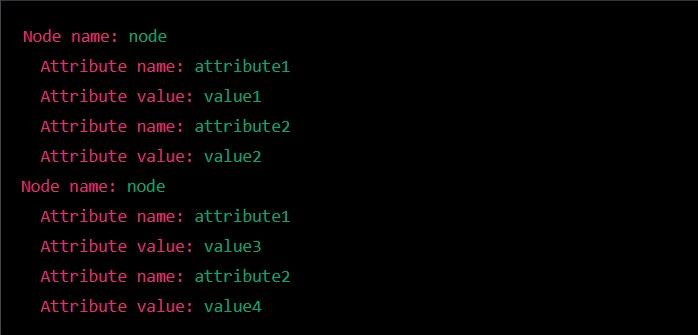
In the above, we are loading an XML document from a file named "data.xml," iterating it over the root element's child element and then printing the attributes and names of each element. 

If the contents of “data.xml” are:

<?xml version="1.0"?>
<root>
    <node attribute1="value1" attribute2="value2">
        <!-- some content -->
    </node>
    <node attribute1="value3" attribute2="value4">
        <!-- some content -->
    </node>
</root>

Output

Then the output would be - 

Output

Logging in Cinder

We are provided with several flexible and easy-to-use logging techniques in Cinder. Cinder logging aims to give its platform users integrated functionality that doesn't avoid specialized logging packages and allows access to the core. In all Cinder apps, the application window shows logging requests made by Cinder, which is enabled by the default LoggerConsole.

In Cinder, we use the function "ci::app::console()" to output log messages to the console. This function will take a string as an argument and eventually print the string to the console when we run the app. Let's look at the following example of how to use this function to log a message in Cinder -

Implementation

#include "cinder/app/App.h"
void MyApp::setup()
{
    // To output a log message to the console
    ci::app::console() << "Hello, world!" << std::endl;
}

Output

Output

We may also use CI_LOG_I macro to get the outputs of log messages with specific log levels. This macro will take that string as an argument and then eventually print the string to the console with a prefix indicating the log level. Let's look at an example of how we can use CI_LOG_I macro to output an info log message - 

#include "cinder/app/App.h"
void MyApp::setup()
{
    // To output an info log message to the console
    CI_LOG_I("Hello, world!");
}


We must note that the log levels mentioned above can be changed at runtime using the CI_LOG_LEVEL environment variable. This would allow us to control the amount of log output generated by our app.

QuickTime MovieWriter

QuickTime MovieWriter is a Cinder class and media player which allows us to save video frames to a desired QuickTime movie file. It is developed by Apple and can handle several formats of digital sound, text, video, and graphics.

To use the QuickTime MovieWriter in Cinder, we need to include a header file as given -  

#include "cinder/qtime/MovieWriter.h". 


Let's look at some essential functions - 

  • Creating an object in QuickTime MovieWriterWe then create an object in QuickTime MovieWriter by calling the function "qtime::MovieWriter::create()" and passing it the path to the dimensions of the movie, frame rate, and output file. Let's look at the following example to understand better - 
     
// Creating a QuickTime Movie Writer object in Cinder
qtime::MovieWriterRef movieWriter = qtime::MovieWriter::create("output.mov", getWindowWidth(), getWindowHeight(), 30.0f);
  • Adding a frame to the movieTo add a frame to the movie, we call the function "addFrame()" of the QuickTime Movie Writer object and pass it through a surface containing the frame data:
     
// Rendering a frame and adding it to the movie
Surface8u surface(getWindowWidth(), getWindowHeight(), false);
gl::readPixels(getWindowBounds(), surface);
movieWriter->addFrame(surface);
 
  • Closing and saving the movie fileFinally, when we finish adding frames to the movie, we call the function "finish()" to close the movie file and save it to disk:
     
// Finishing the movie
movieWriter->finish();

Frequently Asked Questions

What is Cinder?

Cinder is a cross-platform library for professional quality and creative coding in C++. It is used to develop applications for desktop platforms like Linux, Windows, and macOS and mobile platforms like Android and iOS.

What does Cinder logging aim to provide us?

Cinder logging aims to give its platform users integrated functionality that doesn't avoid specialized logging packages and allows access to the core. In all Cinder apps, the application window shows logging requests made by Cinder, which is enabled by the default LoggerConsole.

What is XML?

XML is a text-based format and stands for an extensible markup language. It is used to exchange and store structured data. It is usually used as a format for interchanging data for web services and storing and transferring data over the vast internet. 

How can we modify and parse XML documents in Cinder?

To modify and parse XML documents in Cinder, we can use the pugiXML library. The pugiXML is a fast, easy-to-use, small parser written in C++.  

What is a QuickTime MovieWriter?

Gin provides the developers with a set of features and tools for creating web applications in Golang with middleware, routing support, rendering, texting, context, etc.  

Conclusion

This article taught us about topics like XML in Cinder, Logging in Cinder, and QuickTime MovieWriter. We started with basic understanding and concept-building concepts like what Cinder is and what XML is. If you want to dig deeper into QuickTime MovieWriter, here are some related articles - 


You may refer to our Guided Path on Code Studios to enhance your skill set on DSACompetitive ProgrammingSystem Design, and much more. Check out essential interview questions, practice our available mock tests, look at the interview bundle for interview preparations, and so much more!

Live masterclass