RESTful Routes
Rest stands for Representational State Transfer. It is essential to understand REST as rails use it for URL routing. These are the HTTP methods used with REST to represent the actions performed.
- GET - We use GET requests to retrieve the data. You should note that it will only retrieve the data and not change any existing data there.
- PUT - In PUT requests, we upload data when we have to change the value of the targeted source.
- DELETE - The DELETE command will delete all the representations of the given URL.
- POST - We use Post requests only to send data to the server.
- PATCH - As the name suggests, it is used only for patching. So it only contains the data that has to be modified.
Creating a Route
For creating a route, you will need to map a URL to a controller and an action. As the router sees a request, it dispatches it to a controller's action, which matches the URL.
If a URL looks like this:
/num/1

You can also try this code with Online Ruby Compiler
It will be mapped to a controller's action:
get 'num/:id' => 'num#branch'
You can also try this code with Online Ruby Compiler
This is the shorthand for,
get 'num/:id' to: 'num/branch'
You can also try this code with Online Ruby Compiler
For example, let’s create a student application.
rails new student
You can also try this code with Online Ruby Compiler
After this, create a controller named as RollController inside it.
rails generate controller RollController

Rails.application.routes.draw do
   get 'roll/list'
   get 'roll/new'
   post 'roll/create'
   patch 'roll/update'
   get 'roll/list'
   get 'roll/show'
   get 'roll/edit'
   get 'roll/delete'
   get 'roll/update'
   get 'roll/show_subjects'
end
You can also try this code with Online Ruby Compiler
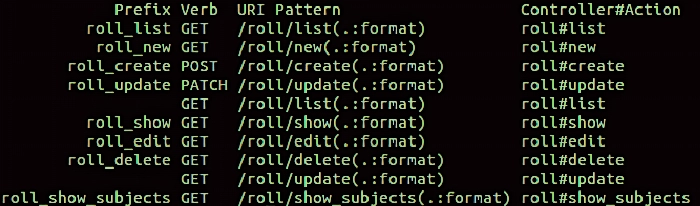
Use the following command for tracking down routing problems.
rake routes
You can also try this code with Online Ruby Compiler
Output:-
Resource Routing
The resource routing enables you to declare all common routes for a controller. It defines separate paths for index, create, update, read, delete, and new actions in a single line of code.
Multiple configuration files for a large codebase
The routes.rb file grows with the app to have many definitions. It would be more challenging to maintain them for someone unfamiliar with the app. Rather of putting all definitions into the config/routes.rb file, you can split routes into multiple files. Let’s see an example:
# config/routes.rb

Rails.application.routes.draw do
 namespace :admin do
   resources :users
   resources :posts
 end

 resources :posts, only: %i[show index]
 resources :users, only: %i[show]
end
You can also try this code with Online Ruby Compiler
If you want to add multiple more routes specific to the given group, storing configuration in the separated files may be a good idea. For this, create a config/routes directory and then create a file for each of the groups:
# config/routes/admin.rb

namespace :admin do
 resources :users
 resources :posts
end
You can also try this code with Online Ruby Compiler
For the users:
# config/routes/user.rb

resources :posts, only: %i[show index]
resources :users, only: %i[show]
You can also try this code with Online Ruby Compiler
At last, load those files into the main config/routes.rb file and making them available in the app. For this, we can overwrite the mapper class and add the draw method like this:
# config/routes.rb

module ActionDispatch
  module Routing
    class Mapper
      def draw(routes_name)
        routes_path = Rails.root.join('config', 'routes', (@scope[:shallow_prefix]).to_s, "#{routes_name}.rb")

        instance_eval(File.read(routes_path))
     end
    end
  end
end

Rails.application.routes.draw do
  draw :admin
  draw :user
end
You can also try this code with Online Ruby Compiler
Redirect on the routes level instead of a controller
The controller’s level’s redirection is typical, but the route level can also achieve such action. The simplest example of a redirection has hardcoded values for both source and destination path:
Rails.application.routes.draw do
  get '/email_us' => redirect('/contact')
end
You can also try this code with Online Ruby Compiler
The redirection returns the 301 response code by default, which means the resource is moved permanently to the new address. Assume you would like to change that behavior and use the response code 302 instead (which means moving temporarily). Then you have to pass the status option as the second argument:
Rails.application.routes.draw do
  get '/email_us' => redirect('/contact', status: 302)
end
You can also try this code with Online Ruby Compiler
Frequently Asked Questions
1. What is a Route?
A Route is a path a data packet travels on a network. The Route has every device that handles the packet between its source and destination, including routers, switches, and firewalls. There are multiple ways for intermediary devices to choose which route data should take. The five primary routing methods are unicast, broadcast, multicast, anycast, and geocast.
2. What is a gem in Ruby?
A gem is equivalent to a plugin or an extension for the programming language ruby. They are open-source libraries containing Ruby code and packaged with extra data. To be exact even rails are nothing more than a gem.
3. How do routes work in Ruby on Rails?
Rails routing is a two-way piece of machinery, instead of as if you could turn trees into paper and then turn paper back into trees. Specifically, it connects incoming HTTP requests to the code in your application's controllers. It helps you generate URLs without having to hard-code them as strings.
Key Takeaways
This article teaches Routes and how it is essential in delivering data across every Ruby on Rails application. We saw why it could be very beneficial for a developer. Click here to learn more about Why you should consider Ruby on Rails for your next web development project.
Click here to see other related blocks on Ruby on Rails.
Also, check out our web development course and Backend.
If you are preparing for your DSA interviews then, Coding Ninjas Studio is a one-stop destination. This platform will help you acquire effective coding techniques and overview student interview experience in various product-based companies.
Happy Learning!
By Abhay Trivedi








 7+ registered

