Generating the action mailer
For generating the mailer, we use the following command -
cd emails
rails generate mailer Usermailer
After running the above command in the app\mailer directory, a file named user_mailer.rb will be generated due to the preceding instruction in the app\mailer directory. and this file will contain the following content -
class Emailer < ActionMailer::Base
end


Now we will create a method in the file -
class UserMailer < ApplicationMailer
   default from: 'CodingNinjas@example.com'

   def welcome_email(user)
      @user = user
      @url = 'http://www.gmail.com'
      mail(to: @user.email, subject: 'Welcome to Coding Ninjas')
   end
end

You can also try this code with Online Ruby Compiler
What is default Hash?
Any mail from this mailer gets a hash of this default value. But if for all messages in this class we set :from header to a value, then it can be overridden as per mail.
What is mail?
The headers :to and :subject is passed in the email message.
We will now create the welcome_email.html.erb in app/views/user_mailer/. and we will use the following template for the email, which is formatted in HTML-
<html>

   <head>
      <meta content = 'text/html; charset = UTF-8' http-equiv = 'Content-Type' />
   </head>

   <body>
      <h1>Welcome to CodingNinjas.com, <%= @user.name %></h1>

      <p>
         You have successfully signed up to CodingNinjas.com and your username is:
         <%= @user.login %>.<br>
      </p>

      <p>
         Follow this link for logging in to the site:
         <%= @url %>.
      </p>

      <p>Thanks for joining, and have a great day!</p>

   </body>
</html>
The next part for this application will look like this-
Welcome to CodingNinjas.com, <%= @user.name %>
===============================================

You have successfully signed up to CodingNinjas.com, and
your username is: <%= @user.login %>.

 Follow this link for logging in to the site: <%= @url %>.
Calling the action mailer
Lastly, we will call a mailer, but we will create a simple User scaffold before that. Run the following command for the same-
rails generate scaffold user name email login
rake db:migrate
Action Mailer is well connected with Active Job, allowing you to send emails outside of the request-response cycle, saving the user time.
class UsersController < ApplicationController
   # POST /users
   # POST /users.json
   def create
   @user = User.new(params[:user])

      respond_to do |format|
         if @user.save
            # for sending a welcome email after save it is told to UserMailer
            UserMailer.welcome_email(@user).deliver_later

            format.html { redirect_to(@user, notice: 'User was successfully created.') }
            format.json { render json: @user, status: :created, location: @user }
         else
            format.html { render action: 'new' }
            format.json { render json: @user.errors, status: :unprocessable_entity }
         end

      end

   end
end
You can also try this code with Online Ruby Compiler
We will go to http://127.0.0.1:3000/users/new for output, and we will see the following screen. Directly we can send an email to anyone we would like to.
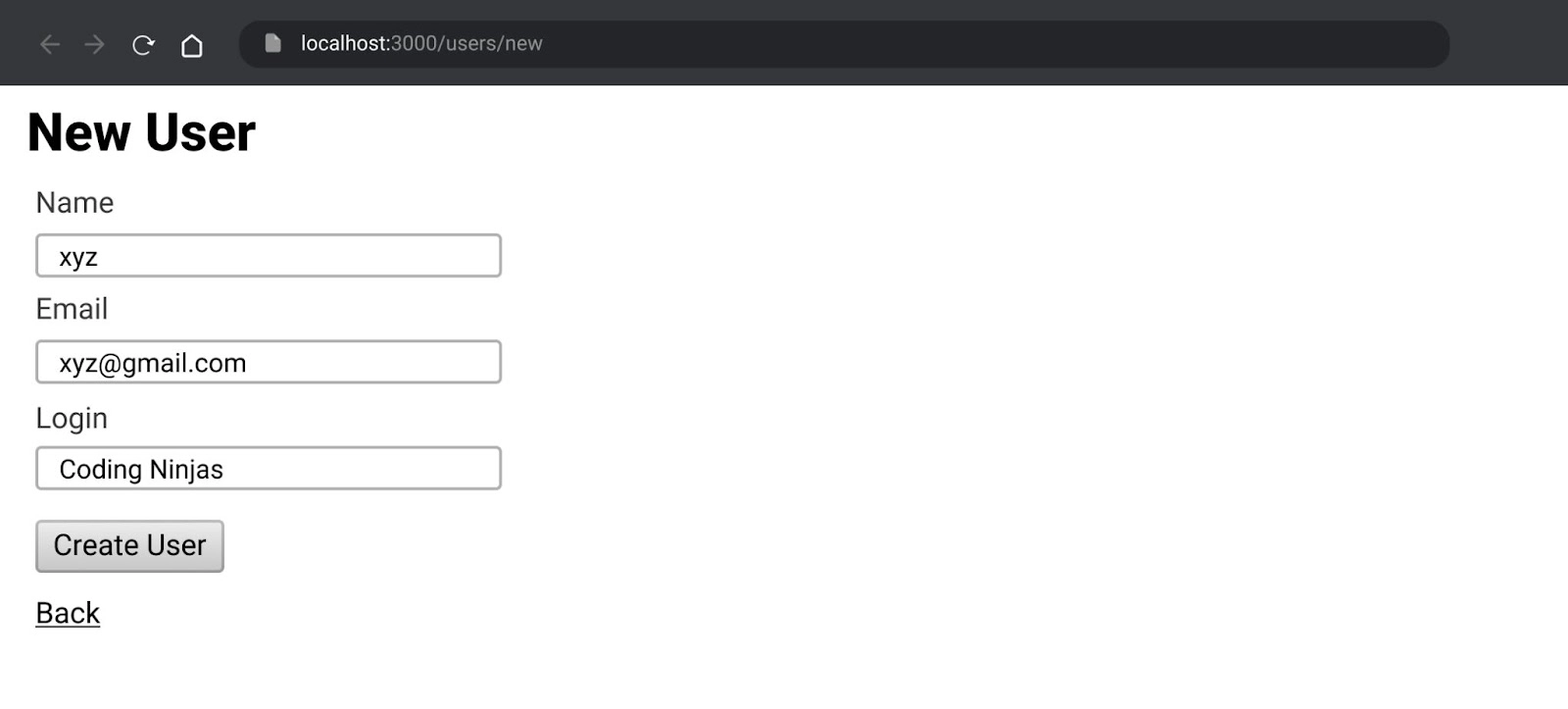 This will send your message and display the text message "Message sent successfully," as well as the output seen below.

Frequently Asked Questions
1. What other platforms can we configure the ruby on rails action mailer?
Here are some of the platforms other than discussed above-
- Amazon SES
- Mailgun
- SendGrid
- Mandrill
2. Which configuration is used by amazon?
For sending emails via Amazon Simple Email Service ruby on rails action mailer use SMTP configuration.
3. Write code for simple configuration through which ruby on rails action mailer can send mails using mailgun account.
config.action_mailer.delivery_method = :smtp
config.action_mailer.smtp_settings = {
  port: 587,
  address: 'smtp.mailgun.org',
  domain: 'hixonrails.com',
  user_name: 'wiktorplaga@hixonrails.com',
  password: 'secret-mailgun-account-password',
  authentication: :plain
}
You can also try this code with Online Ruby Compiler
4. How can we keep our code DRY if we have multiple mailers?
For storing the default email address, we use Application Mailer so that our code remains DRY.
5. How can we control the delivery of the mails?
Action Mailer provides .deliver_now or .deliver_later, which allows us to send emails now or later. Also, the Active job will enable us to send emails outside of the request-response cycle, which makes the application faster for users.
Key Takeaways
In this blog, we learned about sending emails with the help of ruby on rails. Don't come to a halt here. Check out our Ruby vs. Python: What are the differences and how do they matter to you? | Coding Ninjas Blog. Can you also check out the Ruby and Ruby on Rails: How do they differ? | Coding Ninjas Blog blogs? Check out here for more blogs.





 1+ registered

