

Table of contents
1.
Introduction
2.
Set Custom Desired Capabilities
2.1.
Custom Desired Capabilities
2.2.
Location of Custom Desired Capabilities Files
3.
Frequently Asked Questions
3.1.
How can a user make a list of custom desired capabilities for any environment?
3.2.
What are desired capabilities?
3.3.
How can a user add a custom profile?
4.
Conclusion
Last Updated: Mar 27, 2024
Easy

Setting Up Custom Desired Capabilities in Katalon Studio

Career growth poll
Do you think IIT Guwahati certified course can help you in your career?

Introduction

Hello, Readers!!

Have you guys heard about Katalon Studio?

No? Don't worry. we got you covered. Katalon Studio is a robust automation tool with a Selenium-based engine. It is designed to create and reuse automated test scripts for UI without needing to code. 

In this blog, we will discuss about how to configure custom capabilities in Katalon Studio. 

So let us begin!
Setting Up Custom Desired Capabilities in Katalon Studio

Set Custom Desired Capabilities

Desired capabilities are key-value pairs. They tell the browser about different properties, such as the browser's name, version, etc. They are used to configure additional driver instances such as FirefoxDriver, ChromeDriver, etc.

Users can use the Custom settings in the desired capabilities to make a list of custom desired capabilities for any environment.

Custom Desired Capabilities

Follow the below-mentioned steps to create a custom execution with the desired capabilities:

  • Navigate to Project > Settings > Desired Capabilities > Custom. To add a custom profile, click Add on the command toolbar.
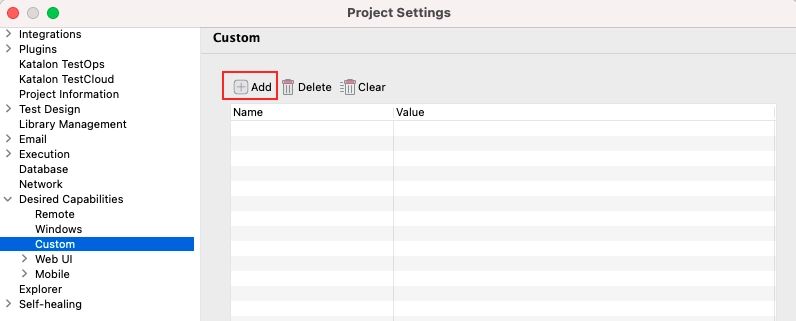
Project Settings Dialog box

Source: Katalon Docs

  • If required, change the name. Then click on More (...) under the Value column.
  • The Custom Execution Configuration Builder dialog box will open. Click on Add. The user then needs to provide the Driver name for their custom execution.
Custom Execution Configuration Builder dialog box

Source: Katalon Docs

  • Under the Preferences column, click on More(...).
  • The Driver Builder dialog box will open.
  • Specify the desired capabilities for the selected driver. 
  • After selecting the capabilities, click on OK.
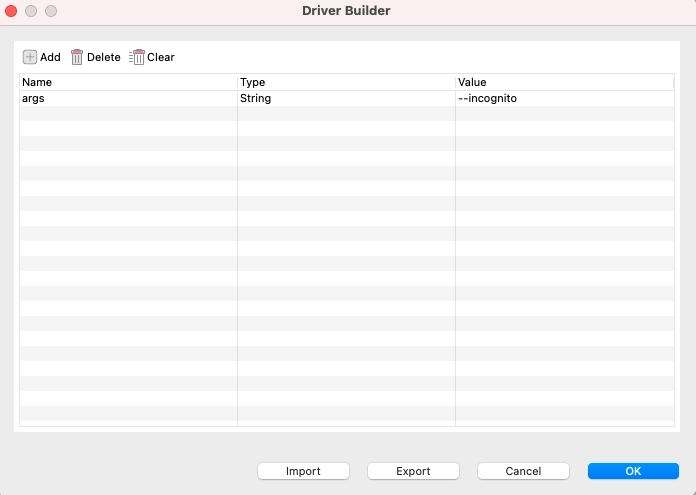
Driver Builder Dialog box

Source: Katalon Docs

Location of Custom Desired Capabilities Files

The user can find the settings files for their custom desired capabilities using the below-mentioned file path:

<location_of_the_test_project>\settings\external\execution

Frequently Asked Questions

How can a user make a list of custom desired capabilities for any environment?

A user can make a list of custom desired capabilities for any environment using the Custom Settings in the Desired capabilities.

What are desired capabilities?

Desired capabilities are key-value pairs. They tell the browser about different properties such as browser name, version, etc.

How can a user add a custom profile?

A user can add a custom profile by clicking the Add button on the command toolbar.

Conclusion

In this article, we have extensively discussed how to Set up Custom Desired Capabilities in Katalon Studio.

After reading about how to Set up Custom Desired Capabilities in Katalon Studio, are you not feeling excited to read/explore more articles on Machine learning? Don't worry; Coding Ninjas has you covered. To learn about what Anaconda iswhat AutoML is, and what are the different applications of AutoML.

If you wish to enhance your skills in Data Structures and AlgorithmsCompetitive ProgrammingJavaScript, etc., you should check out our Guided path column at Coding Ninjas Studio. We at Coding Ninjas Studio organize many contests in which you can participate. You can also prepare for the contests and test your coding skills by giving the mock test series available. In case you have just started the learning process, and your dream is to crack major tech giants like Amazon, Microsoft, etc., then you should check out the most frequently asked problems and the interview experiences of your seniors that will help you in landing a job in your dream company. 

Do upvote if you find the blogs helpful.

Happy Learning!

Thank you

Live masterclass

