Do you think IIT Guwahati certified course can help you in your career?
Introduction
Hey Ninja! Are you reading this article using your favourite web browser? Do you know your web browser is taking support from TCP? Well, your web browser utilises TCP to load web pages. Excited to share this message with your friends using Whatsapp or any texting app? These apps also use TCP(Transmission Control Protocol) for reliable communication.
Flow control is an essential concept in reliable communication using TCP features. . Are you ready to learn more about TCP Flow control? This article explores and examines the characteristics and distinctive qualities of various TCP flow control protocols used in computer networking.
So, without any further ado, let’s start.
What is TCP Flow Control?
TCP Flow Control was created to control the data flow between the user and the server. Flow control mainly refers to TCP's ability to prevent a sender from delivering a receiver too many packets at once. It ensures that a certain amount of bandwidth is available for sending and receiving data so that operations can proceed without encountering serious problems.
The concept is that a node receiving data will communicate in some way with the node sending the data to inform it of its current state.
As we know, two systems can have different software and hardware functionalities. It can be a case when the sender’s system is fast and the receiver is slow. The sender will continuously send the data packets to the receiver, stored in the receiver’s buffer.
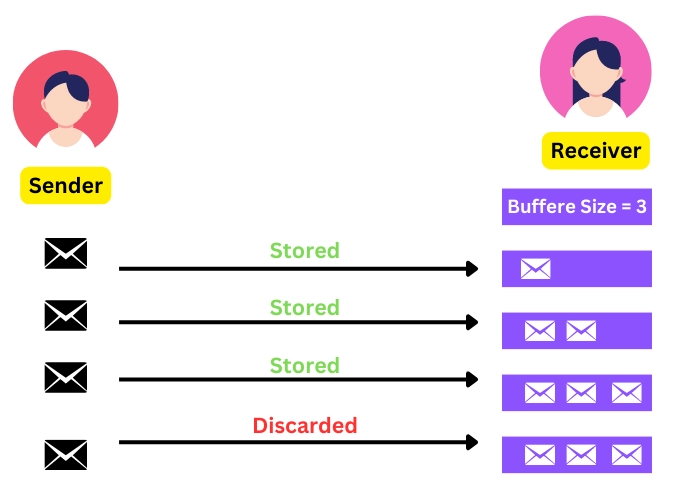
The buffer will be filled quickly since the receiver's processing speed is slow. In that case, the buffer will discard the next packets, resulting in waste. A flow control mechanism is required to prevent such resource wastage issues.
Note: Flow control is optional when the sender is slow, and the receiver is fast.
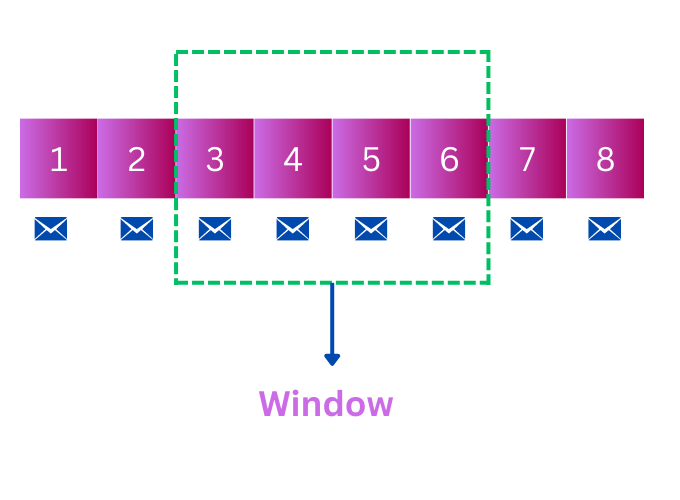
Let’s understand the above diagram. Suppose the receiver’s processing time is 2 messages per second, and the sender’s message-sending time is 6 messages per second.
The receiver stores the message in its buffer when the sender sends the third message. Similarly, the fourth and fifth messages are also stored in the buffer. Now, the buffer is full, and when the sender sends the sixth packet, the packet gets discarded.
This is a simple example, but in real-world applications, the size of data packets is very large, and TCP flow control becomes important for data transmission.
How does TCP Flow Control Work?
This generally happens when we need to transmit data packets over a network.
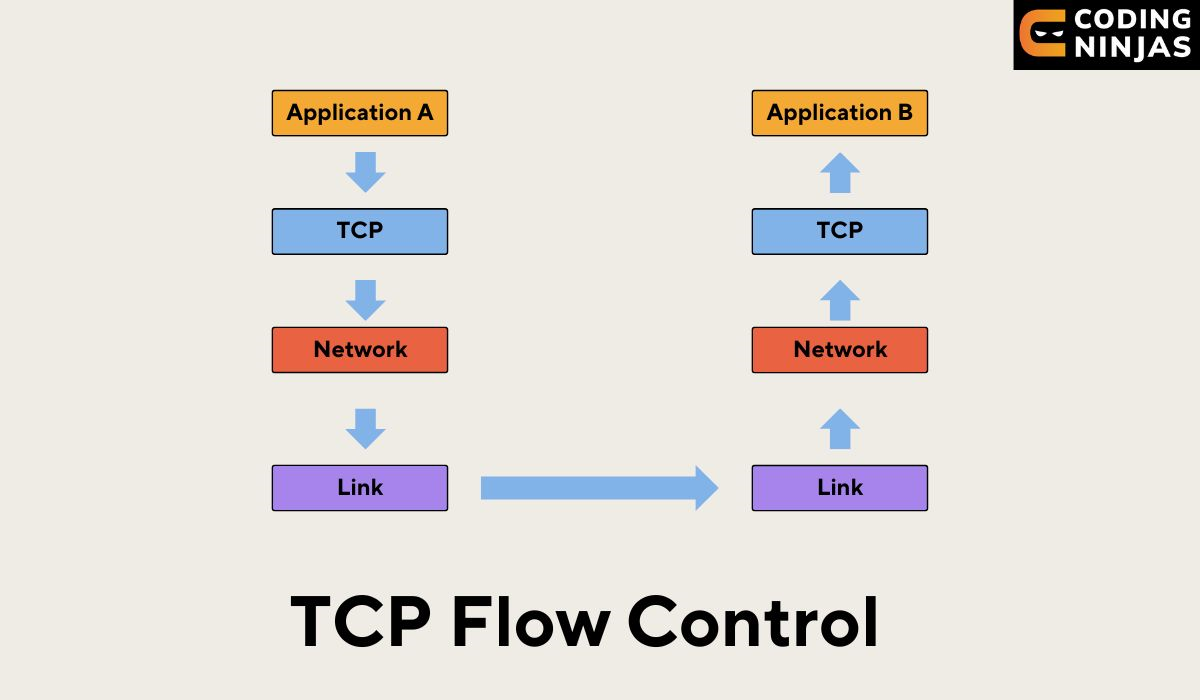
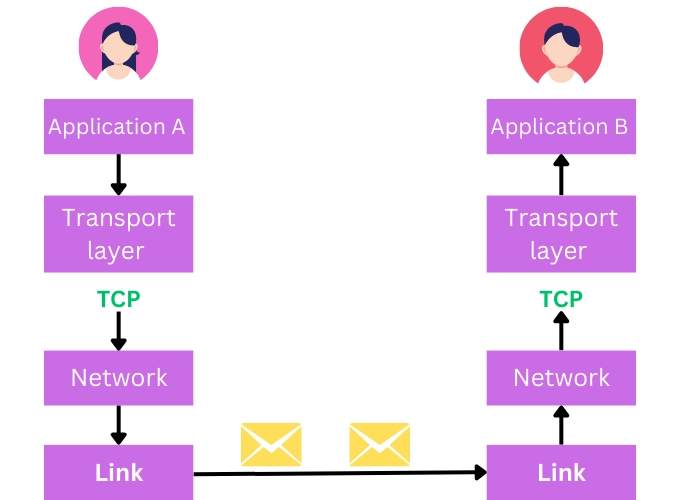
The sender(suppose application A) sends data to application B, a TCP socket. One endpoint of a networked two-way communication relationship between two programmes is a socket.
The transport layer(TCP) will bundle this data in a segment. The segment is given to the network layer (such as IP), which will then find a way to route the packet to the receiving node.
On the receiver’s side, the network layer transfers the exact copy of the data packet to the transport layer.
Note: TCP won't deliver data packets out of order and will wait for retransmission if it detects any message gap or lost packet.
A buffer at the TCP layer will store the data to a fixed limit and then bundle them into segments. Data is retrieved from the receiver buffer after the application is ready.
Flow control mostly refers to TCP's ability to simultaneously stop a sender from sending too many packets to a receiver. From here receiver’s window(buffer) comes into existence.
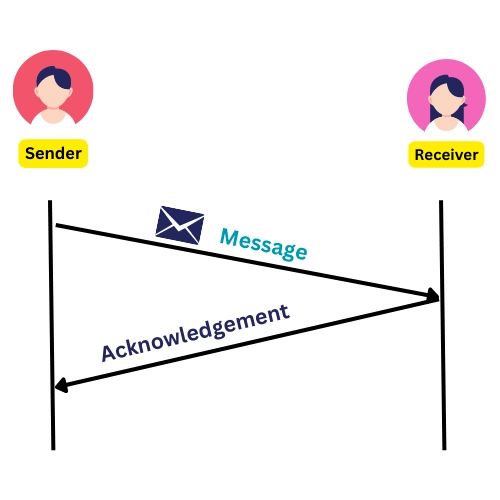
To prevent the loss of data packets, TCP uses the acknowledgement process.
Every time receiver receives a packet, it must acknowledge by sending an ack message to the sender. This ack message also includes the current receiver buffer size (window) length, letting the sender know whether it can still send data.
Till now, we have run through the working of TCP flow control. Now, we will see the protocol that is used for TCP flow control. This protocol is known as SLINDING WINDOW PROTOCOL.
Sliding Window Protocol
A method for sending multiple data packets at once is the sliding window. The sliding window protocol uses a window to control the data transmission flow. This protocol uses a sequence number for data transmission. Hence we can find the receiver end's missing data packet. The sliding window technique uses the sequence number to prevent duplicate data.
The TCP sliding window sets the maximum amount of data bytes (d) that one system can send to another. The values of d depend on two factors:
The size of the sender window( sender's buffer).
The available size and capacity of the receiver window.
The amount of space in the receive buffer depends on how rapidly the receiving application reads data from the buffer, i.e., data processing time. The system stores the data in the buffer until the receiving application reads the data from the receive buffer. Every time the sending system is informed of the buffer's available space.
Let’s discuss more about the sender’s and receiver’s window sizes.
Window Size
In Sliding window protocols, the sending window for the sender and the receiving window for the receiver are separate buffers with predetermined sizes.
The size of the sending window determines the sequence number of the outgoing packets.
Range of sequence number: 0 to 2n-1, where n is the number of bits of one data packet.
Sender’s window size: The size of the sending window is 2𝑛−1.
Receivers’ window size: The maximum number of frames a receiver can accept at once is determined by the size of the receiving window.
Some of the important terms of the Receiver Window are as follows:
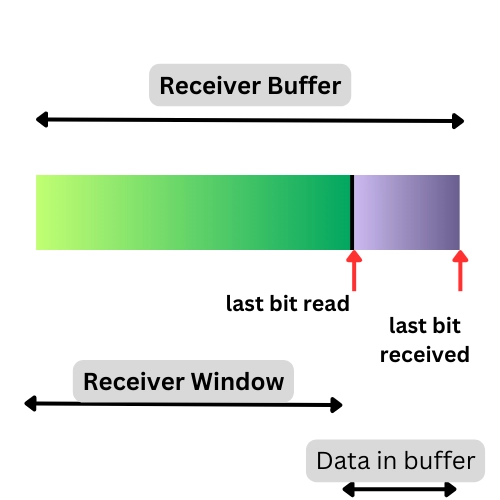
receiveBuffer: It is the buffer size used to store the data. It contains both the available space as well as filled space.
receiverWindow: It is the available space in the receive buffer.
lastByteRead: The last byte of data that is being processed.
lastByteReceived: The last byte of data that is received in the receiveBuffer.
S, the formula for the Receiver window is as follows:
Receiver window = Receiver Buffer - ( last bit received - last bit read).
Generally, the message bytes are represented in bytes. So, in that case, the formula will be
Receiver window = Receiver Buffer - ( last byte received - last byte read).
The Persist Timer
Consider a situation where the receiver sends the ack of the previous packet and waits for the next data packet, but the ack is lost mid-way, and the sender is waiting for the ack. In this case, there is a possibility of deadlock since both the sender and the receiver are waiting for a message to start sending data.
The TCP starts a persist timer whenever it receives an empty window message to address this issue by periodically sending tiny packets to the receiver. WindowProbe is another name for this timer.
Reliability: Ensures reliable data delivery by matching sender and receiver speeds.
Error Recovery: Helps in retransmitting lost or corrupted packets for error recovery.
Efficiency: Optimizes network bandwidth usage by avoiding overloading the network with data.
Fairness: Ensures fair resource sharing among multiple users or applications.
Stability: Maintains network stability by preventing buffer overflow at the receiver.
Scalability: Supports effective data transfer in networks of varying sizes and capacities.
Frequently Asked Questions
Which protocol is used for flow control in computer networks?
Generally, there are two ways to flow control in computer networks. The first is the Stop and Wait protocol, and the second is the Sliding window protocol. While both of these protocols provide a flow control mechanism, the Sliding Window Protocol is more effective than the Stop and Wait Protocol.
Which protocol is used for TCP flow control?
One of the popular protocols used for TCP flow control is the Sliding Window Protocol. When reliable and sequential delivery of data packets is required in Transmission Control Protocol (TCP), a sliding window is a way to regulate data transmission between two network devices.
How TCP flow control offers reliable communication?
TCP can maintain reliability by giving each octet(data bits) in its transmissions a sequence number and requesting an affirmative acknowledgement (ACK) from the receiving TCP. The data is sent again if the ACK is not received in the specified time frame.
How is TCP flow control done?
TCP flow control is achieved using a sliding window mechanism. The receiver advertises its available buffer space to the sender, limiting the number of unacknowledged packets sent.
Conclusion
In conclusion, Flow control mainly refers to TCP's ability to prevent a sender from delivering a receiver too many packets at once.One of the popular protocols used for TCP flow control is the Sliding Window Protocol.
This article extensively discussed TCP flow control and its features.
We hope this blog has helped you. We recommend you visit our articles on different topics of Computer Networks, such as:







 1+ registered

