

Table of contents
1.
Introduction
2.
The Data Abstraction Layer (DAL)
3.
Implementation of DAL
3.1.
Steps for Implementing DAL
4.
Raw SQL
4.1.
_insert
4.2.
_count
4.3.
_select
4.4.
_delete
5.
Problems Related to DAL
5.1.
SQLite
5.2.
MySQL
6.
Frequently Asked Questions
6.1.
What is DAL in Python?
6.2.
What is SQLite used for?
6.3.
What is pyDAL?
6.4.
What is the difference between SQL and SQLite?
6.5.
MySQL vs SQLite: Which is superior?
7.
Conclusion
Last Updated: Mar 27, 2024
Medium

The DAL: A Quick Tour

Author ANKIT MISHRA
0 upvote
Career growth poll
Do you think IIT Guwahati certified course can help you in your career?

Introduction

The main advantage of web2py is thought to be the Database Abstraction Layer (DAL). The DAL makes the underlying SQL syntax available through a simple Applications Programming Interface (API).

Introduction Image

We will learn about the more complex uses of DAL in this blog, such as creating effective tags-based search queries and hierarchical category trees.

The Data Abstraction Layer (DAL)

You'll probably find that web2py is among the easiest frameworks to set up, understand, and use because it greatly emphasizes productivity and ease of use. However, it also has a tonne of functions and provides a tonne of power and flexibility. The DAL (Data abstraction layer) is one of the most essential features of the web2Py. Some of its important features are listed below.

Database Abstraction Layer (DAL), a feature of web2py, is an API that converts Python objects into database objects. Queries, tables, and records are all examples of database objects.

It is not necessary for a developer to compose an entire SQL query because the DAL dynamically constructs the SQL in real-time using the database back end's predefined dialect.

The primary benefit of adopting DAL is the portability of the applications with many types of databases.

Let’s move on to understanding the implementation of DAL.

Implementation of DAL

A database connection is needed by the majority of web2py apps. Therefore, the first stage in the design of an application is to create the database model.

Take the below-implemented program "helloWorld" as an example. The application's Models are where the database is implemented. The file models/db.custom.py contains all of the models for the specific application.

The data flow in Web2Py is shown below, and later we will see the steps for implementing the DAL.

Data Flow Diagram

Steps for Implementing DAL

Step1- The DAL Constructor

Establish a connection to a database. This is made via the DAL function Object(), also known as the DAL object.

dBase = DAL ('sqlite://storage.sqlite')


DAL's significant characteristic is that it permits many connections to the same database, to other databases, or even to databases of a different type. This line is found to be present in the models/db.py file. Therefore, unless you deleted it or needed to connect to a new database, you might not require it. Web2py connects by default to an SQLite database found in the file storage.sqlite.

The databases folder for the application contains this file. If the file is missing, web2py creates it when the program is initially launched.

SQLite saves all the data in a single file and is quick. This indicates that moving your data between applications is simple. In actuality, web2py packages the SQLite database(s) along with the applications. It offers total SQL functionality, including joins, aggregates, and translations.

With all those exciting features, some issues are also there in SQLite. Let's look at them.

One of them is that it does not enforce column types, and the only way to ALTER TABLE is to add or remove columns.

The additional drawback is that any transaction requiring write access locks the entire database.

Step2- Table Constructor

The define_table method can be used to define new tables once the database connection has been made.

dBase.define_table('invoice',Field('name'))


Table constructors likewise employ the approach mentioned above. The table constructor uses the same syntax. The table name is the first argument, and then a list of Field (s). The field constructor accepts the following arguments.
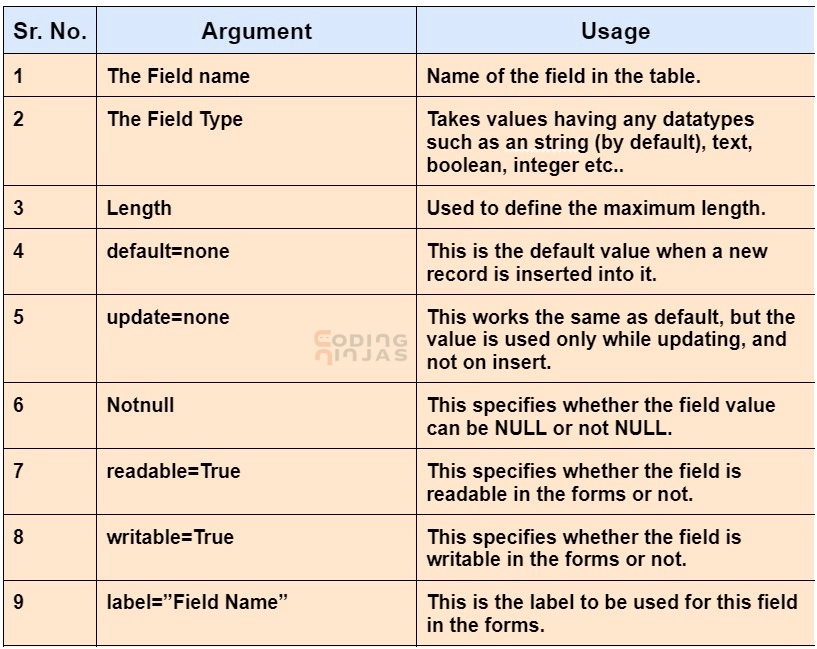
Different Arguements and their Usage

Adding to it, the define_table method also takes these three named arguments,

dBase.define_table('....',migrate=True, fake_migrate=False, format = '%(id)s')


migrate = True, If the table doesn't already exist, web2py is told to create it; if it doesn't meet the model description, it's told to change it.

If the model matches the content of the database table, set fake_migrate = True, which aids web2py in rebuilding the data.

format = "% (id)s", This format string specifies how records in the specified table should be displayed.


Raw SQL

The table constructor and field constructor in DAL let us connect to a database and generate new tables and fields for them.

To correspond to the required output, it may be necessary to construct SQL statements. The following are some of the functions that web2py contains to help create raw SQL.

_insert

This helps in fetching the insert statements for a given table. For example,

print dBase.person._insert(name ='CodingNinjas')


It will retrieve the insert statement for a table named "person".

Using SQL statement, the output is −

INSERT INTO person(name) VALUES ('CodingNinjas');

_count

This helps in fetching count SQL statements, which gives the count of the records. Let's understand by an example, consider a table named 'person', and we need to find the count of persons with the company 'CodingNinjas'.

print dBase(dBase.person.company =='CodingNinjas ')._count()


Using the SQL statement, the output is −

SELECT count(*) FROM person WHERE person.company = 'CodingNinjas ';

_select

This helps in fetching select SQL statements with ease. Let's understand, with an example, Consider a table named 'person', and we need to find the list of persons with the name 'Coder'.

print dBase(dBase.person.name == 'Coder ')._select()


Using the SQL statement, the output is−

SELECT person.name FROM person WHERE person.name = 'Coder';

_delete

This helps in fetching the deleted SQL statements. For example, consider for a table named 'person', and we need to delete the statements with the name 'BUG'

print dBase(dBase.person.name == 'BUG ')._delete()


Using the SQL statement, the output is −

DELETE FROM person WHERE person.name = ' BUG ';

Problems Related to DAL

SQLite

There is no support for dropping or changing columns in SQLite. A field remains active in the database after it is deleted from the table. Therefore web2py won't be notified of any changes.

Setting fake migrate to True will help redefine the metadata in this situation and ensure that any modifications, such as altering or deleting, are maintained under the control of web2py.

SQLite does not support boolean types. The Booleans are internally converted by web2py to a single character string, with the characters "T" and "F" standing for true and false, respectively.

MySQL

MySQL does not support ALTER TABLE. Therefore, database migration requires several commits. Setting the parameter fake migrate = True while defining the database will cause all the metadata to persist, preventing this issue.

I hope now you have understood the Data Abstraction Layer. Let’s move to FAQs.

Frequently Asked Questions

What is DAL in Python?

Database Abstraction Layer (DAL), a feature of web2py, is an API that converts Python objects into database objects, including queries, tables, and records.

What is SQLite used for?

Desktop applications like version control systems, financial analysis tools, media categorization and editing suites, CAD packages, record-keeping programs, and others frequently use SQLite as the on-disk file format.

What is pyDAL?

An entirely Python database abstraction layer is called pyDAL. The pyDAL module dynamically creates the SQL for the database back end in the chosen language.

What is the difference between SQL and SQLite?

The standard SQL language describes establishing relational structure, entering or updating data in relationships, initiating and terminating transactions, etc. SQLite is File-based. It differs from other SQL databases in that it lacks a distinct server process, unlike most other SQL databases.

MySQL vs SQLite: Which is superior?

MySQL is a superior option if you need scalability regarding the number of database queries needed. MySQL defeats SQLite if you need genuine parallelism, stricter security standards, or the ability to govern user permissions.

Conclusion

In this article, we have extensively discussed, The DAL or Data Abstraction Layer and its implementation and related issues.

To learn more about Web2Py, see Troubleshooting Web2PyWhat is Web2PyIntroduction to Web2Py, Creating a New ApplicationPrepare the tool

Be curious

Refer to our guided paths on Coding Ninjas Studio to learn more about DSA, Competitive Programming, JavaScript, System Design, etc. Enrol in our courses, refer to the mock test and problems, and look at the interview experiences and interview bundle for placement preparations.

Do upvote our blogs if you find them helpful and engaging!

Happy Learning!

Thank You
Live masterclass


