




Introduction to Katalon
Katalon is an automating testing software that lets the users test web, mobile or desktop applications and APIs without coding to deliver efficient and robust software to the consumers. The software is built over the Selenium and Appium automation frameworks and makes testing convenient and code-free.
Using Test Hooks
Katalon Studio lets you use Cucumber test hooks, which work at the start and end of the BDD test.
Setting Up Cucumber Hooks
Creating a Cucumber Feature File
You need to first create a Cucumber feature file to apply hooks. For that:
- Go to File > New > BDD Feature File.

Ticking the Generate sample Feature template to generate a sample feature file is optional.
2. Go to File > New > Groovy Script to create step definitions.

Adding Cucumber Hooks
- We will create a step definition that can include the Cucumber hooks.
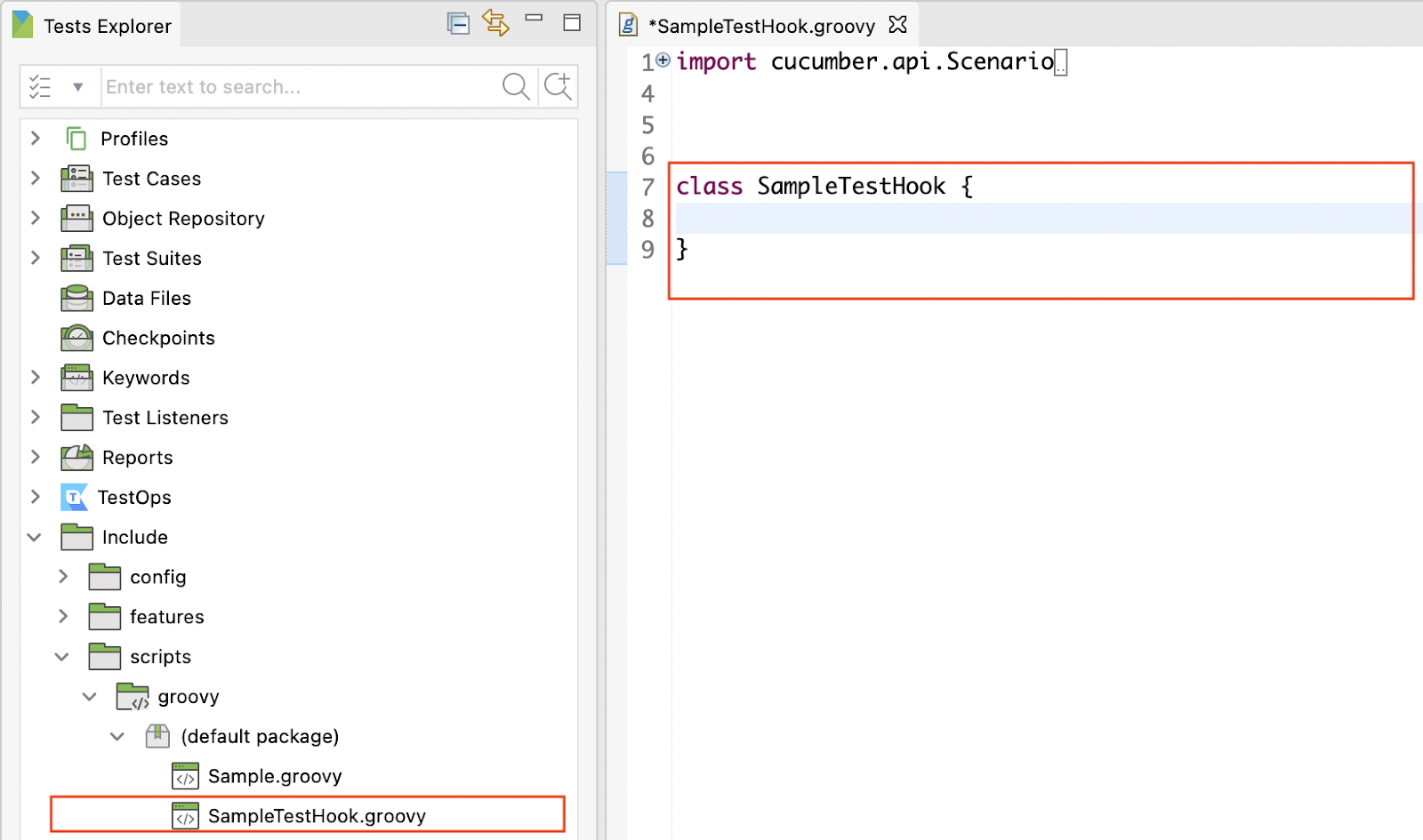
2. We will now add the cucumber hooks to the new step definition. For instance, to add @Before and @After scenario hooks, use the following script:
class SampleTestHook {
    @Before
    public void beforeScenario(Scenario scenario) {
        println 'This is the before scenario method: ' + scenario.getName()
    }


    @After
    public void afterScenario(Scenario scenario) {
        println 'This is the after scenario method: ' + scenario.getName()
    }
}
Creating Test Cases with Cucumber Hooks
- Go to the Manual View of the new test case. Click on the Add dropdown button and select Cucumber Keywords.

2. Select the Run Feature File keyword.

3. Now, right-click on the feature file and select Copy ID. This gives the relative path.

4. Doubt-click the Input cell of the Run Feature File keyword. Paste the copied relative path in the previous step here.

5. Now run the test and verify the Cucumber hooks’ message in the Console log:

Viewing BDD Reports
There are two ways to view your BDD reports: in Katalon Studio or Katalon TestOps.
Viewing in Katalon Studio
There isn’t any custom report for executing feature files. Only generated Cucumber reports for test and test suite collection execution levels are used.
The generated cucumber reports can be found in the same folder of the Katalon Studio report folder. Go to the Katalon Studio Tests Explorer. Right-click on the desired Report folder. Now choose Open Containing Folder. You will be redirected to the local folder when all the Cucumber Reports are stored.
Katalon supports three formats: JSON, HTML and XML.
Viewing in Katalon TestOps
Katalon TestOps supports viewing BDD test results along with advanced analytics like Traceability Matrix Report.
By default, the BDD test reports are disabled to avoid mixing the BDD and Katalon Studio data formatting. However, it can be manually enabled.



 1+ registered

