Do you think IIT Guwahati certified course can help you in your career?
Introduction
Hi Ninja🥷! Let’s learn an exciting topic today. You may have seen Dialogs pop up on many websites and apps and wondered how they are created.
Here we will be using a particular type of Java framework called Vaadin-Dialog. It helps a lot in specifying different kinds of Dialogs. So without any further delay, let's dive into the topic directly.
Dialog
Dialog is a small window that we can use to present information and user interface elements in an overlay.
<!-- Coding Ninjas -->
<!-- Sample code for reference -->

Dialog dialog = new Dialog();

dialog.setHeaderTitle("New employee");
VerticalLayout dialogLayout = createDialogLayout();
dialog.add(dialogLayout);

Button saveButton = createSaveButton(dialog);
Button cancelButton = new Button("Cancel", e -> dialog.close());
dialog.getFooter().add(cancelButton);
dialog.getFooter().add(saveButton);

Button button = new Button("Show dialog", e -> dialog.open());

add(dialog, button);
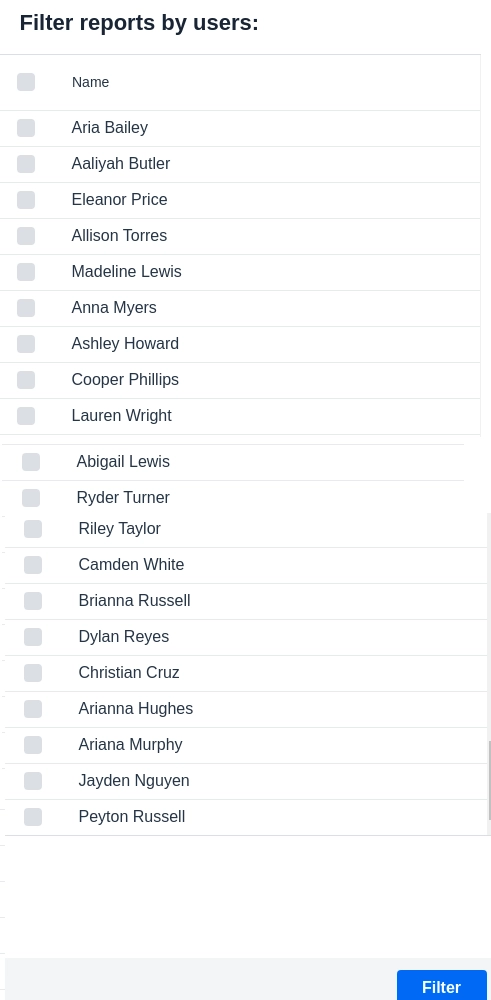
Output:
Structure
The Vaadin-Dialog component has static header and footer areas and a scrolling content area. If the header and footer are not explicitly enabled, they are automatically hidden and are optional.
Header
There is an optional title element and a slot next to it for custom header content in the header, such as a close button.
A modal Dialog blocks the user from interacting with the rest of the user interface while the Dialog is open. A non-modal Dialog, on the other hand, does not block interaction. Vaadin-Dialogs are modal by default.
Use modal Dialogs for:
🍁 displaying important information, like system errors
🍁 requesting user input as part of a workflow, for example, an edit Dialog
🍁 confirmation of irreversible actions, such as deleting data (Confirm Dialog is a convenient alternative for these cases),
🍁 breaking out subtasks into a separate user interface
Use non-modal Dialogs:
🍁 Use them when the user needs access to the content below the Dialog for less critical, optional, or support tasks
<!-- Coding Ninjas -->
<!-- Sample code for reference -->

Dialog dialog = new Dialog();
dialog.setModal(false);
In most cases, non-modal Dialogs should be draggable so the user can move them to access the user interface beneath.
Draggable
Vaadin-Dialogs can be made draggable, enabling the user to move them around using a pointing device.
By default, we can use the outer edges of Dialog and the space between its components to move the Dialog around.
The default areas from which we can drag a Dialog depend mainly on the use of the built-in header:
If we use,
🔥 the built-in header or footer, they function as the Vaadin-Dialog's default drag handles
🔥 without the built-in title, any space within the Dialog functions as a drag handle
Any component contained within a Vaadin-Dialog can be marked and used as a drag handle by applying the draggable class name. We can choose whether or not to make the component's content draggable or just the part itself.
<!-- Coding Ninjas -->
<!-- Sample code for reference -->

dialog.setModal(false);
dialog.setDraggable(true);
..
H2 headline = new H2("Add note");
headline.addClassName("draggable");
Output:
It is recommended to make non-modal Dialogs draggable, so the user can interact with content that the Vaadin-Dialog might otherwise obscure. For example, a Dialog to take notes or add widgets to a dashboard using drag and drop may offer a better experience by allowing the user to move the Vaadin-Dialog around.
Modal Dialogs do not benefit from being draggable, as their modality curtain (the dark overlay behind the Dialog) obscures the underlying user interface.
Resizable
A resizable Dialog allows the user to resize the Dialog by dragging from the edges of the Dialog with a pointing device. Vaadin-Dialogs are not resizable by default.
Dialogues containing dynamic content or a lot of information, such as complex forms or Grids, may benefit from resizing, as this offers the user some flexibility regarding how much data we can view at once. It also gives us control over the part of the obscure user interface.
Vaadin-Dialogs containing very little or compact information does not need to be resizable.
Programmatically, e.g., through the click of a Button
We recommend providing an explicit button for closing a Dialog.
Best Practices
Let us discuss some of the best practices:
Dialogues are naturally disruptive, and we should use them sparingly.
We should not use them to communicate non-essential information, such as success messages like "Logged in", "Copied", etc.
Instead, we may use Notifications when appropriate.
Frequently Asked Questions
What is the use of Vaadin-Dialog?
Vaadin Dialog is mainly used for displaying important information, like system errors. It is also used for requesting user input as part of a workflow, e.g., an edit Dialog. We also use it as it helps in confirming irreversible changes.
What is Vaadin?
Vaadin, a Java web framework, is used for building web applications and websites. We can use it to build reliable web apps with great UI/UX. It is an open-source web application development platform designed especially for Java.
Is vaadin free?
Yes, it is available for both free as well as commercial use. We can use it primarily for free as it is an open-source development platform. We can also use it for commercial purposes at a very nominal rate.
Conclusion
Congratulations, you made it to the end of the vaadin-Dialog article. Vaadin, a Java web framework, includes a set of Web Components and tools that help developers implement modern web graphical user interfaces (GUI) using the popular programming language, Java, only (instead of HTML and JavaScript), TypeScript only, or a combination of both.
We hope this blog increased your knowledge regarding the Vaadin-Dialog. We recommend you to visit our articles on different topics of Vaadin, such as
But suppose you have just started your learning process and are looking for questions asked by tech giants like Amazon, Microsoft, Uber, etc. In that case, you must look at the problems, interview experiences, and interview bundle for placement preparations.
Nevertheless, you may consider our paid courses to give your career an edge over others!
Upvote our Hibernate and Spring Integration blog if you find it helpful and engaging!








 7+ registered

