Do you think IIT Guwahati certified course can help you in your career?
Introduction
Vaadin}> is a web-development application, which allows users to build a consistently good UI/UX using Java. More than 150 000 developers around the world are using Vaadin. More than 40% of the Fortune 100 companies have been using Vaadin. It can be used for both client and server-side development.
Vaadin Radio Button is a group component in which there is a list of related options mutually exclusive to each other and the user can select exactly one of the options. In this article, we will discuss the Radio Button group and its components.
Classification of Radio Buttons
There are different types of Radio Button Groups in Vaadin. We can classify the Radio Buttons based on the-
1️⃣ State
2️⃣ Orientation
3️⃣ Type of Options
Let’s learn more about each option in detail. Let’s Start 🏁
1️⃣ State
In Vaadin, the Radio Button options are mutually exclusive and can take up two states - Read Only State and Disabled State.
📍Read Only State
If we want to use Radio Button options that are not editable but are still accessible, then we set the Radio Button to Read Only state.
To set the Radio Button as Read Only, keep the setReadOnly property as true. This will ensure that the buttons are still visible to the user, but they cannot change the state of the button. The options can be selected and copied.
⭐ Implementation for Read Only State
package com.vaadin.demo.component.radiobutton;

import com.vaadin.flow.component.html.Div;
import com.vaadin.flow.component.radiobutton.RadioButtonGroup;
import com.vaadin.flow.router.Route;

@Route("radio-button-readonly")
public class RadioButtonReadonly extends Div {

  public RadioButtonReadonly() {

    RadioButtonGroup<String> radioGroup = new RadioButtonGroup<>();
    radioGroup.setLabel("Status");
    radioGroup.setItems("In progress", "Done", "Cancelled");
    radioGroup.setValue("In progress");
    radioGroup.setReadOnly(true);
    add(radioGroup);

  }

}
You can also try this code with Online Java Compiler
If we want the Radio Button options to be inaccessible and uneditable, we can set the Radio button state to Disabled. The options will be inaccessible by the screen reader technologies.
To avoid layout modifications when an element's visibility changes and then let users know it exists even though it isn't available right now, we can Disable a Radio Button.
Keeping the setEnabled property as false, the Radio Button options will not be visible and not be editable by the user.
⭐ Implementation for Disabled State
package com.vaadin.demo.component.radiobutton;

import com.vaadin.flow.component.html.Div;
import com.vaadin.flow.component.radiobutton.RadioButtonGroup;
import com.vaadin.flow.router.Route;

@Route("radio-button-disabled")
public class RadioButtonDisabled extends Div {

  public RadioButtonDisabled() {

    RadioButtonGroup<String> radioGroup = new RadioButtonGroup<>();
    radioGroup.setLabel("Status");
    radioGroup.setItems("In progress", "Done", "Cancelled");
    radioGroup.setValue("In progress");
    radioGroup.setEnabled(false);
    add(radioGroup);

  }

}
You can also try this code with Online Java Compiler
The buttons can be put horizontally or vertically.
📍Horizontal
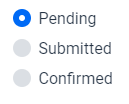
By default, the orientation of the Radio Button is horizontal. It can be helpful if we want to save screen space. It is recommended to have only three options.
Radio Buttons are, by default, set to horizontal orientation.
⭐ Implementation of Horizontal Orientation
package com.vaadin.demo.component.radiobutton;

import com.vaadin.flow.component.html.Div;
import com.vaadin.flow.component.radiobutton.RadioButtonGroup;
import com.vaadin.flow.router.Route;

@Route("radio-button-horizontal")
public class RadioButtonHorizontal extends Div {

    public RadioButtonHorizontal() {
        // tag::snippet[]
        RadioButtonGroup<String> radioGroup = new RadioButtonGroup<>();
        radioGroup.setLabel("Status");
        radioGroup.setItems("Pending", "Submitted", "Confirmed");
        radioGroup.setValue("Pending");
        add(radioGroup);
        // end::snippet[]
    }

}
You can also try this code with Online Java Compiler
If we want to give a choice to the user to enter their Custom Option, keep the “other” Radio Button as the last option. This “other” button will be coupled with a text field area. This Text field will remain hidden unless the “other” option is selected.
⭐ Implementation of Custom Options
RadioButtonGroup<Card> radioGroup = new RadioButtonGroup<>();
radioGroup.addThemeVariants(RadioGroupVariant.LUMO_VERTICAL);
radioGroup.setLabel("Payment method");

List<Card> cards = new ArrayList<>(DataService.getCards());
Card other = new Card();
other.setId(-1);
cards.add(other);
radioGroup.setItems(cards);
radioGroup.setValue(cards.get(0));

radioGroup.setRenderer(new ComponentRenderer<>(card -> {
  if (other.equals(card)) {
    return new Text("Other");
  } else {
    Image logo = new Image(card.getPictureUrl(), card.getName());
    logo.setHeight("1em");
    Span number = new Span(new Text(card.getAccountNumber()));
    return new HorizontalLayout(logo, number);
  }
}));

TextField textField = new TextField("Card number");
textField.setVisible(false);
radioGroup.addValueChangeListener(e -> textField.setVisible(other.equals(e.getValue())));

add(radioGroup, textField);
You can also try this code with Online Java Compiler
The most commonly selected option is kept as the default option. Usually, the default option is kept at the starting of the list.
Some points to remember
⭐For Radio Button Groups, it is important to provide labels. This will help in clearly distinguishing them from one another, especially with multiple adjacent groups.
⭐ Items can be customized to include more than a single line of text.
⭐ Sometimes two radio buttons can be a better alternative to a single Checkbox.
Frequently Asked Questions
Is Vaadin utilized widely?
One of the most well-liked Java web development frameworks, Vaadin, is frequently used to create robust and scalable web applications.
Is Vaadin scaleable?
Finally, the answer is that Vaadin apps do scale effectively. Errors are possible with any framework, as with anything else. However, it's simple to develop applications with Vaadin that scale well, look amazing, and operate excellently, making your users happy by adhering to traditional Java best practices.
Is Vaadin a good framework?
A reliable web framework for creating sophisticated online applications is Vaadin. With Vaadin, creating web-based GUIs is incredibly easy, fast, and similar to creating desktop applications. There are circumstances, though, in which Vaadin is inappropriate.
Conclusion
Pat yourself on the back for finishing this article. We have discussed what Radio Buttons are in Vaadin and how to use them. We discussed the different states and orientations of the Radio Button. We also discussed the variations of Radio Buttons in Vaadin based on the option types.
If you are interested in knowing more about Vaadin, we recommend you read some of our articles -











 7+ registered

