




Introduction
Vaadin is a web development framework that is open source. It includes built-in support for Java scripts and AJAX. You can also use Google Web Toolkit to incorporate external features. Vaadin saves developers time by rendering rich content in the browser without using markup files. The Vaadin framework will generate all markups and supporting files at runtime. Vaadin is a programming language that supports both server and client-side development.
Vaadin Architecture
Vaadin Framework offers two development models for web applications: client-side (browser) and server-side. The server-driven development model is more powerful, allowing application development to take place entirely on the server side by utilizing an AJAX-based Vaadin Client-Side Engine that renders the user interface in the browser.
The client-side model enables the creation of Java widgets and applications, which are then compiled to JavaScript and executed in the browser. The two models can share UI widgets, themes, and backend code and services and can be easily combined.

🔥 In a running situation when the page with the client-side code (engine or application) has been initially loaded in the browser, the Vaadin runtime architecture provides a basic illustration of the client-side and server-side communications.
🔥 Vaadin Framework comprises a server-side API, a client-side API, a slew of user interface components/widgets on both sides, themes for controlling the appearance, and a data model that allows the server-side components to be bound directly to data. It includes the Vaadin Compiler for client-side development, which enables you to compile Java to JavaScript.
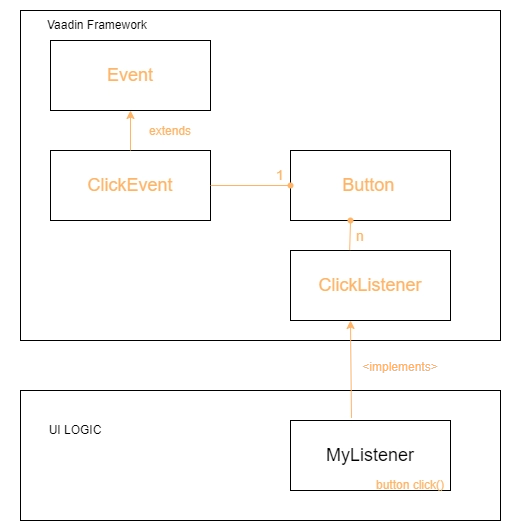
🔥 A server-side Vaadin application serves HTTP requests as a servlet in a Java web server. The servlet class is typically VaadinServlet. The servlet receives client requests and interprets them as user session events. Events are associated with UI components and delivered to the application's event listeners.
🔥 If the UI logic modifies the server-side user interface components, the servlet generates a response that renders them in the web browser. The answers are received by the client-side engine running in the browser, which uses them to make necessary changes to the page in the browser.
The following are the major components of the server-driven development architecture and their functions:
🍁 The User Interface
Vaadin applications provide a user interface to interact with the business logic and data. The UI is implemented technically as a UI class that extends com.vaadin.ui.UI. Its primary responsibility is constructing the initial user interface from UI components and configuring event listeners to handle user input. The user interface can then be loaded into the browser via a URL or embedded into any HTML page.
Please remember that the term "UI" refers to both the general UI concept and the technical UI class concept throughout this book.
🍁 Widgets and User Interface Components
A Vaadin application's user interface comprises components that the application creates and arranges. Each server-side component has a client-side counterpart, a widget, with which the user interacts when rendered in the browser. Client-side applications can also make use of the client-side widgets. These events are relayed to the application logic by the server-side components. A data source can be bound to field components with a value the user can view or edit.
🍁 Engine for Clients
Vaadin's Client-Side Engine manages the rendering of the UI in the web browser by utilizing various client-side widgets, which are the server-side counterparts. It sends user interaction to the server and then renders the changes in the UI again. Asynchronous HTTP or HTTPS requests are used for communication.
🍁 Vaadin Servlet
Server-side Vaadin applications use the Java Servlet API. The Vaadin servlet, or the VaadinServlet class, receives requests from various clients and determines which user session they belong to. They do this by tracking the sessions with cookies and delegating the requests to the appropriate sessions. By extending the Vaadin servlet, you can personalize it.
🍁 Themes
Vaadin distinguishes between the user interface's appearance and its component structure. While the UI logic is implemented in Java code, the presentation is defined in CSS or Sass themes. Vaadin comes with several pre-installed themes. In addition to style sheets, user themes can include HTML templates that define custom layouts and other resources, such as fonts and images.
🍁 Events
Interaction with user interface components generates events, which are processed on the client side by the widgets before being routed to the event listeners defined in the application via the HTTP server, Vaadin servlet, and the user interface components.
🍁 Server Push
Along with the event-driven programming model, Vaadin supports server push, in which User Interface changes are pushed from the server to the client directly without needing a client request or an event. This allows other threads and UIs to update UIs immediately without waiting for a request.
🍁 Data Binding
Vaadin provides a data binding API in addition to the user interface model for associating data presented in field components such as selection components, text fields, and checkboxes with a data source. Using data binding, user interface components can directly update application data, often without the need for control code. You can, for example, bind a data grid component to a backend query response.
🍁 Client-Side Applications
Vaadin supports client-side application modules, which run in the browser, and server-side web applications. Client-side modules have access to the same widgets, themes, and backend services as server-side Vaadin applications. They are helpful when you need highly responsive UI logic, such as for games or serving a large number of clients with potentially stateless server-side code, as well as for a variety of other purposes, such as providing an offline mode for server-side applications.
🍁 Backend
Vaadin is designed to build user interfaces, and other application layers are kept separate from the User Interface. The business logic runs in the same servlet as the User Interface code, or it can be separated by a Java API, EJBs, or distributed to a remote backend service. The data is typically distributed to a database management system and accessed via a persistence solution such as JPA.



 7+ registered

