Do you think IIT Guwahati certified course can help you in your career?
Introduction
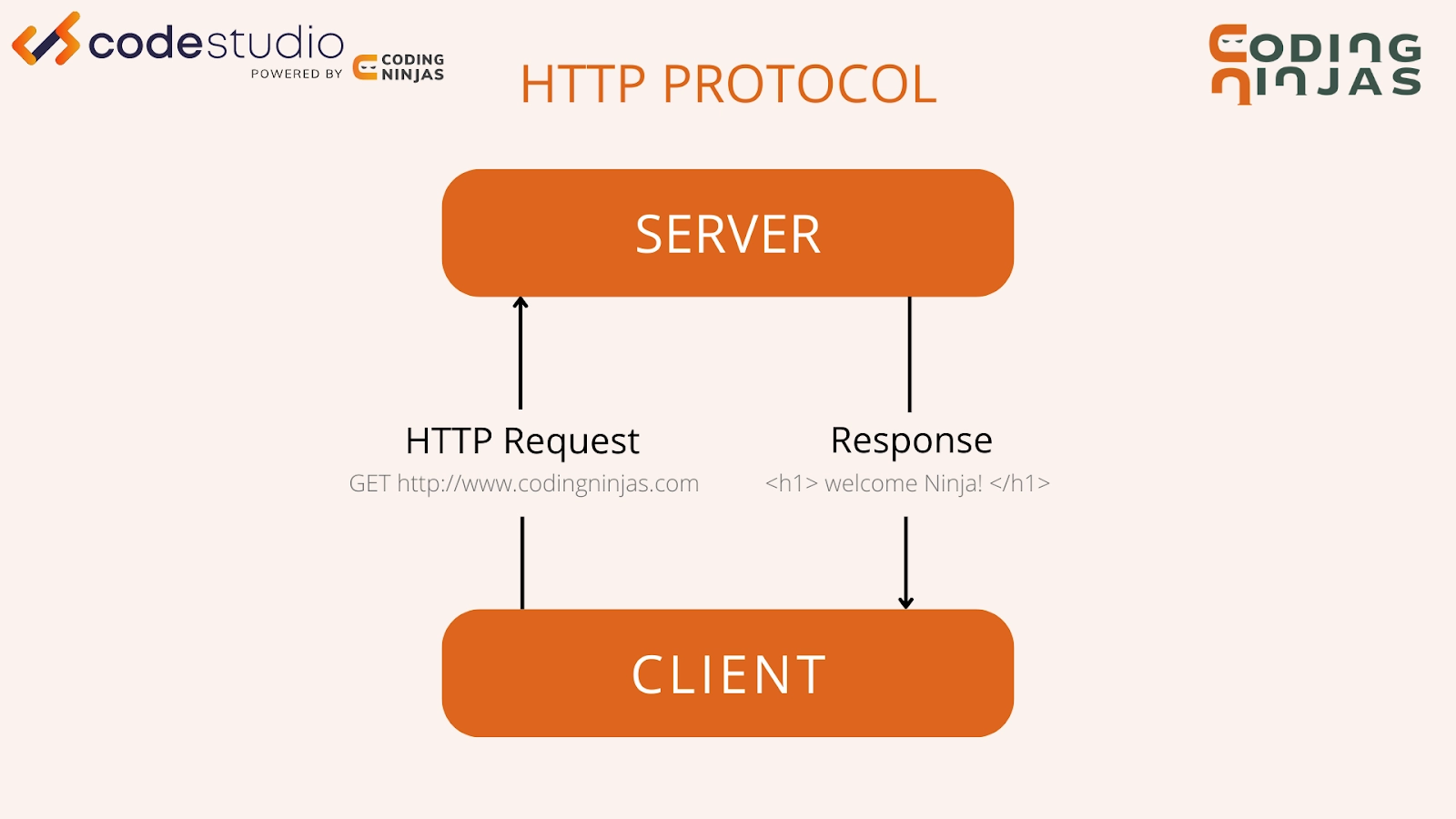
Hi Ninja! Interaction between client and server has always been an exciting topic. The typical interaction between client and server is that a client (browser) requests the server, the server serves the request, and the connection is closed. Client-server interaction can handle most of the requirements that a client needs.
Features like new posts automatically appear at the top of the feed without scrolling, or the situation where we need data to be changed dynamically or in real-time can’t be handled by just typical client-to-server interaction. It is where WebSockets and Actioncable come to work. Actioncable helps in seamlessly integrating WebSockets to your Ruby on Rails application. This blog will teach you WebSockets and actioncable in Ruby on Rails.
WebSocket
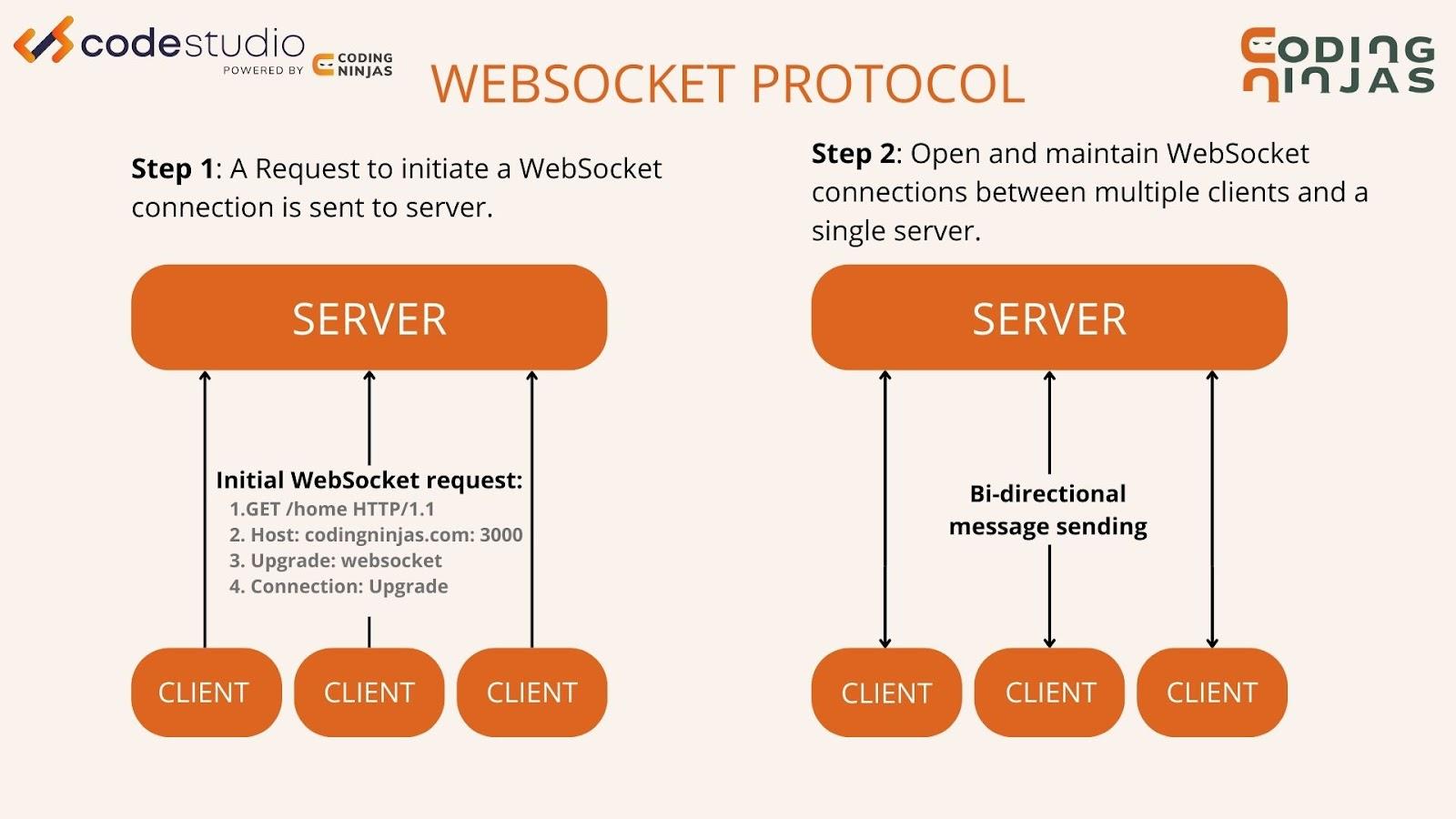
WebSockets allow bi-directional communication between both parties, which means both servers and clients can communicate and exchange data at the same time. This protocol is built on top of TCP. It holds the connection to the server open to send information without a client's request. WebSocket is a TCP-like protocol that allows the server and the client to communicate.
The client is given a particular API to talk to the server which is known as the WebSocket API. A typical HTTP connection opens and closes as the client requests something. A WebSocket connection between server and client keeps the HTTPS connection connected so that the server can send updates to the client without a particular request by the client.
Action Cable
Action Cable is a novelty framework that integrates WebSocket communication to Rails. It was first introduced with Rails 5. It provides a straightforward interface for both client-side JS and server-side Rails code. And as it integrates so tightly with Rails, we have access to all of our models from within our WebSocket workers, effectively layering Action Cable on top of our existing Rails architecture, including Active Record (or any other ORM). Websockets and actioncable in ruby on rails are extremely effective together.
Terminology
In this section, you will learn about common terms in the client-server model related to websockets and actioncable in ruby on rails:
1. Connections
Connections form the link between the client and the server. A single Action Cable can handle multiple connection instances between client and server. It has one connection instance per WebSocket connection.
2. Channels
Each client to a WebSocket connection can subscribe to multiple channels. Each channel contains a logical unit of work. For example, you could have a Chat_Channeland an Appearance_Channel. A client should be subscribed to one or both of these channels.
3. Subscribers
When the consumer/client is subscribed to a channel, they are called subscribers. The connection between a subscriber and the channel is called a subscription. A client can be a subscriber to a given channel any number of times. For example, a client could subscribe to multiple chat rooms simultaneously.
4. Pub/Sub
Pub/Sub or Publish-Subscribe is the approach used by Action Cable to communicate between the server and multiple clients. It refers to a message queue paradigm whereby senders (publishers) send data to an abstract class of recipients (subscribers) without specifying individual recipients.
5. Broadcasting
It is a Pub/Sub link where everything transmitted by the broadcaster is sent to the channel subscribers who are streaming that broadcasting directly. Each channel can be streaming any number of broadcastings.
Server-Side Concerns
To understand the websockets and actioncable in ruby on rails we need to know server-side concerns. Here are some of the server-side concerns listed below:
1. Connections
For every WebSocket connection to the server, a connection object is instantiated. This is the parent object of all the channel subscriptions created later. The link only deals with authentication and authorization, not specific application logic. The client of a WebSocket connection is called the connected consumer. An individual user will create one consumer-connection pair per tab, window, or device they have it opened in..
Connections are instances of ApplicationCable::Connection, which extends ActionCable::Connection::Base. In ApplicationCable::Connection, You authorize the incoming connection In ApplicationCable::Connection, and proceed to establish it if the Ninja can be identified.
1.1 Connection Setup
# application_cable/connection.rb
module ApplicationCable
  class Connection < ActionCable::Connection::Base
    identified_by :ninja

    def connect
      self.ninja = find_verified_ninja
    end

    private
      def find_verified_ninja
        if verified_ninja = User.find_by(id: cookies.encrypted[:ninja_id])
          verified_ninja
        else
          unauthorized_connection
        end
      end
  end
end
Here we assume that you have already handled authentication of the user somewhere in the application and, after successful authentication, it sets an encrypted cookie with the ninja ID.
Hence we look for an encrypted cookie with ninja_id to verify a connection and identified_by designating a connection identifier that can be used to find the specific connection.
2. Channels
Each client to a WebSocket connection can subscribe to multiple channels. Each channel contains a logical unit of work.
2.1 Parent Channel Setup
# application_cable/channel.rb
module ApplicationCable
  class Channel < ActionCable::Channel::Base
  end
end
Then we would create our channel classes. For example, you could have a Chat_Channel and an Appearance_Channel:
# chat_channel.rb
module ApplicationCable
  class Chat_Channel < ApplicationCable::Channel
  end
# appearance_channel.rb
module ApplicationCable
  class Appearance_Channel < ApplicationCable::Channel
  end
A consumer could be subscribed to one or both of these channels.
2.2 Subscriptions
Consumer acts as a subscriber by subscribing to channels; their connection is called a subscription. Messages produced are routed to these channel subscriptions based on an identifier sent by the channel consumer.
# chat_channel.rb
class ChatChannel < ApplicationCable::Channel
  def subscribed
  end
end
Client-Side Concerns
Some of the client-side concerns are as follows:
1. Connections
The generator will, by default, create a channel in the app/channels directory using the following JavaScript:
1.1 Connect Consumer
import { createConsumer } from "@rails/actioncable"
export default createConsumer()
Using the 'bin/rails generate channel' command, you can generate a new channel to make the consumer ready to connect against /cable. To establish a connection, you must specify at least one subscription.
1.2 Subscriber
After creating a subscription, a consumer becomes a subscriber to that channel.
//channels/appearance_channel.js
import consumer from "./consumer"
consumer.subscriptions.create({ channel: "Appearance_Channel" })
This will create the subscription. A consumer can act as a subscriber any number of times to a given channel. For example, a consumer could be a subscriber to multiple chat rooms simultaneously.
Client-Server Interactions
Let’s discuss the client-server interaction to understand the real-time application's support of websockets and actioncable in ruby on rails.
1. Streams
It is a way by which channels broadcasts to their subscribers. For example, the following code uses streaming_from to subscribe to the broadcasting named chat_Ninja Room when the value of the :room parameter is "Ninja Room":
# channels/chat_channel.rb
class ChatChannel < ApplicationCable::Channel
  def subscribed
    streaming_from "chat_#{params[:room]}"
  end
end
Then, somewhere in your Ruby on Rails application, you can broadcast to such a room by calling broadcast:
ActionCable.server.broadcast("chat_Ninja Room", { body: "This Room is the Best Room." })
2. Broadcasting
It is a Pub/Sub link where everything transmitted by the broadcaster is sent to the channel subscribers who are streaming that broadcasting directly. Each channel can be streaming any number of broadcastings.
3. Subscriptions
When the consumer/client is subscribed to a channel, they are called subscribers. This connection is called subscriptions. Broadcasts are then routed to these channel subscriptions based on an identifier that is sent by the cable consumer.
WebSocket is a protocol built on top of TCP. It holds the connection to the server open to send information without a client's request. WebSocket handles the connection between server and client and also sends and receives data through that connection.
What problems does WebSockets solve?
WebSocket makes it possible to open a two-way interactive communication session between the user and a server. With this, you can send messages to a server and receive event-driven responses without polling the server for a reply.
What is Action Cable?
Action Cable is a full-stack offering that provides both a client-side JavaScript framework and a server-side Ruby framework to integrate WebSockets with the rest of your Rails application seamlessly.
Conclusion
This post gave you a brief overview of Websockets and Actioncable in Ruby on Rails. You learned various terms and the technique to implement Actioncable connections. Websockets and Actioncable in Ruby on Rails are essential for developing proper web applications. We hope you enjoyed our presentation on Websockets and Actioncable in Ruby on Rails.
Here are a few key websites that will aid your exploration of Ruby on Rails.







 7+ registered

