window.open() is the method used to open a new window. It accepts three arguments: URL, window target, and window features. Window features contain a string of information about the new window like width, height, etc.
window.open(url, windowName, [windowFeatures]);
You can also try this code with Online Javascript Compiler
Returns a Boolean value indicating whether a window has been closed or not.
console
Returns a reference to the Console object, which provides methods for logging information to the browser's console
defaultStatus
Sets or returns the default text in the statusbar of a window
document
Returns the Document object for the window.
frameElement
Returns the <iframe> element in which the current window is inserted
frames
Returns all <iframe> elements in the current window
history
Returns the History object for the window.
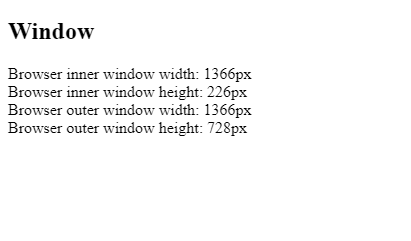
innerHeight
Returns the height of the window's content area (viewport) including scrollbars
innerWidth
Returns the width of a window's content area (viewport) including scrollbars
length
Returns the number of <iframe> elements in the current window
localStorage
Allows to save key/value pairs in a web browser. Stores the data with no expiration date
location
Returns the Location object for the window.
name
Sets or returns the name of a window
navigator
Returns the Navigator object for the window.
opener
Returns a reference to the window that created the window
outerHeight
Returns the height of the browser window, including toolbars/scrollbars
outerWidth
Returns the width of the browser window, including toolbars/scrollbars
pageXOffset
Returns the pixels the current document has been scrolled (horizontally) from the upper left corner of the window
pageYOffset
Returns the pixels the current document has been scrolled (vertically) from the upper left corner of the window
Window Object Methods
Method
Description
alert()
Displays an alert box with a message and an OK button
atob()
Decodes a base-64 encoded string
blur()
Removes focus from the current window
btoa()
Encodes a string in base-64
clearInterval()
Clears a timer set with setInterval()
clearTimeout()
Clears a timer set with setTimeout()
close()
Closes the current window
confirm()
Displays a dialog box with a message and an OK and a Cancel button
focus()
Sets focus to the current window
getComputedStyle()
Gets the current computed CSS styles applied to an element
getSelection()
Returns a Selection object representing the range of text selected by the user
matchMedia()
Returns a MediaQueryList object representing the specified CSS media query string
moveBy()
Moves a window relative to its current position
moveTo()
Moves a window to the specified position
open()
Opens a new browser window
print()
Prints the content of the current window
prompt()
Displays a dialog box that prompts the visitor for input
requestAnimationFrame()
Requests the browser to call a function to update an animation before the next repaint
resizeBy()
Resizes the window by the specified pixels
Frequently Asked Questions:
What is the difference between BOM and DOM in JavaScript?
Ans-> DOM (Document Object Model) is used for interacting with objects in HTML and XML(Extensible Markup Language) documents. BOM(Browser Object Model) is a convention referring to all the functionalities of a web browser.
2. What is the difference between a document object and window object?
Ans-> The document object is HTML, XML, PHP, or other document loaded into the browser, and the window is the first thing loaded into the browser. The document is loaded inside the window object.
3. What is the difference between screen and window property?
Ans-> A window object returns information about both the window and the viewport. The screen object refers to the actual monitor window or desktop size.
Key Takeaways:
In this blog, we talked about the window object of the browser and its methods. The window object represents the browser window. If you enjoyed this blog about window objects, check out Web Technologies.
If you are preparing for your next web development interview, check out the blogs, 25 CSS Interview Questions, and 30 JavaScript interview questions.
Live masterclass
Get hired as an Amazon SDE : Resume building tips
by Anubhav Sinha, SDE2 @ Amazon
05 Nov, 2024
01:30 PM
Google Data Analyst Roadmap: Get Practical Insights
by Maaheen Jaiswal, Data Analyst @ Google
30 Oct, 2024
01:30 PM
Get hired as an Amazon SDE : Resume building tips
by Anubhav Sinha, SDE2 @ Amazon
05 Nov, 2024
01:30 PM
Google Data Analyst Roadmap: Get Practical Insights





 412+ registered