Do you think IIT Guwahati certified course can help you in your career?
Introduction
The acronym for Amazon Web Services is AWS. Amazon is the parent company of AWS. Through its distributed IT infrastructure, it offers various IT resources to businesses. It provides a wide range of services, including packaged software as a service(Saas), infrastructure as a service(Iaas), and platform as a service (PaaS).
In this blog, we will discuss deep detail working with servers in AWS Opswork in Puppet Enterprise. Let's start going!
AWS OpsWorks
AWS OpsWorks allows you to access the Puppet Enterprise features you control using the Puppet console. It also integrates seamlessly with the Puppet code you already have. By automatically patching, updating, and backing up your server, OpsWorks also maintains your Puppet master server.
Back up an OpsWorks for Puppet Enterprise Server
OpsWorks for Puppet Enterprise server backups can be scheduled daily or weekly. You can instruct the service to store the backups in Amazon Simple Storage Service on your behalf. As an alternative, you can perform manual backups as needed.
The backup consists of three types:-
🚦 Automated Backups
🚦 Manual Backups
🚦 Delete Backups
Automated Backups
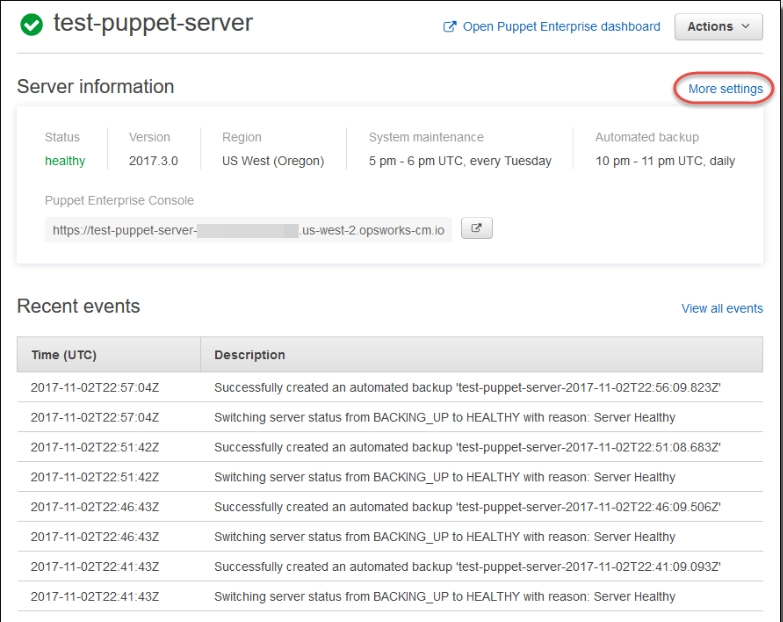
OpsWorks for Puppet Enterprise begins automated backups on the day and time that you specify in the Automated backup section of the Configure advanced settings page of the setup wizard.
The steps to change automated backup settings are as follows:-
✔️ Select More settings from the server's properties page.
✔️ Select No for the Enable automated backups option to disable automated backups. You do not need to move on to the next step; simply save your changes.
✔️ Change the frequency, start time, or generations to keep it in the Automated Backup section. Save your alterations.
Manual Backups
You can begin a manual backup in the AWS Management Console or by executing the AWS CLI create-backup command at any time. There can only be ten manual backups saved at a time; these backups must be manually removed from Amazon S3.
Steps to manually backup data in the AWS Management Console are:-
✏️ Select the server you want to backup on the Puppet Enterprise servers page.
✏️ Select Backups from the left navigation pane on the server's properties page.
✏️ Select Create backup.
✏️ When the page displays a green check mark in the backup's Status column, the manual backup is complete.
To perform a manual backup, enter the following command into the AWS CLI:-
aws opsworks-cm --region region name create-backup --server-name "Name of the Puppet Server" --description "Description of the Backup"
Delete Backups
A backup is deleted from the S3 bucket, where backups are kept removed forever.
The steps to delete a backup in the AWS Management Console are:-
🖊️ Select the server you want to backup on the Puppet Enterprise servers page.
🖊️ Select Backups from the left navigation pane on the server's properties page.
🖊️ Choose Delete backup after selecting the backup you want to remove. Only one backup can be chosen at once.
🖊️ When asked to confirm the deletion, select Yes, Delete after checking the box next to Delete the backup that is kept in an S3 bucket.
Run the following command in the AWS CLI to delete a backup:-
aws opsworks-cm --region region name delete-backup --backup-id Name_of_Server-yyyyMMddHHmmssSSS
Restore an OpsWorks for Puppet Enterprise Server from a Backup
You can quickly select a point in time from which to restore your OpsWorks for Puppet Enterprise server after looking through your available backups.
Server backups include persistent data from configuration management programs, modules, classes, node associations, and database information. The old EC2 instance only briefly remains in a Running or Stopped state after restoration is finished. It eventually comes to an end.
The Puppet software is not updated during a server restore; instead, the backup you select's configuration management data and Puppet versions are used.
The steps to Restore the Server from Backups are as follows:-
🚀 Run the following command in the AWS CLI to get a list of available backups and their IDs. Write down the backup ID that you want to use. The format of backup IDs is myServerName-yyyyMMddHHmmssSSS.
aws opsworks-cm --region region name restore-server --backup-id "myServerName-yyyyMMddHHmmssSSS" --instance-type "Instance Type" --key-pair "EC2 key pair name" --server-name "Puppet Master Name"
🚀 Hold off until the restoration is finished.
Frequently Asked Questions
Which is better, Chef or Puppet?
Using Chef is like programming the control of your nodes, whereas using Puppet is like writing configuration files, to use an analogy. You might prefer Puppet if you or your team have more system administration experience. On the other hand, Chef might be a better fit if most of you are developers.
Describe the Opswork stack.
OpsWorks Stacks can manage servers and applications on AWS and locally. One can model your application as a stack of various layers, such as load balancing, database, and application server.
What is a control tower for AWS?
AWS Control Tower service is used to manage and enforce governance rules for security, operations, and compliance across all of your AWS Cloud organizations and accounts.
Conclusion
Congratulations on finishing the blog! We have studied working with servers in AWS Opsworks in Puppet Enterprise. We further looked at restoring and backing up Opsworks in Puppet Enterprise.
We sincerely hope that this blog has improved your understanding of the AWS Opsworks in Puppet Enterprise, and if you want to learn more, then you can check articles on:-
Please refer to our guided pathways on Code studio to learn more about DSA, Competitive Programming, JavaScript, System Design, etc. Enroll in our courses, and use the accessible sample exams and questions as a guide. For placement preparations, look at the interview experiences and interview package.
Please do upvote our blogs if you find them helpful and informative!







 1+ registered

