




As we saw in our previous article Introduction to Jest, we'll be learning how to write our first unit test in this article. So let's get started by setting up the project.
Setting Up The Project
Before running our first unit test using jest, we need to create a node project and then install jest into it.
-
Start by creating a directory with the name of the project. For example,
mkdir nodeproject -
Now within the terminal, navigate to your project and initialize the node project
cd nodeproject
npm init -y -
We will install the jest package into the project created using the above codes.
npm install –save-dev jest -
Our node project is now ready with jest bindings. Finally, we will edit the package.json file to run all jest based tests. To do that, we will add a custom script in the package.json file.
"scripts": {
   "test": "jest"
 },
Unit Testing Using Jest
Arithmetic Function
To try out a simple unit test using jest, we require a basic javascript code for the application or function under test. Here we will be using a classic Javascript function to perform arithmetic operations to understand basic syntax and working of jest.
Program
const arithmeticFn = {
   //arithmetic function.

   sum: function(a,b) {
       return a + b;
   },

   diff: function(a,b) {
       return a - b;
   },
   prod: function(a,b) {
       return a * b
   },
   div: function(a,b) {
       return a / b
   }
}
//export the function
module.exports = arithmeticFn
Next, We will save the above function as a .js file in the node project with any name.
For example, jest.js
We will now create a test file in the same folder where you saved the function code named jest.test.js (this is the expected convention by jest framework to look for jest based test files). In this file we test the module or application.
Start the code by importing the function under test to execute the code.
Program
const arithmeticFn = require('./jest.js');
//description of the complete test.
describe("testing arithmetic operations", () => {

   //using test to validate multiple functionalities of the program.
   test('adding 1 + 2 should return 3', () => {
       expect(arithmeticFn.sum(1, 2)).toBe(3);
   });

   test('3 - 4 = -1', () => {
       expect(arithmeticFn.diff(3, 4)).toBe(-1);
   });
   test('5 * 6 = 30', () => {
       expect(arithmeticFn.prod(5, 6)).toBe(30);
   });test('8 / 4 = 2', () => {
       expect(arithmeticFn.div(8, 4)).toBe(2);
   });
})Output

- As shown above, we can use describe() to create group unit tests in a single file. It describes the complete test
- test() isolates each unit test and its function. In the above example, we run four tests inside the describe function.
-
expect().tobe() are one of the jest matchers that validate our application results to the given expectations.
Now we can run our test using npm run inside our project. The test case example given above runs to provide the following output.
FizzBuzz Function
We will create a fizz_buzz function, where the program will return “fizz” if the input number is divisible by 3, “buzz” if the input is divisible by 5, “fizzbuzz” if the input is divisible by 15 and the number itself if it is not divisible by either.
The code for this function looks like this. For example, create a javascript file jest.js with the following code:
Program
//function takes integer as input and returns string
function fizz_buzz(n) {

   //variable to store output
   let result = []

   //iteration over the input
   for (n of n) {
       if (n % 15 === 0) {
           result.push('fizzbuzz')
       } else if (n % 3 === 0) {
           result.push('fizz')
       } else if (n % 5 === 0) {
           result.push('buzz')
       } else {
           result.push(n)
       }
   }

   //join all the string outputs in result variable
   return result.join(', ')
}
module.exports = fizz_buzz;We will create the test file for the above program using a similar syntax and naming convention (for example, jest.test.js) as explained above.
Program
const fizz_buzz = require('./jest.js');

describe("FizzBuzz", () => {
   test('[3] should output "fizz"', () => {
     expect(fizz_buzz([3])).toBe('fizz');
   });

   test('[10] should output "buzz"', () => {
     expect(fizz_buzz([10])).toBe('buzz');
   });

   test('[30] should output "fizzbuzz"', () => {
     expect(fizz_buzz([30])).toBe('fizzbuzz');
   });
});Output
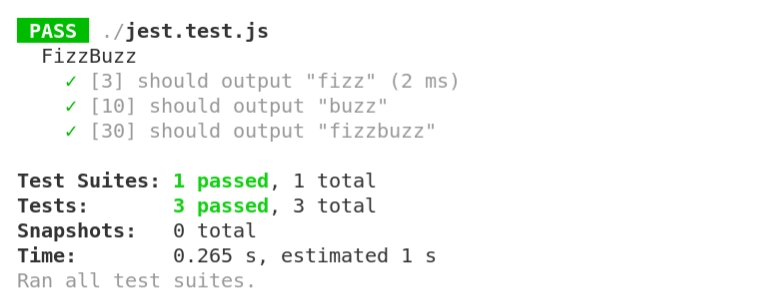
In the above test expect().be() matcher is used to validating string output from the fizz_buzz output for different inputs. Running the above test using npm test will give the following output.


 1+ registered

