Do you think IIT Guwahati certified course can help you in your career?
Introduction
"To err is human; to forgive edit Divine."
It means that it is normal for human beings to make mistakes. While making mistakes is natural, preventing yourself from repeating the same mistake is possible. Various industries use Configuration Management Tools to avoid development-related mistakes and reduce the chance of mistakes. One of the best examples of such tools is SALT or SALT_STACK.
"Salt is the world’s fastest, most intelligent, and scalable automation engine." It is open-source software that can reduce the potential for Human errors. In this article, we will discuss the SALT project and how to download it. Further, we will cover the components of the SALT and the features of the SALT Project.
What is SALT?
SALT is a configuration management and automation tool. You can use it to manage thousands of systems remotely. It uses a central repository to install software, including physical and virtual servers and the cloud, and to make changes to existing ones.
SALT is famous in DevOps teams because it retrieves configuration data and user code from a central code repository, like GitHub, and pushes that content out to servers remotely. Users of Salt have access to a public repository of prebuilt configurations and the ability to develop their scripts, programs, and configurations.
What is SaltStack?
SaltStack automates routine system administration and makes code deployment faster and easier. In 2020, VMware acquired SaltStack. SalStack product technical support moved to VMware on March 5th, 2021. SaltStack, a pioneer in creating intelligent, event-driven automation tools, assists clients in automating ITOps, DevOps, NetOps, or SecOps tasks.
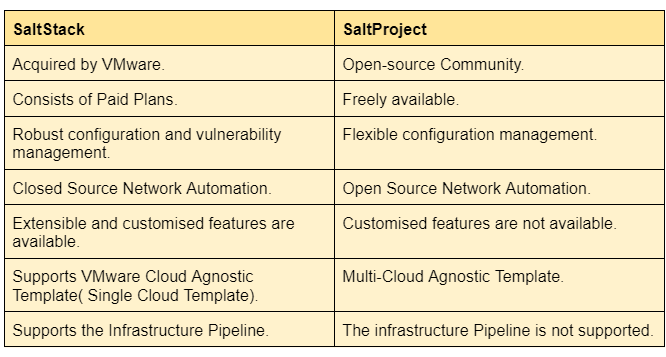
However, VMware continues to support and participate in the Salt Project open-source ecosystem. Some of the differences between SaltStack and SaltProject are as follows:
How to Download SALT?
SALT has been tested and packaged for use on various operating systems, including CentOS, Debian, RHEL, Ubuntu, macOS, and Windows.
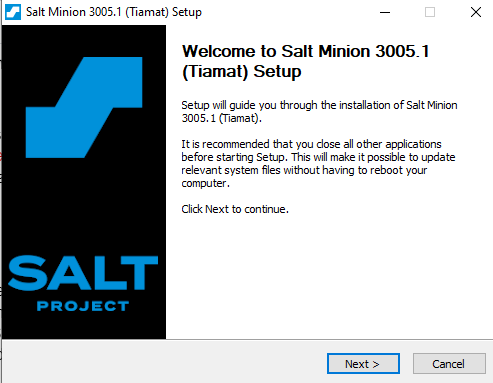
Step 2: To install Salt using a GUI, run the file.
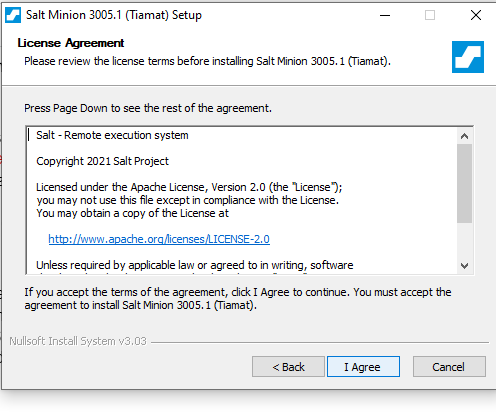
Step 3: Click on the Next button. A licence Agreement Window will appear. Click on I agree to continue the installation.
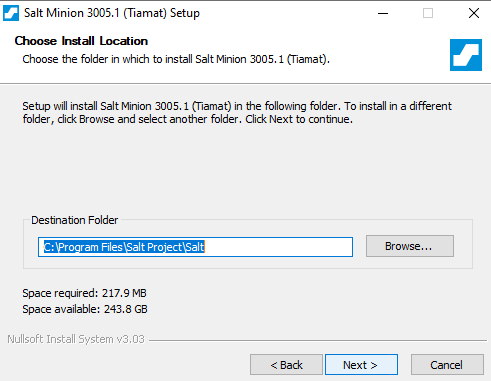
Step 4: Select the Destination Folder and click on Next.
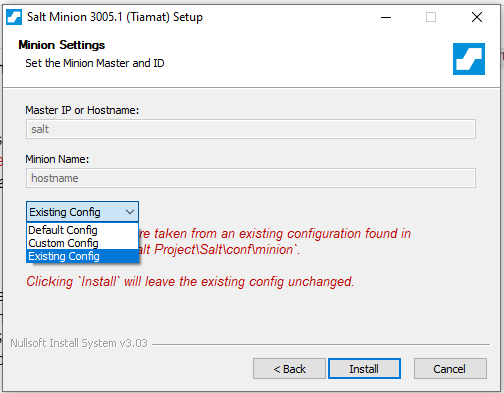
Step 5: Minion Setting Window appears, here, you can change the configuration.
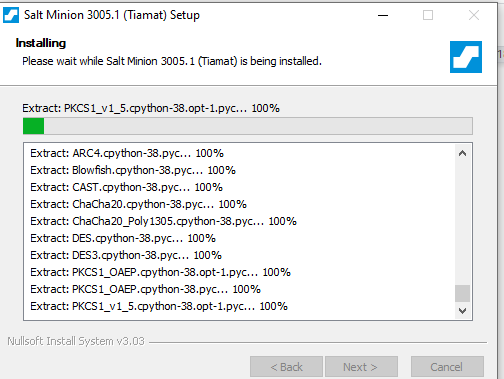
Step 6: Installation of various files begins. It will take a few seconds.
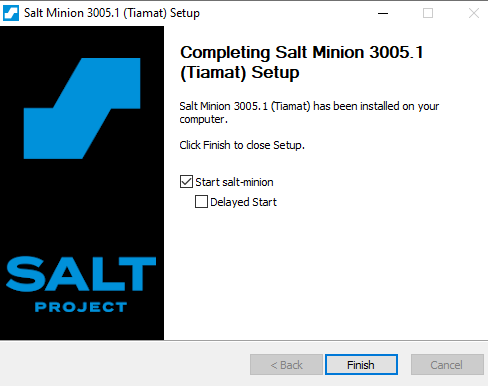
Step 7: Click Finish to end the installation process.
SALT Components
The various Components of the SALT project are as follows:
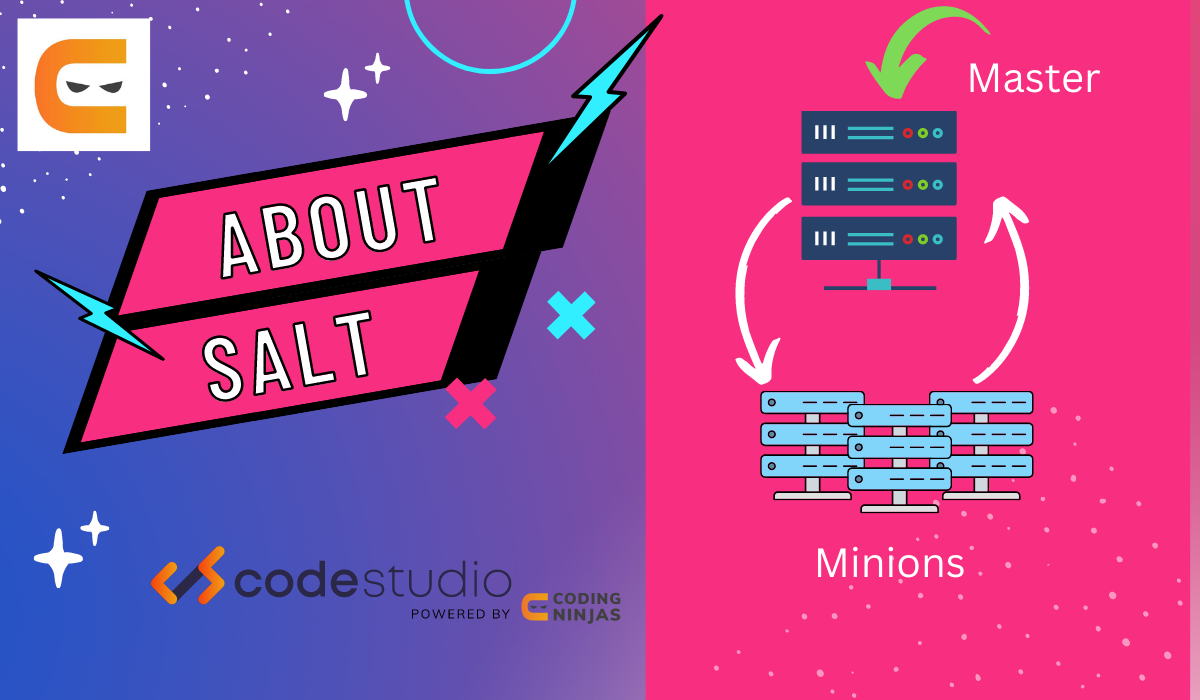
Salt Master: It is the Central management system. The Salt minion, executed on managed systems, is communicated via commands and configurations using Salt Master.
Salt Minions:The managed system receives Salt Master’s commands.
Execution Modules: These are the Ad hoc commands run on one or more managed systems using the command line. These are helpful for the following:
Monitoring, status, and inventory in real-time.
One-time scripts and instructions.
Releasing urgent updates.
Formulas(States): A declarative representation of a system's configuration.
Grains:These are the system variables. The operating system, memory, and many other features of the controlled system are all included in grains, which are static information about the system.
Pillar:It is a user-defined variable. These private variables are created and saved on the Salt Master, after which one or more minions are assigned using targets.
Top File:It compares Salt pillar values and formulas to Salt minions.
Runners:The modules that run on the Salt master to carry out support functions are called runners.
Salt SSH:One can run Salt commands over SSH on systems without Salt minions.
Working on SALTStack
Learning a few facts about how Salt conducts infrastructure management is helpful. The features of the SALT stack are as follows:
Real-time Communication
At the same time, commands are sent to all Salt minions. As a result, queries to thousands of systems can be made in just a few seconds, and updating 10 or 1000 systems takes about the same time. Instead of relying on an (often out-of-date) database, Salt allows you to query your infrastructure in real-time to obtain information about it.
Avoid Freeloaders
The Salt minions execute their tasks. A brief set of instructions that describes the minion properties along with commands in the format: "<minion_properties>: <respective command and arguments>" is used by the Salt master to communicate. As soon as they read the instruction, salt minions check to see if they fit the properties. All the commands that each Salt minion requires are already stored locally so that the command may be rapidly executed and the results delivered to the Salt master.
Scalability
Salt is built for scalability and excellent performance. It is not unusual for users to have more than 10,000 minions on a single master in a production setting, and deployments with more than 35,000 minions on a single Salt master have been documented. Salt has demonstrated its scalability and real-world speed.
Automation
Salt's event-driven architecture enables you to automate continuous administration in addition to initial system configuration, scaling, and repair. Users of Salt automate the installation and maintenance of complex distributed network applications, databases, user accounts, cloud resources, files, standard packages, and much more.
Efficiency
Salt is used almost everywhere. You can utilise the proxy minion system for devices that don’t handle Python. It indicates that support for any network protocol—even one you created yourself—is the only prerequisite for being managed by Salt. Salt commands are given to the proxy minion, which converts them into the native protocol and sends them to the device. The device's return data is analysed, added to a data structure, and then sent back.
Salt Security Advisories
The Apache 2.0 licence governs the use of Salt. It is a permissive licence whose main aspects are required to preserve copyright and licence notices. Developers can modify, copy, or update the source code of already-existing software under the Apache 2.0 licence.
It provides permission for the following:
Modification of Code.
Sharing of code.
Commercial use of code.
Private Use.
Patent Use.
The limitations of the Apache 2.0 licence are
Trademarks: No approval is given to utilise the trade names, trademarks, or service marks under this License.
Warranty: Licensor provides the Work on an "AS IS" basis without warranties or conditions.
Liability: Indicates the warranty and if the owner of the software or licence may be held liable for any damage.
Frequently Asked Questions
How can I join the Community of the SALT project?
There are lots of opportunities to participate in the SALT community. There are about a dozen chances each month to get together with other contributors and the Salt Core team and work together in real-time. The Salt Project Community Events Calendar is the best resource for community updates.
How can I contribute to the SALT Project?
You can help in several ways. You can use Salt to open well-written bug reports and to fix bugs. You can Join a working group. You can improve the documentation. You can also provide fixes, updates, or other code that has yet to be tested. The best way to contribute is to answer the queries in the SALT community.
Which companies use SaltStack?
Various organizations use SaltStack software to manage and protect digital business infrastructure at scale, including TD Bank, IBM Cloud, LinkedIn, eBay, Lego, First Data, Bloomberg, Adobe, Sanofi, and thousands more.
Conclusion
We discussed the SALT stack. We started our discussion with how to download SALT. Further, we discussed the components of the SALT Stack and the leading features of the SALT.
We hope this blog has helped you. We recommend you visit our articles on different SALT topics, such as







 5+ registered

