Do you think IIT Guwahati certified course can help you in your career?
Introduction
Infrastructure as code is made possible by the Ansible toolkit. The open-source suite contains software provisioning, configuration management, and application deployment features. RedHat's yum package manager has a counterpart in Ubuntu called Ansible APT. The Apt Ansible Module is also created using a particular Unix command. This command is in the Debian apt-get package manager.
Let's dive into the article for more information about the Ansible APT module.
Ansible APT
The preferred suite of package management tools in Ubuntu is APT. It stands for "Advanced Packaging Tool." It enables the installation, updating, and removal of packages from Ubuntu or Debian systems. Here are three command-line utilities linked to APT, including:
Apt-get: You can perform all the fundamental package management tasks using this command. The Ansible apt-get module provides this capability.
Apt-add-repository: Using the apt-add-repository command, you can add a new repository. The most recent versions of all the packages might not be in the default repository. Therefore, you must include more repositories for some software maintainers. The Ansible apt repository module provides the functionality for adding a new repository.
Apt-key: To maintain the list of keys for authenticating apt packages, use apt-key. To manage the keys, Ansible uses the apt key module.
Requirements
On the host that executes the module, this needs to be installed:-
python-apt (python 2)
python3-apt (python 3)
aptitude (before 2.4)
Options
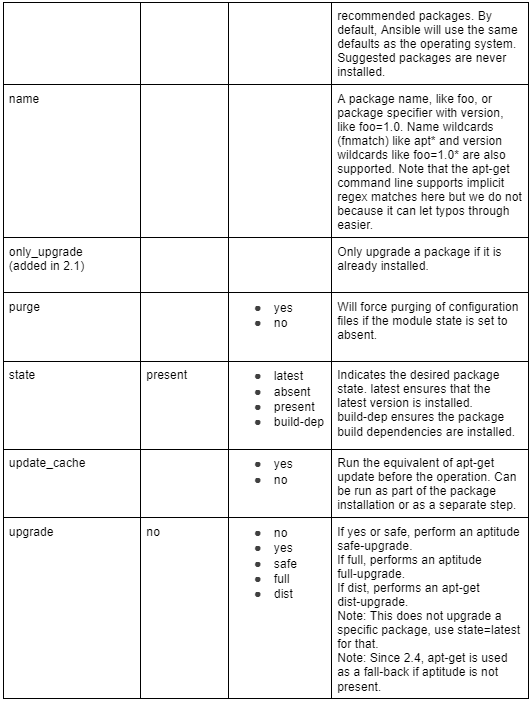
These are not required but can be used accordingly.
Return Values
Typical return values are listed here. Return Values, this module's exclusive fields are as follows:
Installing new Apt Packages
Now, we will see the installation of new packages. But for that, you must include the desired package state and the package name in the name parameter. The package is in the "present" state by default. Additionally, it is preferable to set the update cache to true. By doing this, you can make sure that the indexes and the sources list are in sync. Performing the apt-get update command before installing a package is equivalent to doing so.
The example below will refresh the cache to synchronize the index. Verify the destination server's installation of the "zip" package. Additionally, the package will be installed even if it is not. The package won't be upgraded if it is already installed.
-hosts: loc
tasks:
-name: Ansible apt install packages
apt:
name: zip
state: present
update_cache: true
Installing the latest version of a package
Ansible will only check to see if a package is present if the status of the package is set to "present." As a result, even if the new package is available, it cannot be installed. If you wish to install the most recent versions of the apt packages, the status option must be set to the latest.
This will guarantee that the most recent package is installed.
The following example updates the cache. Then installs the most recent zip package, such as:
-hosts: loc
tasks:
-name: ansible apt install latest version
apt:
name: zip
state: latest
update_cache: true
Ansible install multiple packages
Use items to combine the tasks you normally write separately to install packages. We will install three packages in the example below git, Nginx, and docker-ce.
The ad hoc method, which makes use of the apt module, can also be used to install new packages, for example:
ansible all -m apt -a "name=nginx state=absent" -i inventory.ini
Removing Apt Packages
You can also delete the packages by changing the status option to absent while using the apt module. The zip package will be deleted using the example below. The module won't encounter an error if the package is missing because it is idempotent.
-hosts: loc
tasks:
-name: ansible apt remove package
apt:
name: zip
state: absent
Frequently Asked Questions
How does Update cache work?
A stale cache can cause apt to miss updates or fail to install a package. This is because the version it wants is no longer available from the repositories. The apt module of Ansible receives the command update cache=yes. It instructs it to clear the caches before making any changes (if any).
How do apt and apt-get vary from one another?
Apt is a subset of the apt-get and apt-cache commands. It offers essential package management commands. Although apt-get won't be phased out, you should start using apt more frequently as a regular user.
What does Ansible's update cache function do?
As with Ansible 2.4, this sets update cache=yes if it is explicitly set. To remove all package files from the local repository, run the equivalent of apt-get clean. It cleans up /var/cache/apt/archives/ and /var/cache/apt/archives/partial/ except for the lock file.
What commands does Ansible accept?
The Ansible command executes any commands or scripts on the remote target machine. It is used to carry out operations on a distant node. Simple Linux commands can be performed on a remote node or server. This server can be a member of the host group or a solo server mentioned in the host group using the command module.
Conclusion
In this article, we have extensively discussed the Ansible APT module. We have also explained the requirements, options, and return values. Then we learned how to install new apt packages, remove apt packages, and more in detail.












 1+ registered

