Do you think IIT Guwahati certified course can help you in your career?
Introduction
Infrastructure as code is made possible by the Ansible toolkit. The open-source suite contains software provisioning, configuration management, and application deployment features. One of the most potent modules in the Ansible toolkit is the lineinfile. You can add, modify, remove, or replace a line using the Ansible lineinfile module.
Let's dive into the article for more information about the Ansible Lineinfile module.
Ansible Lineinfile
One of the most potent modules in the Ansible toolkit is the lineinfile. We can add, modify, remove, or replace any line using the Ansible lineinfile module. If you are working with files, the Ansible lineinfile module can help you.
You can change their content by adding new lines or modifying existing ones. You can also replace lines in files when specific text is detected, Ansible lineinfile offers a variety of parameters to do tasks swiftly. You can also use regular expressions to match the line before altering or removing it. Using the backreference argument, the matched line can be modified and reused.
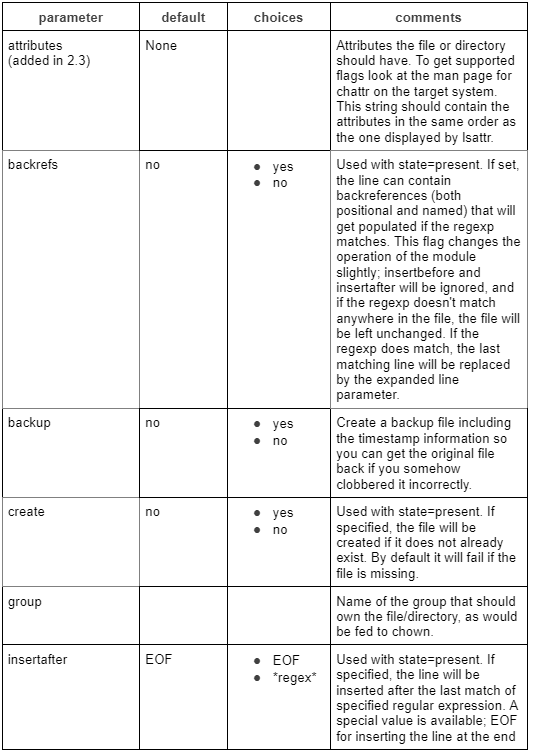
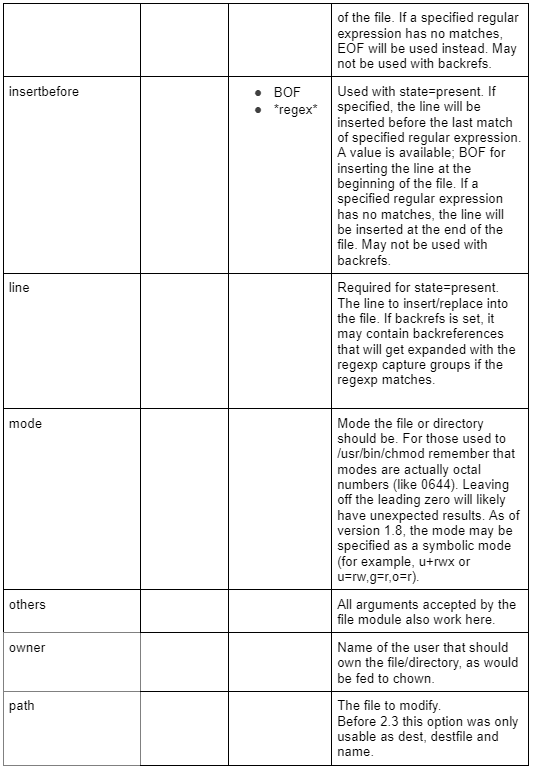
Options
These are not required, but you can use them accordingly.
Insert a Line
Let's see how to add a line to a file if one does not already exist. Using the path (>Ansible 2.3)/ dest argument, you can specify the file's path that will be updated. And use the line option to specify the line you want to add. In the example below, "Inserting a line in a file" will be added to "remote server.txt." The EOF will be updated with the new line. The line will not be concatenated if it already exists.
You can set the create parameter optionally. It instructs the program to create a new file if the requested one is missing. The state's default value is present.
- hosts: loc
  tasks:
    - name: Ansible insert lineinfile
      lineinfile:
        dest: /home/javaTpoint/remote_server.txt
        line: Inserting a line in a file.
        state: present
        create: yes
Removing a Line
Remove the specified line by setting the state argument to absent. The line will not appear anywhere else.
- hosts: loc
  tasks:
    - name: Ansible lineinfile remove the line
      lineinfile:
        dest: /home/javaTpoint/remote_server.txt
        line: Removed lines.
        state: absent
Replacing or Modifying a Line
Now, we will learn how to modify or replace a line. We can combine the regexp parameter with the Ansible "backrefs" parameter. It is the best way to change a line. You should use State=present with this. The file is not modified if the regexp does not match any lines. The final matched line will be replaced if the regexp matches one or more lines. Regexp's grouped elements are populated and can be modified.
In the example below, we are making a line-by-line comment. By putting them inside the parenthesis to "1," the entire line gets caught. The line is replaced by '#1' and then what was captured.
Commenting a line with Ansible lineinfile backrefs
- name: Ansible lineinfile regexp replace the example
  lineinfile:
    dest: /etc/ansible/ansible.cfg
    regexp: '(inventory = /home/fedora/inventory.ini.*)'
    line: '#\1'
    backrefs: yes
Slurp Ansible allows slurping a file from distant nodes. It retrieves data from a remote file stored as a base64-encoded blob. This module also supports Windows targets.
What's Ansible lookup used for?
In Ansible, you can fetch data from external sources using the lookup module. These resources can be local filesystems or some external services or data stores.
What do Ansible INI files do?
Sections of an INI file-based inventory are groupings or groups. special: modifiers connect these groups or groupings. Members of the group who are hosts are listed in section [group 1]. Variables defined as key/value pairs separated by "=" can be used as hosts. The children modifier denotes the presence of groups in the section.
What is the purpose of Ansible's Set_fact?
You can set new variables using this module. On a host-by-host basis, variables are set precisely like information. This information is gleaned from the setup module. During an Ansible-playbook run, these variables will be exposed to subsequent runs.
Conclusion
In this article, we have extensively discussed the Ansible Lineinfile module. We have also explained the options, insert a line, remove a line, and much more.











 1+ registered

