Do you think IIT Guwahati certified course can help you in your career?
Introduction
Azure App Service allows you to create and host web apps, mobile back ends, and RESTful APIs in any of your preferred programming languages without managing infrastructure. It supports both Windows and Linux and allows for automatic deployments from GitHub, Azure DevOps, or any Git repository.
In this article, we will learn about Azure App Service Security. We will also discuss how authentication and authorization work in Azure App.
Authentication and Authorization
Every App service has an Authentication and Authorization module that handles a variety of tasks for our app:
It will authenticate the user with a certain provider, such as Facebook, Google, Twitter, Azure Active Directory, etc.
Tokens will be stored, validated, and refreshed.
It is also in charge of the authenticated session.
Identity formation is injected into request headers.
How do Authentication and Authorization work
The client browser request will arrive at the App service front-end. The same request will then be sent to the Authentication and Authorization module. And that Authentication module will contain all of the Authorization and Authentication functionality, including token management, session management, etc. It will be located outside the web app code. This is why we don't need to change the code between the web application to enable Authentication and Authorization for our app in Azure. Regarding tracing, we may somewhat change this Authentication and Authorization logic by utilizing the environment variable.
Authentication and Authorization module
For our app, the Authentication and Authorization module does various tasks:
Users are authenticated using the given provider.
Tokens are validated, stored, and refreshed.
In charge of the authorized session.
Injects identification data into request headers.
Tracing and logging
HTTPS and Certificates
App Service enables you to encrypt your apps using HTTPS. When you build your app, the default domain name (app name>.azurewebsites.net) is already HTTPS-enabled. If you establish a custom domain for your app, you must also protect it with a TLS/SSL certificate so that client browsers can connect to it securely through HTTPS. App Service supports the following certificate types:
App Service for Free
App Service certificate
Managed certificate
Third-party certificate
Certificate from Azure Key Vault imported
Insecure protocols (HTTP, TLS 1.0, FTP)
App Service enables one-click HTTPS settings to secure your app against unencrypted (HTTP) connections. Unsecured requests are rejected before reaching your application code. See Enforce HTTPS for further details.
TLS 1.0 is no longer deemed safe by industry standards like PCI DSS. Thus App Service allows you to exclude older protocols by requiring TLS 1.1/1.2.
For file deployment, App Service supports both FTP and FTPS. If at all feasible, FTPS should be utilized instead of FTP. You should deactivate one or both of these protocols when they are not used.
Static IP restrictions
Your App Service app allows queries from all IP addresses on the internet by default, but you can restrict access to a specific subset of IP addresses. On Windows, Program Service allows you to provide a list of IP addresses permitted to access your app. Individual IP addresses or a range of IP addresses determined by a subnet mask might be included in the authorized list. See Azure App Service Static IP Restrictions for further details.
Client authentication and authorization
Azure App Service handles user authentication and permission for client apps. When enabled, it can sign in users and client apps with minimal or no application code. You may either create your authentication and permission solution or let App Service handle it for you. Before passing web requests to your application code, the authentication and authorization module processes them, and it refuses unauthorized requests before they reach your code.
Authentication and authorization for App Services are supported by various authentication providers, including Azure Active Directory, Microsoft accounts, Facebook, Google, and Twitter.
Service-to-service authentication
When authenticating against a back-end service, App Service provides two different mechanisms depending on your need:
Service identity - Sign in to the remote resource using the app's identity. App Service makes it simple to construct a managed identity that can be used to authenticate with other services like Azure SQL Database or Azure Key Vault.
On-Behalf-Of (OBO) - Grant, the user, delegated access to external resources. Your App Service app may conduct delegated sign-in to a remote service, such as Microsoft Graph API or a remote API app in App Service, with Azure Active Directory as the authentication provider.
Connectivity to remote resources
Your app may require access to three sorts of distant resources:
Azure services
Resources included within an Azure Virtual Network
Resources on-premises
App Service allows you to establish secure connections in each scenario, but you should still follow security best practices. For example, always utilise encrypted connections even if the back-end resource enables unencrypted connections. Furthermore, ensure that your Azure back-end service supports the bare minimum of IP addresses.
Azure resources
When your app connects to Azure resources like SQL Database and Azure Storage, the connection remains within Azure and does not traverse network borders. However, because the connection runs across Azure's shared networking, always ensure your connection is encrypted.
Resources inside an Azure Virtual Network
Through Virtual Network integration, your app may access resources in an Azure Virtual Network. A point-to-site VPN is used to connect the integration to a Virtual Network. The app can then use their private IP addresses to access the resources in the Virtual Network. On the other hand, the point-to-site link continues to use Azure's shared networks.
Create your app in an App Service environment to isolate your resource connectivity from Azure's common networks. Because an App Service environment is always deployed to a separate Virtual Network, the connection between your app and the Virtual Network's resources is completely segregated.
On-premises resources
On-premises resources, such as databases, can be accessed securely in three ways:
Hybrid connections - Uses a TCP tunnel to establish a point-to-point connection to your distant resource. TLS 1.2 with shared access signature (SAS) keys is used to establish the TCP tunnel.
Integration of a Virtual Network with a Site-to-Site VPN - As mentioned in Resources inside an Azure Virtual Network, the Virtual Network can be connected to your on-premises network using a site-to-site VPN. In this network configuration, your app, like other resources in the Virtual Network, may connect to on-premises resources.
App Service environment with site-to-site VPN - As stated in Azure Virtual Network Resources, the Virtual Network can be connected to your on-premises network through a site-to-site VPN. In this network configuration, your app, like other resources in the Virtual Network, may connect to on-premises resources.
Application secrets
Application secrets, such as database credentials, API tokens, and private keys, should not be stored in code or configuration files. The widely recommended technique is to use the standard pattern in your language of choice to access them as environment variables. The technique to establish environment variables in App Service is through app settings (especially for .NET applications, connection strings). App settings and connection strings are encrypted on Azure and decoded just before being injected into your app's process memory when it launches. The encryption keys are rotated regularly.
Network isolation
Except for the Isolated price tier, all tiers in App Service operate your programmes on the same network infrastructure. For example, the public IP addresses and front-end load balancers are shared with other tenants. By hosting your programmes inside a specialized App Service environment, the Isolated layer provides total network separation. An App Service environment is hosted on your own Azure Virtual Network instance.
It lets you:
Your apps will be served via a dedicated public endpoint with dedicated front ends.
Serve internal applications with an internal load balancer (ILB), which restricts access to your Azure Virtual Network. The ILB has an IP address from your private subnet, ensuring that your apps are completely isolated from the internet.
Use an ILB in front of a web application firewall (WAF). The WAF protects your public-facing apps with enterprise-level features such as DDoS protection, URI filtering, and SQL injection prevention.
Managed Service Identity
This service was just added to Azure. We're going to create an identity for our app and provide that identity access to various services. We no longer need to keep any userID-password pairs to access certain Azure services. We often go to the Azure site and instruct ARM to build a managed service identity for your Azure App Service. And when we do so, an Azure Active Directory service principal is established.
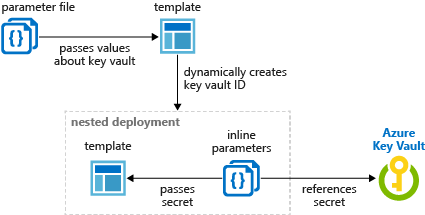
For example, suppose we wish to access a secret from the Azure key vault. By providing that token and having a correct access policy configured inside the Azure key vault, our application code will be able to get the secret at run time and utilize that secret to access an on-premises resource.
App Service Environments security
If we use App service environments, we will have the following extra security benefits:
Network security groups: We may use network security groups to associate with and manage traffic entering our App service.
Web Application Firewall: This is an application Gateway feature that provides centralized security for your web applications against common attacks and vulnerabilities. The web application firewall is built on OWASP core rule sets 3.0 or 2.2.9.
Authentication with Azure active directory for Web App
Step 1: Launch your API App and navigate the Authentication/Authorization tab.
Step 2: Click the toggle switch on/off button. Turn it on.
Step 3: Select "Login using Azure Active Directory" as the Action to take when the request is not authorized.
Step 4: Now set up Azure Active Directory in express mode. After that, click on create, followed by save.
Other security areas
We should be aware of and take advantage of extra security areas for the App service.
ISO, SOC, and PCI compliance: If we are processing credit card information, the underlying environment is PCI compliant, but you must also pursue PCI compliance at the application layer. However, in terms of the environment, Microsoft Azure App Service is PCI compliant.
IP address whitelisting: If we want to limit the access to our App services from a specified trustworthy IP address, we may do so inside the Azure portal for our app services.
SSL connection: We may activate SSL communication to encrypt data in transit.
Conclusion
This article extensively discussed Azure App Security Services, its authentication, authorization and other security areas. We have also brushed up on some steps to authenticate the active directory for the Web App. We hope this blog has helped you enhance your knowledge regarding Microsoft Azure.








 1+ registered

