Do you think IIT Guwahati certified course can help you in your career?
Introduction
In this article, we will discuss the Azure event grid, its various components, what we can do with the Azure event grid, and the different services offered by the azure event grid.
What is the Azure Event Grid?
Event Grid is a serverless, highly scalable event broker for integrating apps that use events. Event Grid sends events to subscriber destinations like apps, Azure services, or any other endpoint with which Event Grid has network connectivity. Other applications, SaaS, and Azure services could be the source of the events.
Event Grid allows you to link solutions that are based on event-driven architectures. Events are used in an event-driven architecture to transmit occurrences in system state changes to other applications or services, for example. Filters can route specific events to different endpoints, multicast events to numerous endpoints, and ensure that your events are delivered reliably.
Azure Event Grid is used to increase availability by natively spreading across numerous fault domains in each region and across availability zones (in regions that support them). See Products available by region for a list of regions that Event Grid supports.
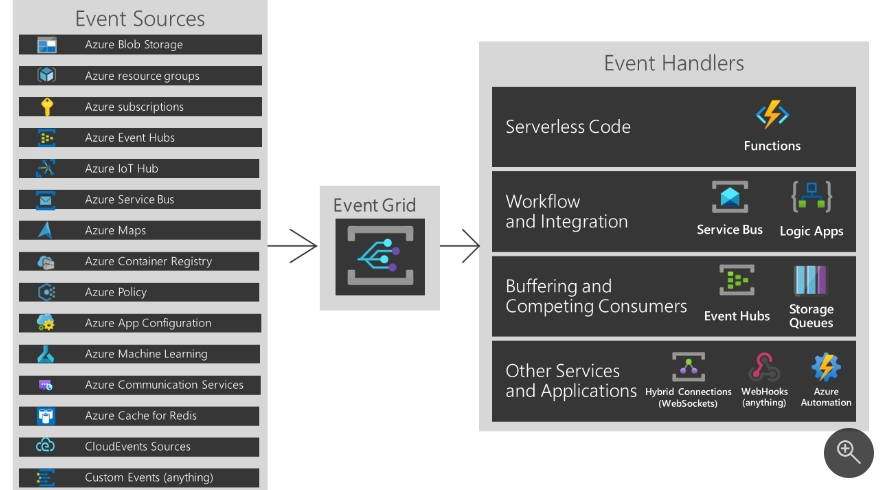
The following diagram summarises the event sources and event handlers or destinations.
The event grid supports the following event sources:
1. Your service or solution for publishing events to Event Grid and allowing customers to subscribe to them. Depending on your needs, Event Grid offers two different types of resources.
Custom Topics, or "Topics" for short, are a type of custom topic. If your requirements are similar to the following user story, use custom topics:
"As a system owner, I want to communicate state changes to other systems by publishing events and routing those events to event handlers, either under my control or not, who can process my system's events as they see fit."
Domains. If you wish to deliver events to numerous teams at once, use domains. Your needs are most likely similar to the following:
"As a system owner, I want to notify many teams in a single tenancy when my system's state changes so that they can process my system's events as they see fit."
2. Partner Events allows a SaaS provider or platform to post their events to the Event Grid. You can, for example, subscribe to those events and automate tasks. The following partners' events are now available:
Auth0
Microsoft Graph API. Using the Microsoft Graph API, you can access events from Microsoft Outlook, Teams, Azure AD, SharePoint, Conversations, security alerts, and Universal Print.
3. An Azure service. The Azure services support sending events to the Event Grid.
Azure API Management
Azure Blob Storage
Azure App Service
Azure App Configuration
Azure FarmBeats
Azure Cache for Redis
Azure Communication Services
Azure Container Registry
Azure Maps
Azure Health Data Services
Azure Key Vault
Azure Event Hubs
Azure Kubernetes Service
Azure Machine Learning
Azure Media Services
Azure Policy
Azure resource groups
Azure Service Bus
Azure SignalR
Azure IoT Hub
Azure subscriptions
Event Handlers
The following Azure services now support processing Event Grid events:
Webhooks.
Service Bus queues and topics
Azure functions
Event Hubs
Storage queues
Relay hybrid connections
Partner destinations
Concepts
In Azure Event Grid, five ideas will help you get started:
Events: What took place?
Event Sources: The location of the Event
Topics: Publishers send events to this endpoint.
Event Subscriptions: The endpoint or built-in method for routing events to multiple handlers. Handlers also employ subscriptions to filter incoming events effectively.
Event Handlers: The program or service that responds to an event
Capabilities
Simplicity - Aim events from your Azure resource to any event handler or endpoint by simply pointing and clicking.
Advanced filtering - Filter by event type or publish path to ensure that event handlers receive only the most relevant events.
Fan-out - Subscribe to multiple endpoints to the same Event to transmit copies of the Event to as many locations as necessary.
Reliability - Events are given after a 24-hour retry with exponential backoff.
Pay-per-event - You only pay for the events you use.
High Throughout - Build high-volume workloads on Event Grid for high throughput.
Built-in Events - Use resource-defined built-in events to get up and running quickly.
Custom Events - Use Event to route, filter, and deliver custom events consistently in your app
What can I do with the event grid?
Azure Event Grid has a number of capabilities that make serverless, operations automation, and integration work much easier:
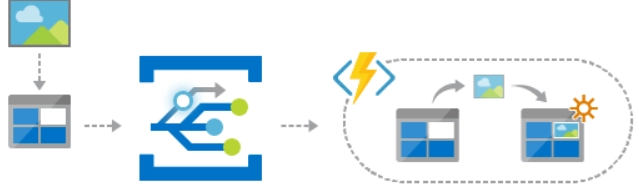
Data sources and The event handlers are linked together by Event Grid. For example, when photographs are added to a blob storage container, use Event Grid to activate a serverless function that analyses them.
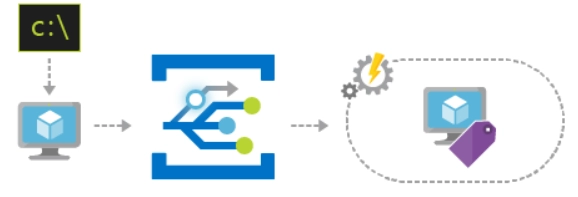
You can use Event Grid to speed up automation and make policy enforcement easier. For example, when a virtual machine or database in Azure SQL is built, utilize Event Grid to alert Azure Automation. Use the events to verify compliance with service setups, add metadata to operations tools, tag virtual machines, and file work items automatically.
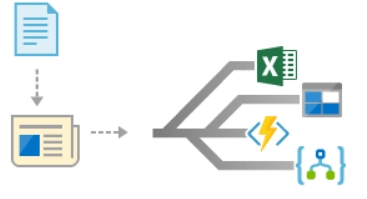
Event Grid is a service that connects your app to other services. Create a custom topic to transmit your app's event data to Event Grid, for example, and benefit from its dependable delivery, intelligent routing, and direct Azure connection. Alternatively, you can utilize Event Grid in conjunction with Logic Apps to process data without having to write code.
How Much Does Event Grid Cost?
You only pay for what you may use with Azure Event Grid's pay-per-event pricing model. The first 100,000 operations are free per month. Subscription delivery attempts, event ingress, management calls, and subject suffix filtering are operations.
Service offered by Azure
Azure provides three different services to help with an event or message delivery across a solution. These are the services:
Azure Event Grid
Azure Event Hubs
Azure Service Bus
Despite certain similarities, each service is tailored to a specific context. This article explains the distinctions between these services and might help you decide which one is best for your needs. The communications services are often complementing and can be used in tandem.
Event vs Message services
The difference between the services that deliver an event and services that send a message is significant.
Event
Quick communication of a condition or status change is called an event. The publisher of the Event has no expectations about how the Event will be handled. The Event's consumer chooses what to do with the notice. It is possible for a single event or a sequence of events to occur.
Because they report state changes, discrete events are actionable. To move on to the next step, the consumer must know something has happened. The event data contains information about what happened but not the news that caused it to happen. For example, an event notifies customers that a file has been created. It may contain generic information about the file but does not include the file itself. In serverless solutions, discrete events aid with scalability.
A set of events that report on a state and can be analyzed. The events are chronologically ordered and interconnected. To understand what happened, the consumer requires an ordered succession of events.
Message
Unprocessed data created by a service intended for consumption or storage elsewhere is referred to as a message. The message contains the data that initiated the message pipeline. The publisher of the communication has a presupposition about how the recipient will receive the message. Both sides have signed a contract. The publisher, for example, might send a message with raw data, expecting the consumer to create a file from it and answer once the operation is complete.
Azure Event Grid
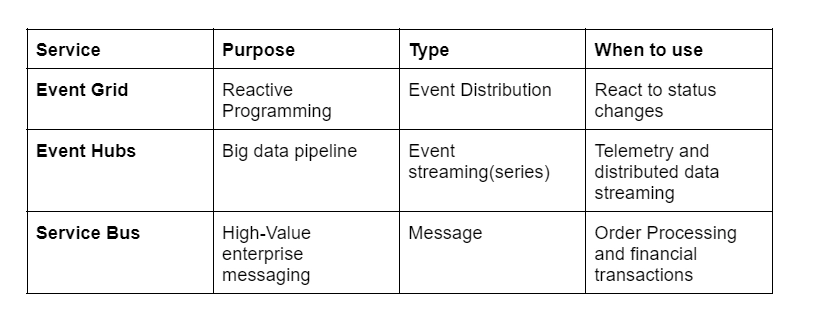
Event Grid is an eventing backplane that enables event-based reactive programming. It's based on the publish-subscribe model. Publishers send events out with no idea how they will be received. Subscribers select the events for which they want to be notified.
Event Grid is deeply integrated with Azure services and may be used in tandem with third-party apps. It lowers costs and makes event consumption easier by eliminating the need for regular polling. Event Grid effectively and reliably transports events from Azure and non-Azure resources. It transmits events to the registered subscribers' endpoints. The event message contains all the information you'll need to react to changes in services and applications. Event Grid isn't a data pipeline, hence the updated object isn't sent.
The following are its characteristics:
Scalable in real-time
Serverless computing at a low cost
Event Grid is available in two editions: Azure Event Grid, a fully managed PaaS service on Azure, and Event Grid on Kubernetes with Azure Arc, which allows you to utilize Event Grid on your Kubernetes cluster wherever it is deployed, on-prem or in the cloud.
Azure Event Hubs
Azure Event Hubs is a data streaming and event intake platform. It can handle millions of events per second and process them in real-time. It simplifies telemetry and event stream data capture, storage, and replay. At any given time, data may come from a multitude of sources. Event Hubs can make telemetry and event data available to multiple stream-processing infrastructures and analytics services. There are two types of data streams: data streams and bundled event batches. This service provides a single solution for real-time data retrieval and recurring replay of stored raw data. It can save streaming data to a file for further processing and analysis.
The following are its characteristics:
Latency is low.
Thousands of events per second can be received and processed.
At least once, an event must be delivered.
Azure Server Bus
Service Bus is an enterprise message broker with message queues and publish-subscribe topics that is completely managed. Enterprise applications that require transactions, ordering, duplicate detection, and instantaneous consistency should use the service. Cloud-native apps can use Service Bus to provide dependable state transition management for business processes. Use Azure Service Bus to handle high-value messages that cannot be lost or duplicated. This service can also connect current on-premises systems to cloud solutions and provides highly secure communication across hybrid cloud solutions.
A brokered messaging system is Service Bus. Messages are stored in a "broker" (such as a queue) until the consuming party is ready to receive them. The following are its characteristics:
Advanced messaging features such as first-in, first-out (FIFO), batching/sessions, transactions, dead-lettering, temporal control, routing and filtering, and duplication detection are required for reliable asynchronous message delivery (enterprise messaging as a service).
At least once, a message is delivered.
Messages can be sent in a specific order if desired.
Comparison of Services
Use the services Together
In some circumstances, you combine the services to perform different tasks. An e-commerce site, for example, could utilize Service Bus to handle orders, Event Hubs to collect site data, and Event Grid to respond to events such as an item being sent.
In other circumstances, you connect them to construct a data and event pipeline. Event Grid is used to respond to events in other services. See Stream large data into a data warehouse for an example of using the Event Grid with the Event Hubs to migrate data to a data warehouse. The data streaming workflow is depicted in the diagram below.
Event Grid is a serverless, highly scalable event broker for integrating apps that use events. Event Grid sends events to subscriber destinations like apps, Azure services, or any other endpoint with which Event Grid has network connectivity.
What are Azure event hubs?
Azure Event Hubs is a data streaming and event intake platform for huge data sets. It can handle millions of events per second and process them quickly. It simplifies telemetry and Event stream data capture, storage, and playback.
What is Azure cloud shell?
You can utilize the Azure Cloud Shell, a free interactive shell, to complete the tasks in this article. It comes with pre-installed and configured Azure tools that you may use with your account.
What are the services offered by Azure?
Different services offered by Azure are:
Azure Event Grid
Azure Event Hubs
Azure Service Bus
Conclusion
In this article, we discussed the Azure event grid, and its various components, along with what we can do with the Azure event grid and what are the different services offered by the azure event grid.








 1+ registered

