Do you think IIT Guwahati certified course can help you in your career?
Introduction
Are you ready to embark on a journey into data analysis and statistical computing? Look no further than the R programming language. When we start learning any programming language, the first task is understanding its syntax. Let us discuss the basic syntax of the R programming language.
In this blog, we will take our first step into the world of R programming language and learn the basic syntax of R programming language. We will also discuss different data types and some reserved words in R.
Installation
We need to download R language and an IDE for its compilation to use and write your first program in R programming language. To download R on your computer, visit the following link: https://cran.rstudio.com/.
You can select either of the three: Windows, Linux, or macOS, depending on your requirements. Download the latest version of R.
R only provides a basic command-line interface, so we will also download RStudio, an Integrated Development Environment (IDE). Visit the following link to download it:
To know the installation process in detail, visit What is R Studio? Follow the instructions, and once the installation is complete, you're ready to move on to the next step.
What is the syntax of R?
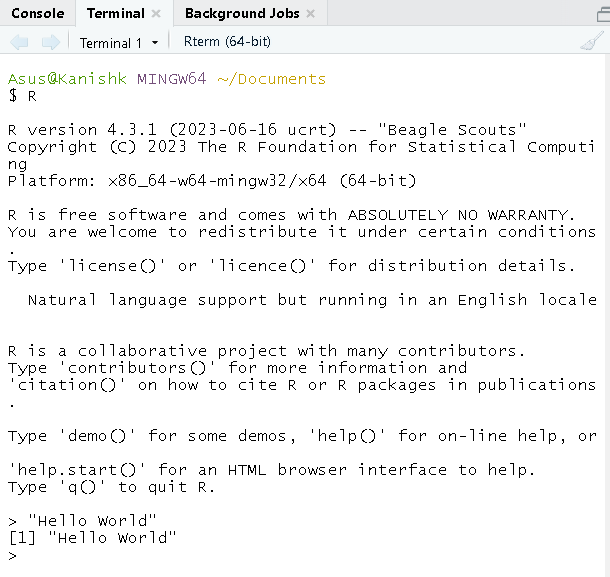
The syntax of a programming language refers to how to write valid code in that language. We will be using RStudio, but we can also use the R command prompt. Type the following command in the terminal to launch the interpreter.
$ R
Let us get started by understanding some basic syntax of the R programming language.
• We can output a code without using the print() function on the terminal. However, the print() function is also available.
• We use single or double quotes to output text in the R programming language.
• To output numbers, type the number without quotes.
• We can perform all the arithmetic operations.
Now, We will write our code inside scripts called RScripts in R. To open a new RScript file in RStudio, Go to the File tab, click on New File, and open a new RScript file.
We will use the print() function, which prints to the console.
Code:
Output:
Hello World!
To understand and write your first Hello World program in R, visit Hello R!!! Your first program in R. Now let us understand some key elements of R syntax, i.e., variables, comments, and keywords.
Common Variables in R
Until now, we can only execute a line of code but not store or reuse it further. R uses objects and variables to store data. An object is a named entity that holds a value, and a variable is a name associated with an object. We can store the data in variables and reuse it again in different parts of the code.
Variables are created by assigning a value to them using the assignment operator <-, =, or ->.
= (Simple Assignment)
<- (Leftward Assignment)
-> (Rightward Assignment)
The following code shows all three ways of assignment.
R supports various data types such as numeric, character, logical, and complex. These are crucial for performing operations and manipulating data effectively. Let us understand the syntax for these data types in detail.
Numeric data types represent real numbers, including integers and decimal values.
x <- 200   #Integer
y <- 6.9   #Decimal
Character data types represent strings or text.
name <- "Kanishk" #String
Logical data types represent Boolean values, i.e., TRUE or FALSE.
if_valid <- FALSE
Complex data types represent complex numbers with real and imaginary parts.
c <- 5 + 7i #Complex number with real part 5 and imaginary part 7
Control Structures in R
Control structures in R enable you to control the flow of execution based on certain conditions. The main control structures in R include:
If-Else Statements:
if (condition) {
  # Code to execute if the condition is TRUE
} else {
  # Code to execute if the condition is FALSE
}
For Loops:
for (variable in sequence) {
  # Code to execute repeatedly
}
While Loops:
while (condition) {
  # Code to execute repeatedly until the condition is FALSE
}
Data Structures in R
R provides various data structures to store and organize data efficiently. Some of these are vectors, matrices, data frames, and lists. Let us understand the syntax for the above data structures.
Vectors are sequences of elements of the same data type.
x <- c(1, 2, 3, 4, 5) # Creating a numeric vector
Matrices are two-dimensional arrays with rows and columns.
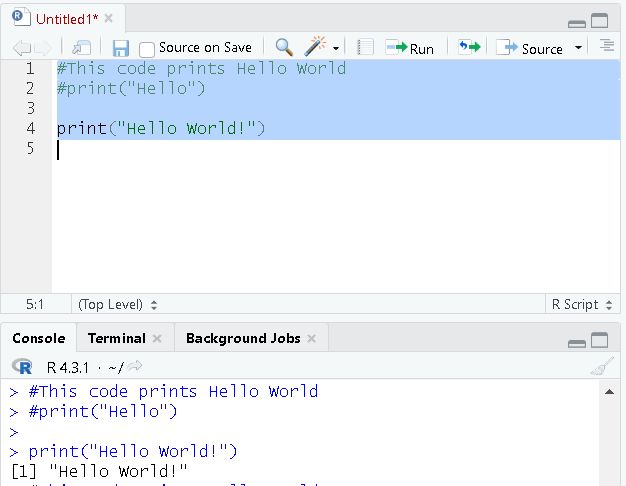
Comments are used to provide explanations or annotate code without affecting its execution. In R, we can comment using the hash symbol (#). The R interpreter ignores anything written after the hash symbol. The following shows the usage of comments:
#This code prints Hello World
#print("Hello")

print("Hello World!")
When we execute the above code, it will ignore the first two lines as they are comments, execute the last line, and print "Hello World!". The following image shows the output.
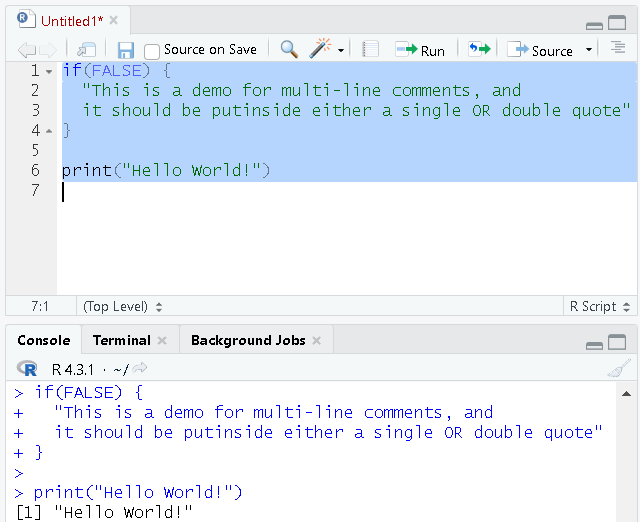
R does not support multi-line comments. We can either comment line by line as we did in the above example or use the below trick.
if(FALSE) {
   "This is a demo for multi-line comments, and it should be put  inside either a single OR double quote."
}

print("Hello, World!")
As the condition for the if statement is always FALSE, the block of code inside it will not execute at any time.
Keywords in R
Some words are reserved and cannot be used as a variable name. These are known as keywords. We can view these keywords using either help(reserved) or ?reserved.
if
else
while
repeat
for
function
in
next
break
TRUE
FALSE
NULL
Inf
NaN
NA
NA_integer_
NA_real_
NA_complex_
NA_character_
…
if, else, repeat, while, function, for, in, next, and break is used for control-flow statements and declaring user-defined functions.
TRUE and FALSE are used as boolean constants.
NaN defines Not a Number value, and NULL defines an Undefined value.
Inf is used for Infinity values.
Frequently Asked Questions
What is R Programming Language?
It is an open-source programming language used for data visualization and statistical analysis. It has a bunch of existing libraries or packages that provide a wide range of functionalities for domains, including Statistics and Data Analysis.
Why is understanding the syntax of R important?
Understanding the syntax of R is crucial because it allows you to write correct and efficient code. It ensures your code behaves as expected. By mastering the syntax, you can write clean, readable, and maintainable R code, which is essential for collaborating with others and debugging errors.
How to use comments in R code?
We can comment on a line using the hash symbol (#). Anything written after the hash symbol on a line is considered a comment and is ignored by the R interpreter. Comments help explain our code and document your code. But R does not support multi-line comments.
Conclusion
We expect this article was insightful and that you learned something new today. In this blog, we learned the syntax for the R programming language in detail. Mastering the basic syntax is essential for leveraging its data analysis and statistical computing capabilities. We discussed the basic data types in R. We also reviewed the control structures and important data structures in R. In the end, we also discussed using comments and some reserved keywords in R.
By understanding these core concepts, we explored R's vast potential and embarked on our journey to becoming proficient R programmers. Remember, practice makes perfect. The more you code in R, the more proficient you'll become. To learn more about R programming language, do visit.









 1+ registered

