Do you think IIT Guwahati certified course can help you in your career?
Introduction
Hey Readers!!
Have you ever heard of the term Zero Touch Deployment? It helps the IT teams to deploy large network devices.
This article will teach you about Chef Desktop Zero Touch Deployment - In windows.
So let's explore this topic more in-depth.
Enrolling the devices
With broad application and configuration features that are intended to grow with automation, Chef Software's Desktop pattern and tools augment well-known device management solutions.
Thanks to the Chef Desktop pattern, your Windows and macOS users will still be able to access these programs through a single catalogue even if you have to manage 10,000 applications across 1,000 devices in your fleet. Chef Desktop uses the industry-leading technologies from Chef Software, which include observability, compliance reporting, and an audit trail.
This article covers automating the Chef Desktop pattern to manage your Windows devices.
Required Software
Including particular applications for macOS and Windows systems as well as Microsoft Intune and Windows Autopilot subscriptions in the integration of Chef Desktop.
Microsoft Azure
Microsoft Intune
Windows Autopilot
macOS
Apple Enterprise Developer Account
This program enables the automatic assignment of macOS devices to an MDM service, which provisions the devices on your behalf.
AutoPkg
An automation framework for macOS software packaging and distribution called AutoPkg is focused on automating the tedious activities involved in setting up third-party software for widespread deployment to managed clients.
Munki
A free software initiative from Walt Disney Animation Studios is called Munki. It is a collection of tools for controlling software on macOS machines.
MunkiAdmin
A graphical user interface (GUI) for managing munki repositories is called MunkiAdmin.
Storage Explorer
Microsoft offers a free application called Storage Explorer that you may use to manage your Azure cloud storage resources.
Windows
Gorilla
Gorilla is a project that is open source. It is a collection of tools for controlling software on Windows systems.
Storage Explorer
Microsoft offers a free application called Storage Explorer that you may use to manage your Azure cloud storage resources.
Setup Azure
Let's explore setting up Azure in this section.
Register Devices in Azure
To set up Azure as the MDM that receives the laptops and devices you desire to monitor, sign in to Apple Business Manager and follow the instructions in the article above.
Windows Options
Azure serves as the MDM and enrollment service simultaneously for Windows-based devices. Additionally, when the necessary settings from a laptop are collected, the most recent versions of Windows 10 will bootstrap from Azure.
Dynamic Device Management
To dynamically assign profiles and configuration policies to macOS and Windows devices, utilize dynamic device groups. Because each device in the group is given the appropriate policies, dynamic device groups are crucial for macOS and Windows kiosk-style devices.
But what happens if you'd prefer more control over how users rather than equipment are managed? By using this strategy, the same rules are applied to all users as a group. In this manner, an account's management will remain accurate even if a user logs onto a different system.
You must set up two device groups for Windows and two for Mac devices (a total of four device groups). To apply the initial enrollment profile, use the first device group. The second device group is used to install, update, and remove scripts, packages, and other things on the devices.
Configuration Scripts
Create and fill out your PowerShell configuration scripts for the validation.pem and client.rb files in the c:chef directory for Windows devices. The Chef Infra Client should also be installed.
Registering the Devices with Chef Infra Server
A local workstation can communicate with a Chef Infra Server using the knife command-line tool. You'll issue two knife commands from your development workstation to the Chef Infra Server. The Chef Infra Server node is created with the first command, and a Chef policy is then applied to it with the second.
# knife node policy set SERIAL_NUMBER_OR_FQDN 'NODE_GROUP' 'POLICYFILE'
knife node create S90T7HK2
Created node [S90T7HK2]
knife node policy set S90T7HK2 'Windows_Node_Policy_Group' 'ChefDesktop.'
Successfully set the policy on node S90T7HK2
Re-Registering the Devices with Chef Infra Server
You might need to re-register a device if its contents have changed while it is being tested or at any other time. To re-register a gadget, adhere to the following steps:
# Chef Infra Server distinguishes between a Node object and a Client object
knife node delete S90T7HK2
Deleted node [S90T7HK2]
knife client delete S90T7HK2
Deleted client [S90T7HK2]
knife node creates S90T7HK2
Created node [S90T7HK2]
knife node policy set S90T7HK2 'Windows_Node_Policy_Group' 'desktop-config'
Successfully set the policy on node S90T7HK2
Setting up Gorilla for Application Management
The two apps will handle both managed installations and managed uninstallations. Additionally, Munki for macOS offers customers a ready-made application they can view and choose from unmanaged programs. We'll release unmanaged apps through the exclusive Microsoft Store for Windows users.
Create a CDN
First, use this guide to create an Azure Content Delivery Network (CDN). You will start with a CDN that is empty. Use this empty CDN to host all of the app content we wish to make available for our Windows and Mac devices. We will need to set up somewhat different directory and file structures for each sort of OS.
Create Containers in your Storage Account
Only controlled material for Windows users is placed in the corresponding bucket, and we will make licensed content accessible to Windows users through the App Store.
Access your storage account.
Select Blob Storage > Containers from the menu.
Make two containers and label one "Munki" and the other "Gorilla."
Put 'Container' as their access level.
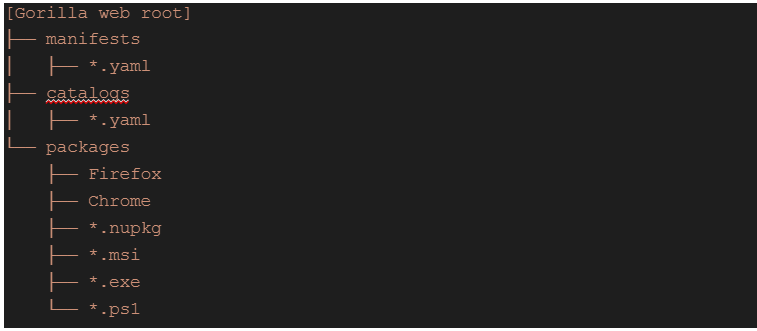
The below is Gorilla Container
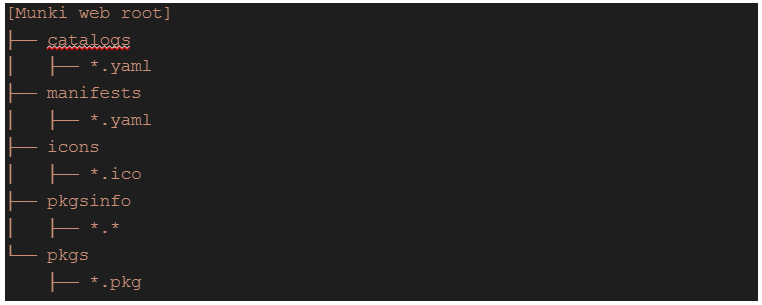
Create a folder structure for your Munki container that resembles this:
Windows (Gorilla) Catalog and Manifest
Consider and prepare what you ultimately want to include in the manifests and catalogs that users can access. For simplicity, we will show you how to deploy each OS type by installing Firefox and Visual Studio Code on clients.
How Gorilla Operates
Save the config.yaml file to your Chef Desktop cookbook's /files directory. Your Windows 10 desktops receive the config.yaml setting when you configure the app resource in the Windows recipe file. When Gorilla reconnects to your CDN the following time, it will download the manifest, parse the application and catalogue listings for loading, and then attempt to launch the application by first loading the catalogs. Use gorilla -d to receive the debug output on the command line to see this in action.
A Chef tool automates setup, package installation, and nearly anything else you can think of. We've been using Chef for a while for Linux automation, but Chef also offers excellent Windows compatibility.
How do I find my chef version in Windows?
If you're using chef11 or chef12 and there isn't a couch db, the version manifest for chef11 on Ubuntu is located in /opt/chef-server/version-manifest.
What is the difference between Ansible and chef?
Ansible is an open-source IT automation tool, whereas Chef is a for-profit solution.
What is chef deployment?
Chef is an open-source cloud deployment and configuration management tool. Anyone can use it to organize servers, whether they are in a departmental data centre or the cloud.
What is the latest version of chef?
Chef 12.22 is the most recent version available for Windows stacks.
Conclusion
This article has extensively discussed the Chef Desktop Zero Touch Deployment - In windows
After reading about the Chef, are you not feeling excited to read/explore more articles on chefs? Don't worry; Coding Ninjas has you covered.
Refer to our guided paths on the Coding Ninjas Studio platform to learn more about DSA, DBMS, Competitive Programming, Python, Java, chef infra server - users JavaScript, etc.










 1+ registered

