chef-backend.rb Settings
The chef-backen.rb file is generated using the chef-backend-ctl gen-sample-backend-config command. It controls most of the features and configuration flags of a Chef HA backend node. There are options to control the stability, reliability and uptime of the backend PostgreSQL databases, the Elasticsearch index, and the leader election systems.
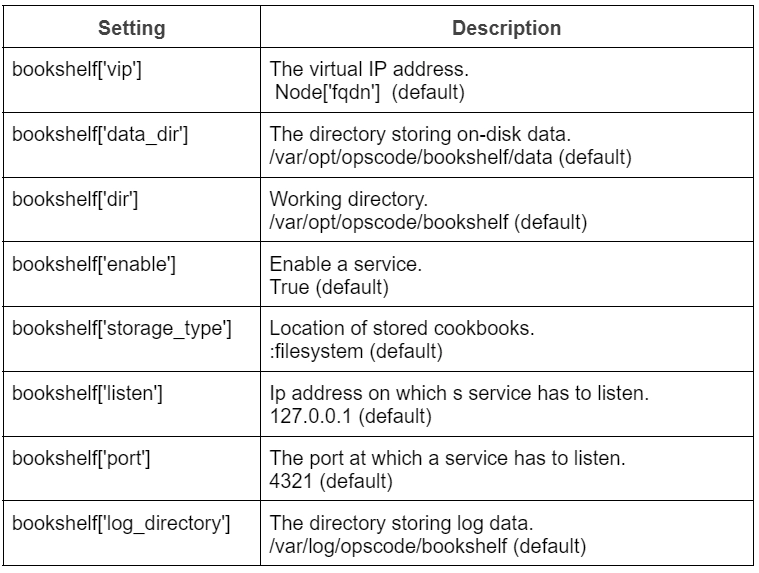
The settings that can be modified freely are:

PostgreSQL
PostgreSQL settings in the chef.backend.rb file.

Other Settings

Server Firewalls and Ports
The Chef Infra Server uses TCP ports. All services have to be listening at the respective ports. Telnet is a system tool used to initiate connections. The following diagram shows the various ports required by the Chef Infra Server in a standalone configuration.

Source
External ports are external with respect to the workstation or any other user accessing the Chef Infra Server through the Chef Infra Client. For standalone configurations, ports must be external and accessible through any firewall. To ensure that all services are available to the Chef Infra Server, a single loopback interface must be configured to use 127.0.0.1 as the address. In the Chef Infra Server's tiered configuration, there are front-end and back-end servers.

Source
Security
SSL certificates and Chef Infra Server Credentials Management are the key security features of the Chef Infra Server.
SSL Certificates
Automatic configuration to use SSL certificates can be done by adding nginx['ssl_certificate'] and nginx['ssl_certificate_key'] settings in the server configuration file. Manually, the certificates can be updated by placing the certificate and private key in the correct files after the initial configuration of the Chef Infra Server. The locations are /var/opt/opscode/nginx/ca/FQDN.crt and /var/opt/opscode/nginx/ca/FQDN.key. After replacing the contents of the files, reconfigure the Chef Infra Server and restart the Nginx service to load the new changes.
Chef Infra Server Credentials Management
By default, the Chef Infra Server restricts writing credentials only to the files present in /etc/opscode. It can be restricted even further using the insecure_addon_compat configuration option in the chef-server.rb file. Setting this option false causes the credentials to be written only at /etc/opscode/private-chef-secrets.json. The default permission of the /etc/opscode/private-chef-secrets.json file allows only root users to read and write credentials. This makes it highly secure as the file contains secrets to access all the underlying sensitive data of the Chef Infra Server.
Frequently Asked Questions
How important is installing SSL certificates in Chef?
SSL certificates are digital signatures for a website and provide encrypted connections with authentication facilities. They help secure the website from security attacks to access sensitive data. Users can create private keys to ensure secure data transmission between the Chef Server and the Chef Client.
What are the different SSL settings in the Chef Infra Server?
The different SSL settings in the Chef Infra Server are nginx['ssl_certificate'], nginx['ssl_certificate_key'], nginx['ssl_ciphers'] and nginx['ssl_protocols']. The Nginx cypher suite can be configured using the ssl_protocols and ssl_ciphers settings.
What is Nginx?
Nginx is a HTTP and reverse proxy server that can be used as a load balancer, cache and main proxy. The Nginx service helps manage traffic to the Chef Infra Server, including virtual hosts for API request/response routing and routing between front-end and back-end components.
Conclusion
This blog discusses how to configure the Chef Infra Server. It explains the various configuration settings of the chef-server.rb and chef-backend.rb files. It also mentions the different options to configure Server ports and security settings in the Chef Infra Server. Check out our articles on Chef InSpec Terminology, Chef Shell for Debugging and Troubleshooting Chef Workstation. Explore our Library on Coding Ninjas Studio to gain knowledge on Data Structures and Algorithms, Machine Learning, Deep Learning, Cloud Computing and many more! Test your coding skills by solving our test series and participating in the contests hosted on Coding Ninjas Studio!
Looking for questions from tech giants like Amazon, Microsoft, Uber, etc.? Look at the problems, interview experiences, and interview bundle for placement preparations. Upvote our blogs if you find them insightful and engaging! Happy Coding!








 1+ registered

