Do you think IIT Guwahati certified course can help you in your career?
Introduction
Chef is a robust automation platform that turns infrastructure into code. Whatever the size of your network, Chef Infra automates the configuration, deployment, and management of infrastructure across it, whether you're operating in the Cloud, on-premises, or in a hybrid environment.
Whatever the size of your network, Chef Infra automates the configuration, deployment, and management of infrastructure across it, whether you're operating in the Cloud, on-premises, or in a hybrid environment.
Chef Infra Overview
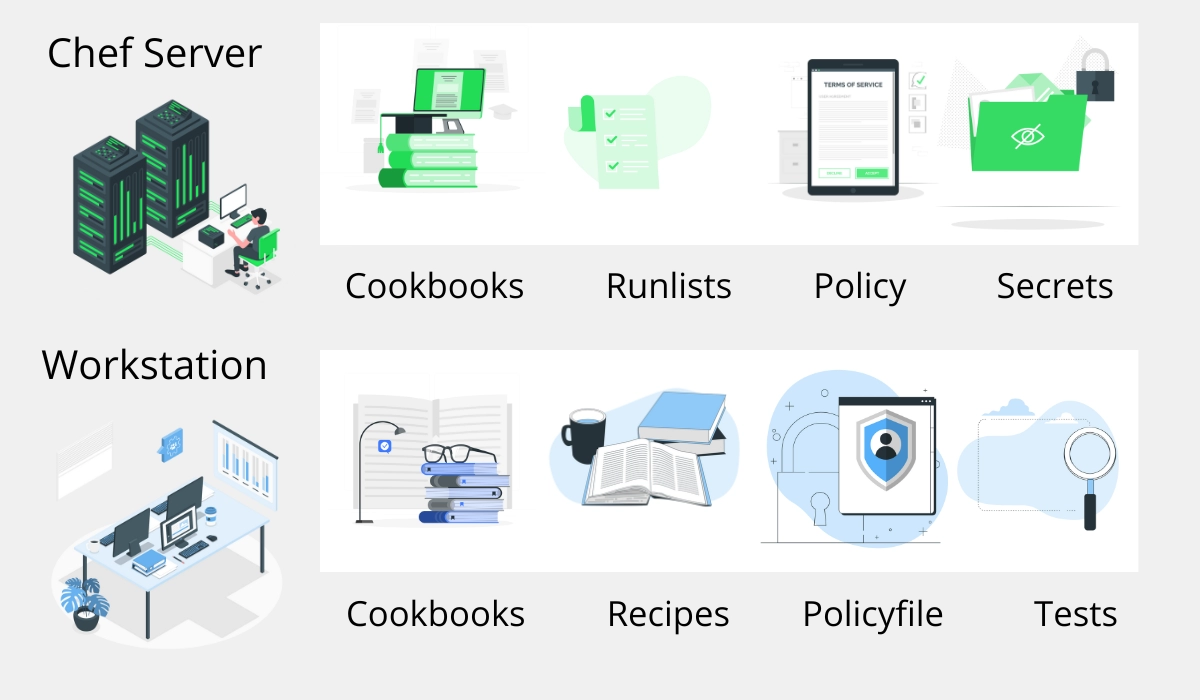
Let us learn the relationships between the different components of Chef Infra, such as the nodes, Server, and workstation. These components work jointly to supply Chef Infra Client with the information it needs to do its job.
Chef Server
The Chef Infra Server serves as a hub of information. Users from workstations upload Cookbooks and policy settings to Chef Infra Server. Once the Chef Infra Client run is completed, the Chef Infra Client uploads revised run data to the Chef Infra Server.
Cookbooks
A cookbook is the fundamental unit of policy and configuration in Chef Infra. A cookbook describes a design and includes everything that is needed to support that design. The Chef Infra Client uses Ruby with extended DSL to create cookbooks and describe recipes for specific resources. An appropriate set of resources are open to the Chef Infra Client to support the most typical infrastructure automation plans.
Run list
A run-list describes all the data required for Chef to configure a node into the preferred state. An ordered list of roles and recipes run in a particular order is called the Run-list. The run-list and node attributes make up the node object. Chef Infra Client analyzes the list of files with those already present on the node from previous executions. It then downloads every new and modified file from the Chef Infra Server.
Policy
The policy explains how business and functional processes map to objects that are kept on the Chef Infra Server. Some of the Chef Infra Server policy objects are roles, cookbook versions, and environments.
Chef Workstation
Chef Workstation is the place where users connect with Chef Infra. Users can interact with the Chef Infra Server and compose and test cookbooks with Chef Workstation. Multiple workstations are set up to permit users to write, test, and maintain cookbooks.
Cookbooks
A cookbook is the basic unit of policy and configuration in Chef Infra. A cookbook describes a design and includes everything that is needed to support that design. The Chef Infra Client uses Ruby with extended DSL to create cookbooks and describe recipes for specific resources. An appropriate set of resources are open to the Chef Infra Client to support the most typical infrastructure automation plans.
Recipes
A recipe is the most basic configuration component within the association. A recipe is written using Ruby. A recipe is run by the Chef Infra Client only when asked. If the same recipe runs more than once, the results will be the same.
Policy
The policy explains how business and functional processes map to objects that are kept on the Chef Infra Server. Some of the Chef Infra Server policy objects are roles, cookbook versions, and environments.
Test
Testing cookbooks improves the grade by ensuring they are doing what they are supposed to do by being authored uniformly. The recipes in cookbooks are validated by Unit and integration testing. And the quality of the code is validated by Syntax testing.
Chef Infra Client Overview
Here are the steps Chef Infra Client takes to configure a node when the chef-client command is run.
Get configuration data
Chef Infra Client acquires process configuration data from the client.rb file on the node, and then node configuration data is fetched from Ohai. The name of the node is an important piece of configuration data and is found in the node_name attribute in the client.rb file or is also provided by Ohai. Typically for the FQDN node, Ohai provides the name that is unique within organizations.
Authenticate to the Chef Infra Server
Authentication to the Chef Infra Server by Chef Infra Client is done by using Chef Infra Server API and RSA private key.
Get, rebuild the node object
The node object is fetched from the Chef Infra Server and rebuilt by the Chef Infra Client. A node object consists the system attributes set by Ohai. When Chef Infra Client runs a node for the first time, a node object is created from the default run-list.
Expand the run-list
The run-list is expanded from the rebuilt node object by Chef Infra Client, and it gathers an entire list of recipes in the same order that they will be involved with the node.
Synchronize cookbooks
All the cookbook files that is required for the actions specified in the run-list are requested by the Chef Infra Client from the Chef Infra Server. After having received the files from Chef Infra Server, the Chef Infra Client compares the list of files to to the ones that are already present on the node from previous executions. It then downloads every new and modified file from the Chef Infra Server.
Reset node attributes
All attributes of the rebuilt node object are reset. Attributes from Ohai, Policyfiles, and attribute files are loaded. Attributes that are described in attribute files are loaded based on cookbook order. Attributes of rebuilt node objects are revised according to attribute importance with the attribute data. The rebuilt node object is complete when all the attributes are updated.
Compile the resource collection
The node object in each resource is identified by Chef Infra Client and built into resource collection. To make sure that all language extensions and Ruby classes are available, libraries are loaded first to all resources. Then attributes are loaded, followed by custom resources. At last, all recipes are loaded as specified in the run-list. This is called the "compile phase."
Converge the node
The system is configured by Chef Infra Client based on the information collected. Resources are executed in the hierarchy specified by the run-list. Each resource describes an action to run that configures a distinct part of the design. This process is called the execution phase/convergence
Process exception, update the node object, and report handlers
Once the actions specified in the resource collection by resources are done, the node object is updated on the Chef Infra Server by Chef Infra Client with the node object built during a Client run which makes the node object open for search.
Get, and run Chef InSpec Compliance Profile
Compliance Phase begins once the Chef Infra Client finishes Chef InSpec run. Then Chef InSpec recovers tests from the InSpec profile or the audit cookbook.
Send or Save Compliance Report
Once the InSpec tests are done, Chef InSpec looks into the reporting handlers mentioned in the InSpec profile or audit cookbook and processes them suitably.
Stop, wait for the next run
When the Chef Infra Client run is complete and the settings are configured, the Chef Infra Client terminates and waits until it is asked to run again.
Nodes
A node is a physical, cloud, network device, or virtual device that is managed by Chef Infra.
The types of nodes
Server
The server and the virtual machine can be classified as physical node. Any active device that is attached to a network and is capable of transferring data on a medium is called a physical node.
Cloud
Nodes hosted on services such as Amazon Web Services (AWS), Google Compute Engine, or Microsoft Azure are called Cloud-based nodes.
Virtual Machine
A machine that behaves much like a physical machine but runs only as a software implementation is called a virtual node.
Network Device
Networking devices such as routers or switches that are being managed by a Chef Infra Client are called network nodes.
Container
Devices on which an approach to virtualization approach that permits a single operating system to host many working configurations where single responsibilities are isolated from all other obligations are called container nodes.
Node Names
In the Chef Infra Server, the name of a node is mandated as part of the authentication process. Within an organization, the name of nodes must be unique.
The node name is found in the node_name attribute in the client.rb file or is also provided by Ohai. Typically for the FQDN node, Ohai provides a name that is unique within organizations.
Node Objects
There are two essential aspects of nodes that are classified as node objects.
Attributes
A specific piece of data regarding like the number of clients a node is capable of accepting, network interface, a file system, etc., are called attributes.
Run-lists
An ordered list of roles and recipes that run in a particular order is called the Run-list. The run-list and node attributes make up the the node object. Chef Infra Client analyzes the list of files with the ones that are already present on the node from previous executions. It then downloads every new and modified file from the Chef Infra Server.
Frequently Asked Questions
What is Chef in DevOps?
A guide for people new to DevOps With Chef, a DevOps program in your kitchen, becoming an expert in the Cloud is much simpler. Chef is an open-source cloud deployment and configuration management tool. Anyone can use it to organize servers in a departmental data center or the Cloud.
What is Chef infra used for?
A powerful automation platform called Chef Infra turns infrastructure into code. Whatever the size of your network, Chef Infra automates the configuration, deployment, and management of infrastructure across it, whether you're operating in the Cloud, on-premises, or in a hybrid environment.
What are the search options available in chef infra?
Chef infra has many fields in search as we can search by platform ID, instance type.
Recipe. And search by cookbook and search by node, search by node and environment, and search for nested attributes.
What are handlers in Chef Infra?
Handlers are used to identify conditions that may occur during a Chef Infra Client run and then instruct Chef Infra Client on how to handle these events when they emerge.
Is the chef infra server accessible?
Chef is open source, available without charge, and has a helpful wiki and online documentation. Chef has a variety of "flavours." Using Chef-Server, you can run the entire thing for nothing (which requires you to set up the server software in addition to the client software on your system)
Conclusion
In this article, we have looked into Chef Infra overview along with the client side overview. To get started with Chef Infra, check out our articles on










 1+ registered

