Table of contents
1.
Introduction 
2.
System Requirements 
2.1.
Chef Infra Server
2.2.
Chef Infra Client
3.
Install Using Bootstrap
4.
Working with Proxies 
4.1.
Environment Variables
5.
Working with the client.rb 
6.
Air-Gapped Installation 
6.1.
Required Cookbooks
6.2.
Private Supermarket 
7.
Upgradation 
8.
Uninstalling 
9.
Frequently Asked Questions 
9.1.
What is the command to undo an uninstall?
9.2.
Explain Chef Components.
9.3.
What is the role of OHAI?
9.4.
What is the use of a knife? 
9.5.
What is the run-list in Chef?
10.
Conclusion
Last Updated: Mar 27, 2024
Medium

Chef Infra Installation

Author Geetika Dua
0 upvote
Career growth poll
Do you think IIT Guwahati certified course can help you in your career?

Introduction 

Intro image


Chef Infra is a widely accepted automation tool that transforms the infrastructure into a codebase. Whether you use Cloud, a Local system, or a hybrid environment does not matter.

It takes care of the infrastructure configuration, deployment, and maintenance.

Working

System Requirements 

System Requirements

Before installing Chef Infra, ensure the following-

  • The machine running the infra is explicitly powerful.
  • Each system that you will manage is dependent on the supported platform.
  • The network and Firewall configuration is accurate.

Chef Infra Server

Chef Infra Server must be able to satisfy the following needs of the system, whether it runs on a cloud or premises-

  • 64-bit CPU architecture
  • CPU support for SSE4.2 extensions
  • Four total cores 
  • 8 GB of RAM or more
  • 5 GB of free disk space in /opt
  • 10 GB of free disk space in /var

The user must fulfill these requirements before installing the Chef Infra Server.

  • Hostnames 
  • FQDNs 
  • NTP 
  • Mail Relay 
  • cron 
  • git 
  • Apache Qpid 
  • Required users 
  • Firewalls and ports

Chef Infra Client

  • The minimum necessary Random Access Memory should be 512MB.
  • A minimum of 200MB and 600Mb disk space is essential for Linux and windows, respectively. This is the memory need of Chef Infra Client Binaries which are stored in the directory.
  • 1 GHz or faster processor is recommended for the smooth running of the application.

The Chef workstation requires 64-bit Architecture, a minimum of 4GB RAM, and 2GB of disk space to function.

Install Using Bootstrap

It allows the user to install Chef Infra Client on a target system, so it runs as a client and makes the node communicate with a Chef Infra Server. There are two ways to do this:

  • Run the knife bootstrap command.
  • Perform an install to bootstrap from the node itself. 

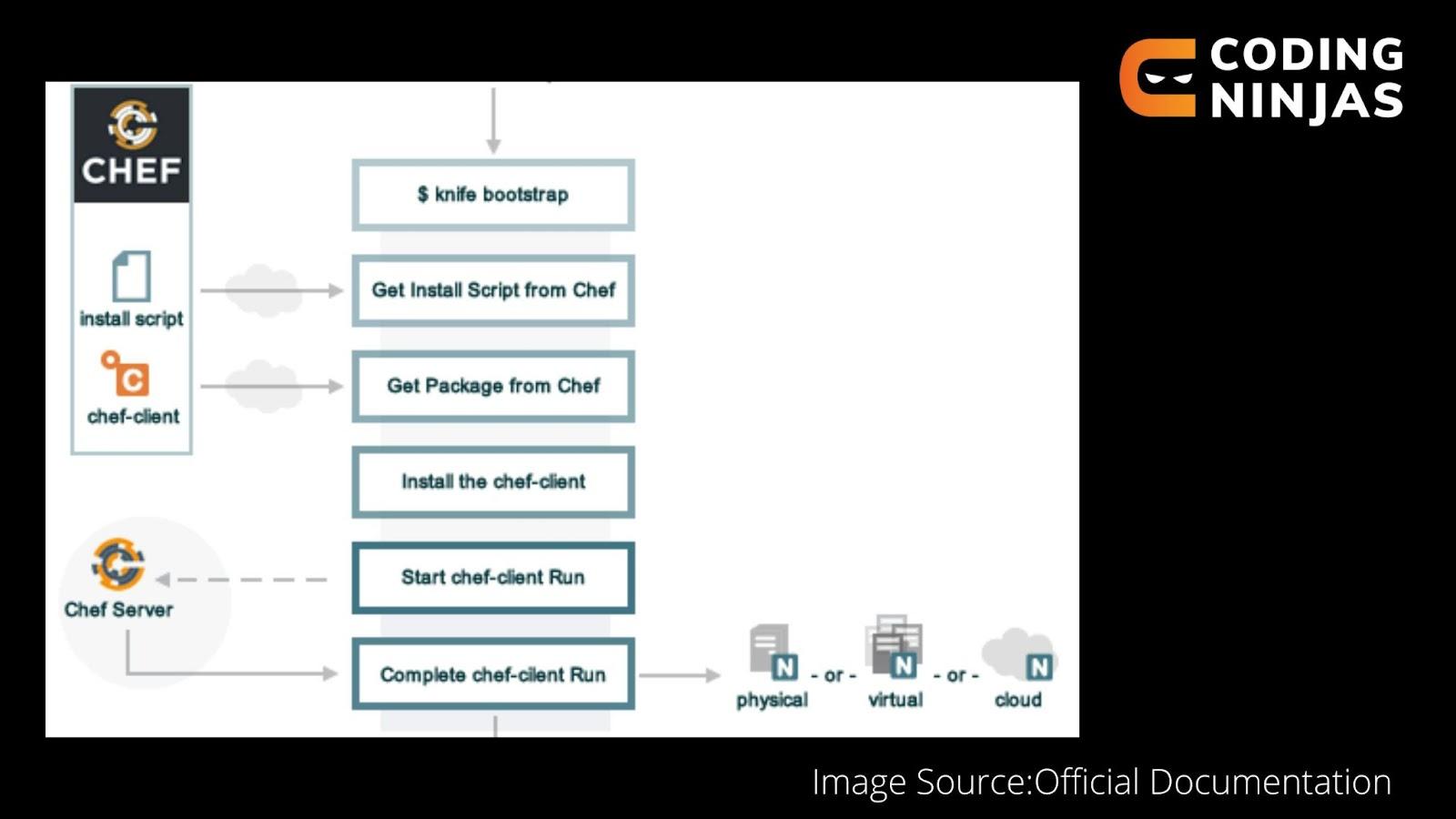
The following diagram illustrates the operations that occur when installation is done using Bootstrap.

Bootstrap

The following happens in a knife bootstrap operation:-

Stages Description
Knife bootstrap Initially, the knife-bootstrap command is initiated.
Install script from the chef The script shell requests the chef website to provide the latest version of the chef infra client.
Get the chef infra package. The appropriate package is downloaded after obtaining system-specific information.
Install Chef Infra Client A native package downloads the Chef Infra client.
Start a Chef Infra Client run First-boot.json is generated as a part of the knife-bootstrap command
Complete the Chef Infra Client Run. By default, the first client run contains an empty run list.

Knife Bootstrap- It is a widespread technique to carry out the installation by directly giving the node access to the chef's website. It automatically judges the latest version and the operating system compatibility.

For more information on how to run the bootstrap command, Please refer to the official documentation.

  • After the identification of FQDN(Fully Qualified Domain Name) and Ip Address, run the following command-
knife bootstrap 172.16.1.233 -U USERNAME --sudo
  • Verify that the chef infra server recognizes the node by running the following command-
knife client show NAME_OF_NODE
  • For viewing the complete list of nodes associated with the Chef Infra Server, run the following command-
knife client list


Unattended Installs

This method eliminates the need for SSH for the installation process. It facilitates the installation on its own. Chef Infra Client may be included in an image that launches the Chef Infra Client at boot, deployed using User Data, or installed using another type of post-deployment script when using an unattended bootstrap.

Working with Proxies 

  • Many chef commands do not work properly if not configured. This generally happens in a proxy-driven environment.
  • To begin working with proxies, first, you need to determine the proxy server and then configure it. The processes are different in both Operating Systems.
  • For HTTP, HTTPS, and FTP, the user can specify proxy settings in the configuration files for the knife and the Chef Infra Client.
  • The default value is usually NIL for http_proxy_pass, https_proxy_pass, ftp_proxy_pass, http_proxy_user, https_proxy_user, and ftp_proxy_user.
  • The no_proxy setting lists addresses for which the user cannot use the proxy.
no_proxy 'ninjas.cn.com,ninjas.cn2.com,ninjas.cn3.com'

Environment Variables

Some applications may ignore the proxy settings and follow them partially. So, in these situations, environment variables are used to set the proxy.

Chef Infra Client will set the ENV variable depending on these settings if HTTP proxy, HTTPS proxy, FTP proxy, or no proxy is set in the client.rb file but not in the ENV. 

http_proxy 'http://proxy.exampletest.org:8080'
http_proxy_user 'meself'
http_proxy_pass 'Password321'
ENV['http_proxy'] = 'http://meself:Password1@proxy.exampletest.org:8080'

Working with the client.rb 

The client.rb file, which has the following features, describes how the Chef Infra Client is set up on a node:

Every time the chef-client program is launched, this file is loaded.

The default path for this file on Windows computers is C:chefclient.rb. The default path for this file on all other systems is /etc/chef/client.rb.

To override the configuration file's default location, use the —config argument on the command line.

This file is not automatically created.

The configuration file has the following settings-

add_formatter

allowed_automatic_attributes

allowed_default_attributes

allowed_normal_attributes

allowed_override_attributes

authentication_protocol_version

automatic_attribute_blacklist

blocked_automatic_attributes

blocked_default_attributes

blocked_normal_attributes

blocked_override_attributes

cache_path

Checksum_path

chef_guid

chef_license

chef_repo_path

chef_server_url

chef_zero.enabled

chef_zero.port

clear_gem_sources

client_fork

minimal_ohai

named_run_list

no_lazy_load

no_proxy

node_name

Node_path

A sample client.rb file that contains the most basic method to connect to Hosted Chef

chef_server_url  'https://api.chef.io/organizations/<orgname>'
validation_client_name '<orgname>-validator'
validation_key '/etc/chef/validator.pem'
client_key '/etc/chef/client.pem'

To obtain more information on working with the client.rb, refer to the official documentation.

Air-Gapped Installation 

There are certain needs that the user must fulfill. The list is as detailed below-

  • A method to get packages to your air-gapped machines
  • Machines on the air-gapped network should be able to resolve each other using the Domain Name System.
  • A server’s Fully Qualified Domain Name (FQDN)
  • A Private Ruby gem mirror should be present.
  • An artifact store should have some packages available: Chef Workstation, Chef Supermarket, Chef infra client, and an install script.

Required Cookbooks

For Chef Supermarket:

Required Gems 

These Ruby gems need to be present to install private Supermarket-

  • mixlib-install
  • mixlib-shellout
  • mixlib-versioning
  • artifactory

Create an install script 

An install script is utilized to install Chef Infra Client when the user bootstraps a new node. It pulls the Chef Infra Client package from the artifact store.

#!/bin/bash

cd /tmp/
wget http://packages.example.com/chef_13.2.20-1_amd64.deb
dpkg -i chef_13.2.20-1_amd64.deb

Private Supermarket 

Allows you to host your internal version of the Chef Supermarket. This is done using your air-gapped network.

To begin with,  you have to configure Chef Identity credentials.

Log on to the server and update the /etc/opscode/chef-server.rb configuration file

oc_id['applications'] ||= {}
oc_id['applications']['supermarket'] = {
  'redirect_uri' => 'https://supermarket.mycompany.com/auth/chef_oauth2/callback',
}

Follow these steps to implement Private Supermarket.

Upgradation 

Upgradation

The user should update the Chef Infra Server before performing upgradation on the Chef Infra Client.

  • Different operating systems require different command line commands. For Linux/macOS and Linux based -
curl -L https://chef.io/chef/install.sh | sudo bash

For Windows-

. { iwr -useb https://omnitruck.chef.io/install.ps1 } | iex; install
  • If the user wants a particular application version, he can specify the same in the command line.
curl -L https://chef.io/chef/install.sh | sudo bash -s -- -v 17.9.26


. { iwr -useb https://omnitruck.chef.io/install.ps1 } | iex; install -version 17.9.26

Uninstalling 

Uninstallation

This part discusses how to uninstall the components and data.

  • The uninstall command removes the chef infra server application without removing all the data.
chef-server-ctl uninstall
  • For uninstallation of the chef management console, follow these steps-
chef-manage-ctl cleanse
rm -fr /var/opt/opscode/nginx/etc/addon.d/*manage*
chef-server-ctl restart nginx

In the case of Chef Analytics as well, uninstall command is used. It removes the application analytics but not the data.

opscode-analytics-ctl uninstall

The same procedure works for reporting applications as well.

opscode-reporting-ctl uninstall

To uninstall the Chef workstation, the user needs to follow the following steps owing to their operating system.

Debian

dpkg -P chef-workstation

macOS

sudo rm -rf /opt/chef-workstation

RedHat

rpm -qa *chef-workstation*
sudo yum remove -y <package>

Windows

Use Add / Remove Programs to remove the Chef Workstation on the Windows platform.

Frequently Asked Questions 

What is the command to undo an uninstall?

Reconfigure command is used to undo the uninstall action.

Explain Chef Components.

Chef Workstation, Chef Node, and Chef Server are the three main components of Chef.

What is the role of OHAI?
OHAI is a tool employed to obtain configuration data.

What is the use of a knife? 

The knife is a command line tool that establishes communication between the Chef-server and the Chef-Workstation.

What is the run-list in Chef?

They provide the information required to configure the nodes in a required state.

Conclusion

In this article, we studied various methods that are used to install Chef Infra Server and Client on your system.

A thorough understanding of the topic can be carried out by referring to the Chef Infra Installation Documentation.

For more information on Chef and DevOps, Refer-

Refer to our guided paths on Coding Ninjas Studio to learn more about DSA, Competitive Programming, JavaScript, System Design, etc. Enroll in our courses and refer to the mock test and problems available. Take a look at the interview experiences and interview bundle for placement preparations.

Happy Coding!

Live masterclass