






Introduction
Turtle is an inbuilt module in Python similar to the virtual canvas. We can use it to draw pictures and attractive shapes. It provides us with a screen (cardboard) and a turtle (pen). We need to move the pen to draw something on the screen. To move pen, there are some functions, i.e backward(), forward(), etc.
In this blog, we will learn how to draw a clock using Turtle in Python, along with the steps and code.
Clock using Turtle in Python
In this section, we will learn how to draw a clock using Turtle in Python. Before we start learning how to draw a clock using Turtle in Python, be sure that you know the Turtle basics. To learn more about Turtle programming in Python, refer to the blog Turtle Programming in Python.
Clock
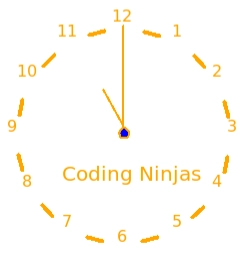
Our clock will look like the above image. Now let's look at the steps to draw a clock using Turtle in Python.
Steps
The following steps have to be followed to draw a clock using Turtle in Python:
- Import the turtle module.
- Create Screen object and set Screen configuration.
- Create a Turtle object and set its position and speed.
- Draw a dashed line and print the number on the clock in a circular shape.
- Draw center and fill blue color in it.
- Write "Coding Ninjas" at the required position.
- Run turtle.done() function.
Now let's look at the code to draw a clock using Turtle in Python.
Code
# Import the package
import turtle

# Create a screen object
screen = turtle.Screen()

# Set the screen configuration
screen.setup(500, 500)

# Make turtle Object
clock = turtle.Turtle()

# Set the turtle object color
clock.color("Orange")

# Set a turtle object width
clock.width(4)

# Function to draw the hour hand
def drawHourHand():
   clock.penup()
   clock.home()
   clock.right(90)
   clock.pendown()
   clock.forward(100)

# Value for numbers in clock
value = 0

# Loop to print the clock numbers
for i in range(12):
   # Increment value by 1
   value += 1
   # Move the turtle in air
   clock.penup()
   # Circular motion
   clock.setheading(-30 * (i + 3) + 75)
   # Move forward for space
   clock.forward(22)
   # Move the turtle to surface
   clock.pendown()
   # Move forward for dash line
   clock.forward(15)
   # Move turtle in air
   clock.penup()
   # Move forward for space
   clock.forward(20)
   # Wite clock numbers
   clock.write(str(value), align="center", font=("Verdana", 12, "normal"))

# Color the centre by setting position
clock.setpos(2, -112)
clock.pendown()
clock.width(2)

# Fill color blue at the center
clock.fillcolor("Blue")

# Start filling
clock.begin_fill()

# Create a circle of radius 5
clock.circle(5)

# End filling
clock.end_fill()
clock.penup()
drawHourHand()
clock.setpos(-20, -64)
clock.pendown()
clock.penup()

# Write the clock by setting position
clock.setpos(-60, -160)
clock.pendown()
clock.write("Coding Ninjas", font=("Verdana", 15,"normal"))
clock.hideturtle()
turtle.done()
Output

You can practice by yourself with the help of online python compiler for better understanding.
You can also read about Palindrome Number in Python here.


 1+ registered

