




Introduction
Web Application Development is one of the most popular software development technologies in the technical space. It comes with multiple tools and frameworks that facilitate web application development. Vaadin is one such open-source framework we can use to develop web applications. It encourages developers to use Java as their programming language to develop various User Interfaces (UIs) without the compulsion of directly using HTML and JavaScript.
There are several tools of Vaadin which make it quite easy to operate. Therefore, it is now one of the most preferred platforms used for web development. In this blog, we will discuss one such tool of Vaadin, Collaboration Engine, in detail.

Collaboration Engine
As the name suggests, Collaboration Engine is a tool of Vaadin used for building real-time collaboration features. These features are added to the web application made in Vaadin with a few lines of code. It helps Vaadin users to communicate collaboratively and edit within web applications. The entire process is completed in real-time, providing excellent efficiency to the created applications.
Use Cases
There are several use cases for the Collaboration Engine. Some prominent features are explained below.
Form Editing
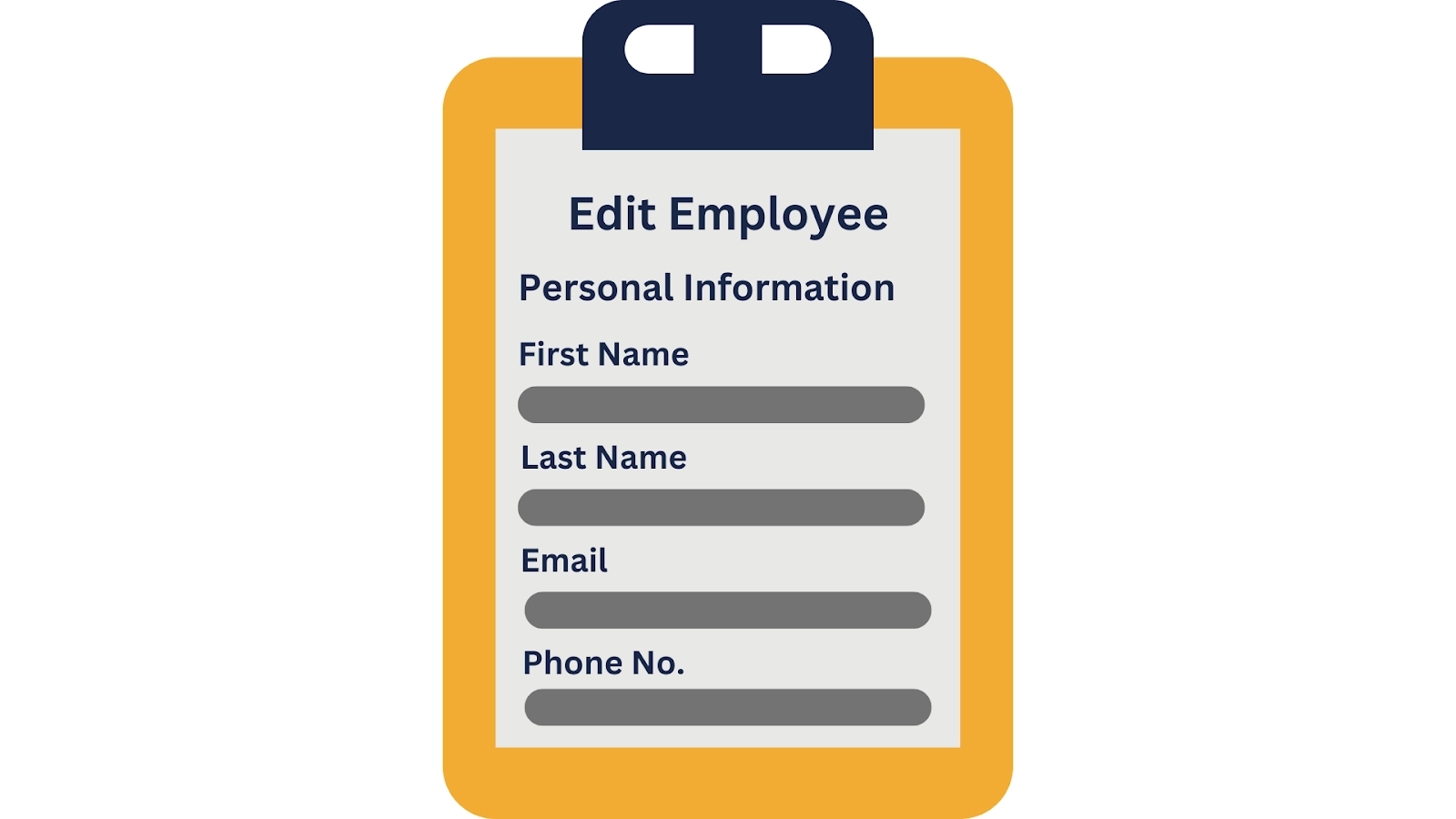
All users can edit forms at the same time. You can refer to the image below for an example of form editing.
Avatars
Users can see who else is viewing the same content using Avatars. Automatic updations take place whenever a user joins or leaves continuously.

Real-time discussion
Users will be able to send messages to one another within the application. This discussion can take place either synchronously or asynchronously.
Low-level API
Users can build their own collaborative experiences using the Collaboration Engine. These low-level APIs can be created by sharing data in CollaborationMap and CollaborationList data structures.
Working
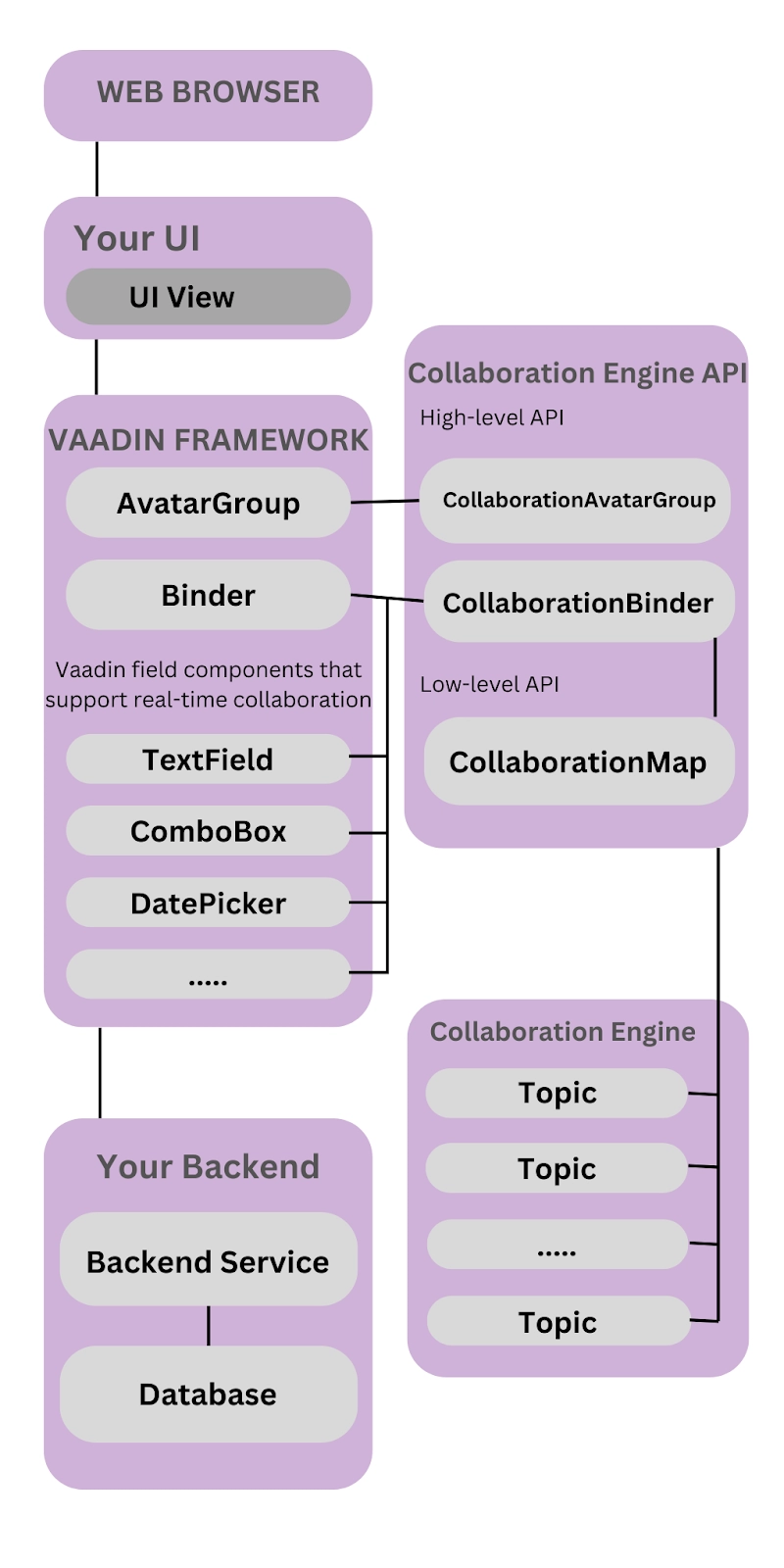
Collaboration Engine provides Vaadin users with an excellent library connected to its backend. The backend facilitates real-time data sharing and users’ state sharing between applications.
Presently, it works in the memory of the application. Its standalone version is yet to be released. You can deploy this version within the same infrastructure.
Central Concepts
As the name depicts, these concepts will help you throughout your journey with Collaboration Engine.
Topics
The data is collected into topic instances that manage the collaboration between users. These instances are shared among all users in interaction with the same part of the application.
A topic is usually compared to a chat room because of its components. It has an identifier and some participating members. An identifier or topic ID is a free-form string unique to an application, just like a serial number. It is recommended to include both the name and identifier of an entity in the topic ID. This is done to maintain its uniqueness. The members receive all updates of that topic instance they are participating in.
Helpers for Specific Use Cases
Collaboration Engine contains several high-level APIs that help in addressing numerous use cases. A few mostly used APIs are explained below in the table.
High-Level APIs |
Description |
| CollaborationBinder | This component improvises the regular Vaadin Binder to share the current details of each field. These details are shared with every user using the same topic simultaneously. |
| CollaborationAvatarGroup | This component contains the avatar of every user using the current topic. It is updated continuously based on the users’ entering or leaving. |
| CollaborationMessageList | This component displays the message submitted using the CollaborationMessageInput component. This process of addition takes place in real time. |
Collaboration Managers
The Collaboration Managers of Vaadin provide mid-level APIs to its users. These APIs facilitate the handling of collaborative data for the most popular use cases. Also, lets developers to create their theories and customize components accordingly.
You can refer to the examples below for a better understanding.
- PresenceManager
As the name suggests, it regulates the presence of users by letting you mark their presence and subscribe to presence changes.
- MessageManager
MessageManager lets users submit messages inside a topic instance and put notifications to the ones incoming.
Low-Level API
The low-level APIs can be created by sharing data in CollaborationMap and CollaborationList data structures. It allows the synchronization of arbitrary users among Vaadin users. It can be used along with Collaboration Managers or separately to create customized experiences. You can start working with low-level APIs by starting a TopicConnection through CollaborationEngine::openTopicConnection.
Challenges
One most common challenges associated with Collaboration Engine arises due to data sharing. A topic instance consists of multiple named maps and lists shared among connections. Each map further contains several <String-key, value> pairs. Also, each list contains numerous ordered values.

It is advisable that shared instance values must be immutable. This notifies subscribers when the shared instance is getting replaced by another instance.
Also, a conditional replacement operation is available on the map. It prevented overwriting and did modifications to the parts of shared data.
Limitations
The Collaboration Engine we are using currently is quite stable and production-friendly. Yet, some features are under development and thus unavailable.
You can use the list below for your reference.
- Absence of support for complex data structures such as nested arrays and hash maps.
- Topic data cannot persist between server restarts. Users have to persist topic data manually and repopulate it after a restart if required.
- Collaboration among multiple nodes in a group of application servers is not supported. The standalone version still in progress will enable Collaboration Engine to be used from multiple application servers.
Setting up the Collaboration Engine
Now, when we have learned about the several aspects of the Collaboration Engine. It is time to grab hold of its setup process.
Preparing the Application
As a part of the pre-preparation, we need to set up a Vaadin project in the application. Then, enable the server push by using the Java code below. The @Push annotation at the top lets the server communicate the update between clients in real time.
@Push
@SpringBootApplication
public class Application extends SpringBootServletInitializer implements AppShellConfigurator
{
    public static void main(String... args)
    {
        SpringApplication.run(Application.class, args);
    }
}
Note that you can implement the interface in the main application class in spring applications.
Adding Collaboration Features
A Vaadin user has the option to add several collaboration features to enhance his created application. Here, we have used an example of a form that users can edit anytime to change a person's name and date of birth.
We will use the following Java code to create a form.
public static class Person {
    private String name;
    private LocalDate dateOfBirth;

    public String getName() {
        return name;
    }

    public void setName(String name) {
        this.name = name;
    }

    public LocalDate getDateOfBirth() {
        return dateOfBirth;
    }

    public void setDateOfBirth(LocalDate dateOfBirth) {
        this.dateOfBirth = dateOfBirth;
    }
}
A list of available collaboration features is added below. We have added appropriate descriptions with every feature to make you understand better.
🌷 Creating a Simple View
Firstly, we will create a simple look with a text field and a date picker. Here, we have not added any collaborative functionalities. You can use the following Java code to start with.
@Route(value = "ce/tutorial", layout = MainView.class)
public class TutorialView extends VerticalLayout
{
    public TutorialView()
    {
        TextField nameField = new TextField("Name");
        DatePicker dateOfBirthField = new DatePicker("Date of birth");
        add(nameField, dateOfBirthField);
    }
}
🌷 Providing User Information
We use the UserInfo class to get user information. It represents a user of a collaborative application. Properties such as name and image display the users currently editing the same field or viewing the same view.
The user id field is the unique identifier for all logged-in users. It lets multiple users open the same view using multiple browser tabs. You can use the Java code below to get the user information.
String userId = System.identityHashCode(UI.getCurrent()) + "";
UserInfo localUser = new UserInfo(userId, "User " + userId);
The name field contains and displays the names of other users while editing the field. The user’s avatars contain the abbreviation of the name. The colorIndex property is generated automatically. It determines the color to be used in Avatars and field highlights.
🌷 Adding User Avatars
A CollaborationAvatarGroup component is created to display the users using the application simultaneously. You can use the following Java code below to create a CollaborationAvatarGroup component.
CollaborationAvatarGroup avatarGroup = new CollaborationAvatarGroup(localUser, "tutorial");
addComponentAsFirst(avatarGroup);
Firstly, the component accesses the UserInfo object created earlier to know how to retrieve the avatars. Then, the component requires topic id as a second argument. You can learn more about topics from the Central Concepts of this article.
If you plan to expand the application in the future, you will need unique topic ids for each entity. The same CollaborationAvatarGroup component can be edited and reused for different persons. The setTopic() method is used to change the topic ids.
🌷 Adding Field Collaboration
The CollaborationBinder class enables collaboration with the text field and date picker components. It facilitates the Binder class to bind the values between Java Beans and Vaadin field components.
Firstly, the class requires the type to be edited along with the local user’s information to complete its initialization. Then, we use the usual binder methods for binding the person’s object name and date of birth to the text field component and date picker component respectively.
At last, we will set the topic to form a connection and a supplier for the initial bean value. This will fill the fields at an instance when the first user connects to the topic. Also, the supplier loads the editable item from the backend.
In the example above, we have filled with an empty Person object. It communicates the field value among users and displays the current user using field highlight. You can use the following Java code for your reference.
CollaborationBinder<Person> binder = new CollaborationBinder<>(Person.class, localUser);
binder.forField(nameField).bind("name");
binder.forField(dateOfBirthField).bind("dateOfBirth");
binder.setTopic("tutorial", () -> new Person());
Running the Application
Look for the README.md file of the application. Read and follow the instructions given to start the application. Open the http://localhost:8080/ directory in multiple browsers to test the application.
Ensure you check every feature properly, such as field, field highlight, avatars, etc.


 7+ registered

