Table of contents
1.
Introduction
2.
Default Widget in Form Fields
3.
Django form field custom widgets
4.
Django form field custom widgets - DateField
5.
Frequently Asked Questions
6.
Key Takeaways
Last Updated: Mar 27, 2024

Django form field custom widgets

Author Tanay kumar Deo
2 upvotes
Career growth poll
Do you think IIT Guwahati certified course can help you in your career?

Introduction

Django is one of Python's most popular, trusted, and reliable web development frameworks. With Django, we can quickly create web applications without worrying about installation or dependency problems that we usually find with other frameworks.

widget is the Django representation of an HTML <input> element. The widget in Django will handle the rendering of the HTML elements and extract data from a POST/GET dictionary that corresponds to the same widget. Whenever we specify a field on a Django form, Django uses some default widget appropriate to the data type to be displayed. This article will learn about Django form field custom widgets with a detailed example.

Default Widget in Form Fields

To use Django form field default widgets, we need to have a project named codingninjas and an app called Coding Ninjas Studio working in it. 

Refer to the below articles to check how to create a project and an application in Django.

Whenever we specify a field on a Django form, every field has a pre-defined widget. For example, IntegerField has a default widget of NumberInput. We can find the full list of pre-defined widgets here.

Now let's create a form in "Coding Ninjas Studio/forms.py".

from django.db import forms
# Create our models here.
 
class AuthorDetailForm(forms.Form):
    Name = forms.CharField()
      Author_email = forms.CharField()
You can also try this code with Online Python Compiler
Run Code


We have created an AuthorDetailForm with the fields Name and Author_email in the above code. 

To render our form, we need to create a Django view and template to display our form. In Coding Ninjas Studio/views.py, create a view with the following code:

from django.shortcuts import render
from .forms import AuthorDetailForm
 
# Creating a view
def form_view(request):
    new_form = AuthorDetailForm(request.POST or None)
    context = {}
    context['form'] = form
    return render(request, "home.html", context)
You can also try this code with Online Python Compiler
Run Code


After creating our form_view let's create a template in the Coding Ninjas Studio/home.html,

<form method="POST">
    {% csrf_token %}


    // Using form in Template
    {{ form.as_p }}
    <input type="submit" value="Submit">
</form>
You can also try this code with Online Python Compiler
Run Code


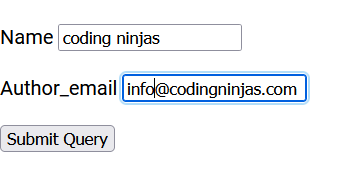
Finally, we can run our application with the following command to see our form.

Python manage.py runserver
You can also try this code with Online Python Compiler
Run Code


Output

Django form field custom widgets

This section will learn about the Django form field custom widgets. We may override the default widget Django offers of each field for various purposes. To do so, we need to explicitly define the widgets we need to assign to a field.

Let's customize our form with the following code in Coding Ninjas Studio/forms.py,

from django.db import forms
# Create our models here.
 
class AuthorDetailForm(forms.Form):
    Name = forms.CharField( widget = forms.Textarea )
      Author_email = forms.CharField( widget = forms.CheckboxInput )
You can also try this code with Online Python Compiler
Run Code


Now visit http://localhost:8000/ to see the changes.

Output

In the above example, we can see that we can assign any widget to any field using the widget attribute.

Note – The validations added on fields will remain the same. For example, even if an IntegerField is made a CharField, it will only accept the Integer inputs.

Django form field custom widgets - DateField

Although we already saw Django form field custom widgets. Let's see a demonstration with the DateField. Consider our forms.py as:

from django.db import forms
# Create our form here.
 
class AuthorDetailForm(forms.Form):
    date = forms.DateField()
You can also try this code with Online Python Compiler
Run Code


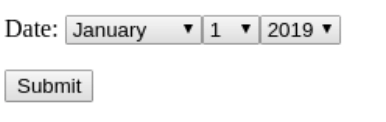
By default, DateField has a TextInput widget. Now let's modify the widget for better and more convenient input of a date. Add SelectDateWidget to DateField in forms.py,

from django.db import forms
# Create our form here.
 
class AuthorDetailForm(forms.Form):
    date = forms.DateField(widget = forms.SelectDateWidget)
You can also try this code with Online Python Compiler
Run Code


Now visit http://localhost:8000/ to see the changes.

Output

Frequently Asked Questions

1. What is a MultiWidget?

Ans. A MultiWidget is a widget composed of multiple widgets. For example,

from django.forms import MultiWidget


class SplitDateAndTimeWidget(MultiWidget):
    
    def decompress(self, value):
            if value:
            return [value.date(), value.time()]
            return [None, None]
You can also try this code with Online Python Compiler
Run Code

2. Can we style the Django form field custom widgets?

Ans. Yes, we can style the Django form field custom widgets with the help of JavaScript and CSS.

3. What is the difference between widgets and form fields?

Ans. Form fields in Django deal with the input validation logic and can be used directly in templates. In contrast, widgets in Django deal with the rendering of HTML form fields on the web app and the extraction of raw data. However, widgets need to be assigned to the form fields.

4. What are core arguments?

Ans. Core Arguments are non-specific arguments. All fields accept these arguments. Some of the core arguments are mentioned below:

  • required (Boolean)
  • max_length and min_length
  • label (String)
  • initial (String) for CharField()
  • initial (Boolean) for BooleanField()
  • initial (Datetime) for DateField()

Key Takeaways

This article taught us Django form field custom widgets using detailed examples. In our example, we learned Default widgets in Django and implemented various Django form field custom widgets.

Don't stop here. Check out the blogs Best Django Books, Top 30 Basic Django Interview Questions: Part 1, and Top 30 Intermediate Django Interview Questions: Part 2.

We hope you found this blog helpful. Liked the blog? Then feel free to upvote and share it.

Live masterclass