How to use Django Forms
To utilize Django Forms, you must first create a project and an app in it. You can construct a form in app/forms.py after you've started an app.
Creating a Django Form
In Django, building a form is quite similar to creating a model. The type of fields that would exist in the state must be specified. To fill out a registration form, for example, you might need to know your first name (CharField), your roll number (IntegerField), and so on.
Enter the code in ninjas/forms.py to build a form.
# import the standard Django Forms
# from built-in library
from django import forms


# creating a form
class InputForm(forms.Form):


first_name = forms.CharField(max_length = 200)
last_name = forms.CharField(max_length = 200)
roll_number = forms.IntegerField(
help_text = "Enter 6 digit roll number"
)
password = forms.CharField(widget = forms.PasswordInput())
Render Django Forms
Although Django form fields include various built-in methods to help developers, customizing the User Interface occasionally necessitates manual implementation (UI). A form has three built-in ways for rendering Django form fields.
- {{ form.as_table }} will render them as table cells wrapped in <tr> tags
- {{ form.as_p }} will render them wrapped in <p> tags
- {{ form.as_ul }} will render them wrapped in <li> tags
Move to views.py and construct a home view below to render this form into a view.
from django.shortcuts import render
from .forms import InputForm


# Create your views here.
def home_view(request):
context ={}
context['form']= InputForm()
return render(request, "home.html", context)
In view, one needs to just create an instance of the form class created above in forms.py. Now let’s edit templates > home.html
<form action = "" method = "post">
{% csrf_token %}
{{form }}
<input type="submit" value=Submit">
</form>
The output window at localhost would look like this:

Create Django Form from Models
Django ModelForm is a class that is used to directly convert a model into a Django form. If you’re building a database-driven app, chances are you’ll have forms that map closely to Django models.
Syntax:
from django import forms

class FormName(models.Model):
         # each field would be mapped as an input field in HTML
        field_name = models.Field(**options)
Now when we have our project ready, create a model in ninjas/models.py,
# import the standard Django Model
# from built-in library
from django.db import models


# declare a new model with a name "GeeksModel"
class NinjasModel(models.Model):
# fields of the model
title = models.CharField(max_length = 200)
description = models.TextField()
last_modified = models.DateTimeField(auto_now_add = True)
img = models.ImageField(upload_to = "images/")


# renames the instances of the model
# with their title name
def __str__(self):
return self.title
Enter the following code in ninjas/forms.py to construct a form for this model directly:
# import form class from django
from django import forms


# import GeeksModel from models.py
from .models import NinjasModel


# create a ModelForm
class NinjasForm(forms.ModelForm):
# specify the name of model to use
class Meta:
model = NinjasModel
fields = "__all__"
Basic Form Data Types and Fields
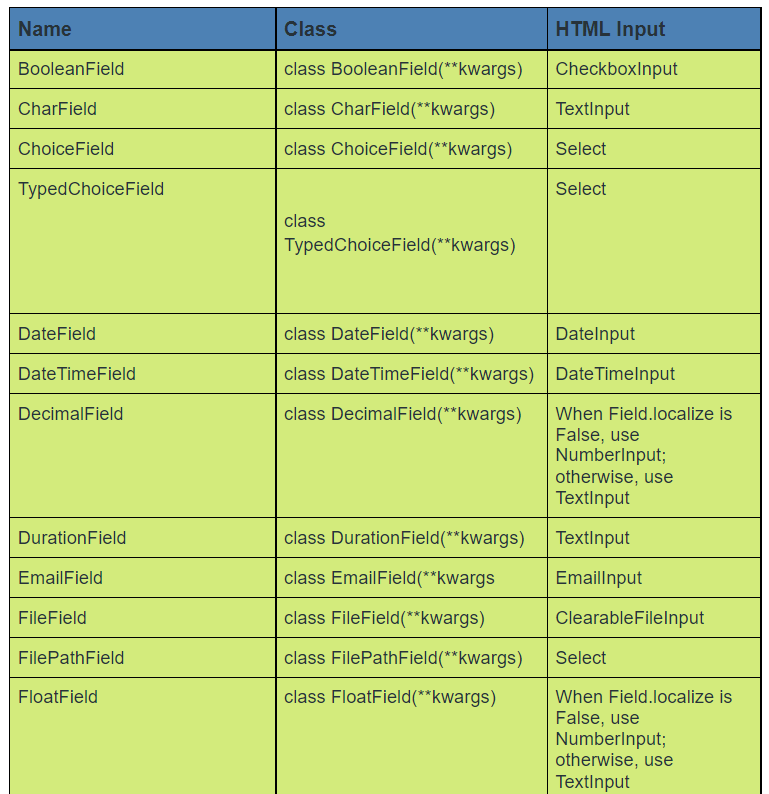
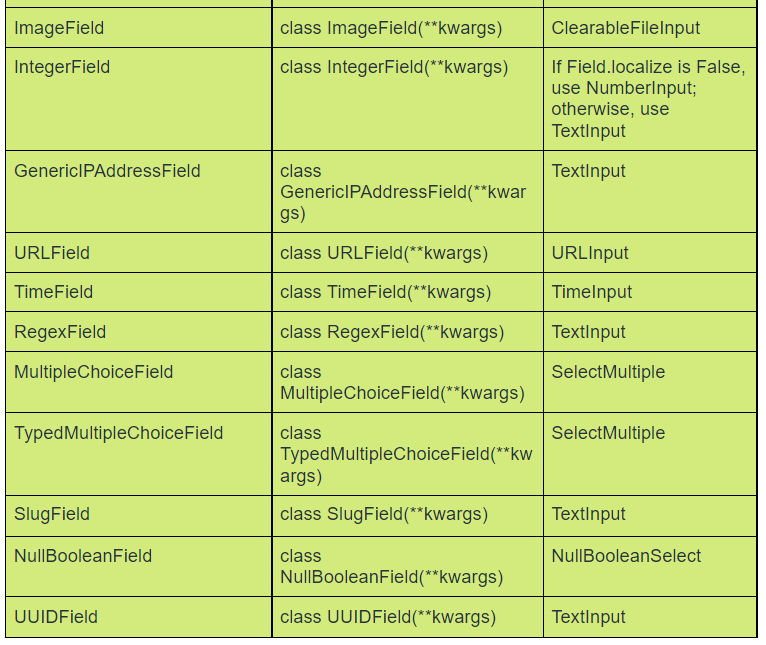
The list of fields that a form defines is the most significant and only required portion of the form. Fields are specified via class attributes.
The following is a list of all Django Form Field types.
Core Field Arguments
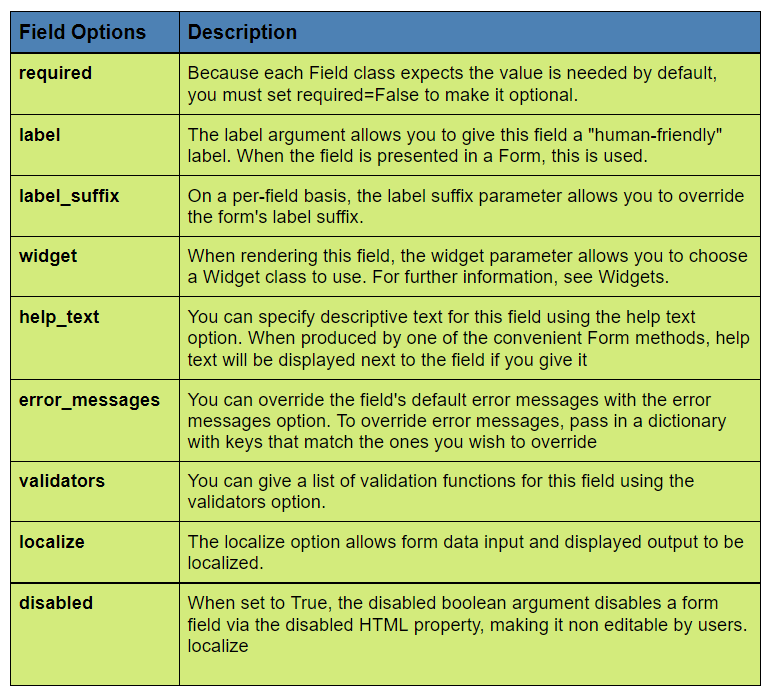
The arguments given to each field for applying a constraint or imparting a specific characteristic to that field are known as core Field arguments.
If you give CharField core field argument required = False option, the user will be able to leave it blank.
Each constructor of the Field class takes at least these arguments. Although some Field classes allow field-specific arguments. The following is a list of core field arguments.
Frequently Asked Questions
-
Why do we use forms in Django?
Django provides a Form class that is used to create HTML forms. It describes a form and how it works and appears. Each field of the form class map to the HTML form <input> element and each one is a class itself, it manages form data and performs validation while submitting the form.
-
What is the difference between form and ModelForm in Django?
The differences are that ModelForm gets its field definition from a specified model class, and also has methods that deal with saving of the underlying model to the database. A form is a common form that is unrelated to your database (model ).
-
How many types of Django forms are there?
Django form fields define two types of functionality, a form field's HTML markup and its server-side validation facilities.
Key Takeaways
The most crucial component of creating a Form class is defining the form's fields. Each field has its own set of validation rules, as well as a few other hooks.
Django transforms Django form fields into HTML input fields.
For more Django related blogs click the following links:
-
for loop- Django template tags.
- Django email confirmation
Happy reading!!







 7+ registered

