Table of contents
1.
Introduction
2.
Salt File Servers
2.1.
Basic Setup
2.2.
Environments
2.3.
Directory Overlay
3.
Local File Server
4.
Frequently Asked Questions
4.1.
Can we make Salt use the local file system in just a single command?
4.2.
How many environments can I add in Salt?
4.3.
Is specifying an environment necessary when fetching files?
5.
Conclusion
Last Updated: Mar 27, 2024
Medium

File Server Configuration in Salt

Author Satvik Gupta
1 upvote
Career growth poll
Do you think IIT Guwahati certified course can help you in your career?

Introduction

Salt is an open-source software used to manage software configuration and to perform remote execution of commands. Salt allows us to manage hundreds, or even thousands of servers using very few (could even be one) Master nodes. File servers are an integral part of Salt - they are used to efficiently deliver files to Minion nodes.

File Server Configuration in Salt

This article will cover the steps to set up and configure your file server using Salt. You'll learn how to use Salt's powerful configuration management and automation capabilities to quickly and easily deploy and manage your file server. 

Salt File Servers

Salt File Servers are written in ZeroMQ. ZeroMQ is a messaging library. It allows us to send messages between different processes and different servers. It is exceptional in the fact that it doesn't use any message broker - i.e., no particular middleware is used for handling the messages. This makes it fast, efficient, and easy to use.

Basic Setup

To perform the basic setup, go to the master config file. It is usually present at /srv/salt/master on the master machine. Add the following lines to it.

file_roots:
  base:
    - /srv/salt


We will see the meaning of this in the coming paragraphs. 

Environments

Most software development processes use the concept of environments. For example, the coding part generally occurs in the dev environment. There is a separate test environment for testing, staging, and, finally production. Different organizations may have more or fewer environments, and they may be named differently.

Then, it makes sense to have environments in our Salt file server configuration. Different environments would need different files. Salt allows us to add environments to our file servers. This lets each environment have different file trees.

We can specify different environments in the following way.

file_roots:
  base:
    - /srv/salt/base
  dev:
    - /srv/salt/dev
  prod:
    - /srv/salt/prod


With this configuration, Salt will look for a particular file in whatever environment is currently being used. 

For example, say we search for a file named test.txt, a dummy text file. If we are working in the base environment, Salt will look in /srv/salt/base on the master machine. On the other hand, Salt will look in the /srv/salt/dev folder if we are working in the dev environment. We can specify which environment we are in when running salt commands.

Directory Overlay

Sometimes, we cannot guarantee that a particular file will be in a particular folder or it might not exist in a particular environment. We can use Salt's directory overlay feature to avoid error responses in these cases.

With these, we can add multiple directories for each environment. They will be searched in the order that they are listed. 

file_roots:
  base:
    - /srv/salt/base
    - /srv/salt/other_folder
  dev:
    - /srv/salt/dev
    - /srv/salt/dev_other
    - /srv/salt/base
  prod:
    - /srv/salt/prod
    - /srv/salt/prod_other
    - /srv/salt/base


Searching for files will follow this flowchart.
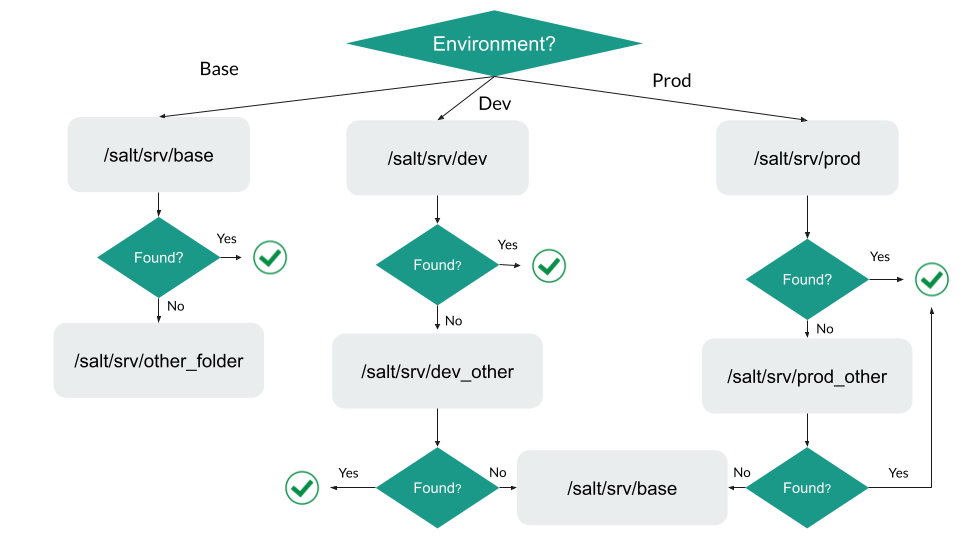
Flowchart for how searching will occur

If the file is not found even in the last folders, Salt will be unable to deploy it across minion machines.

Local File Server

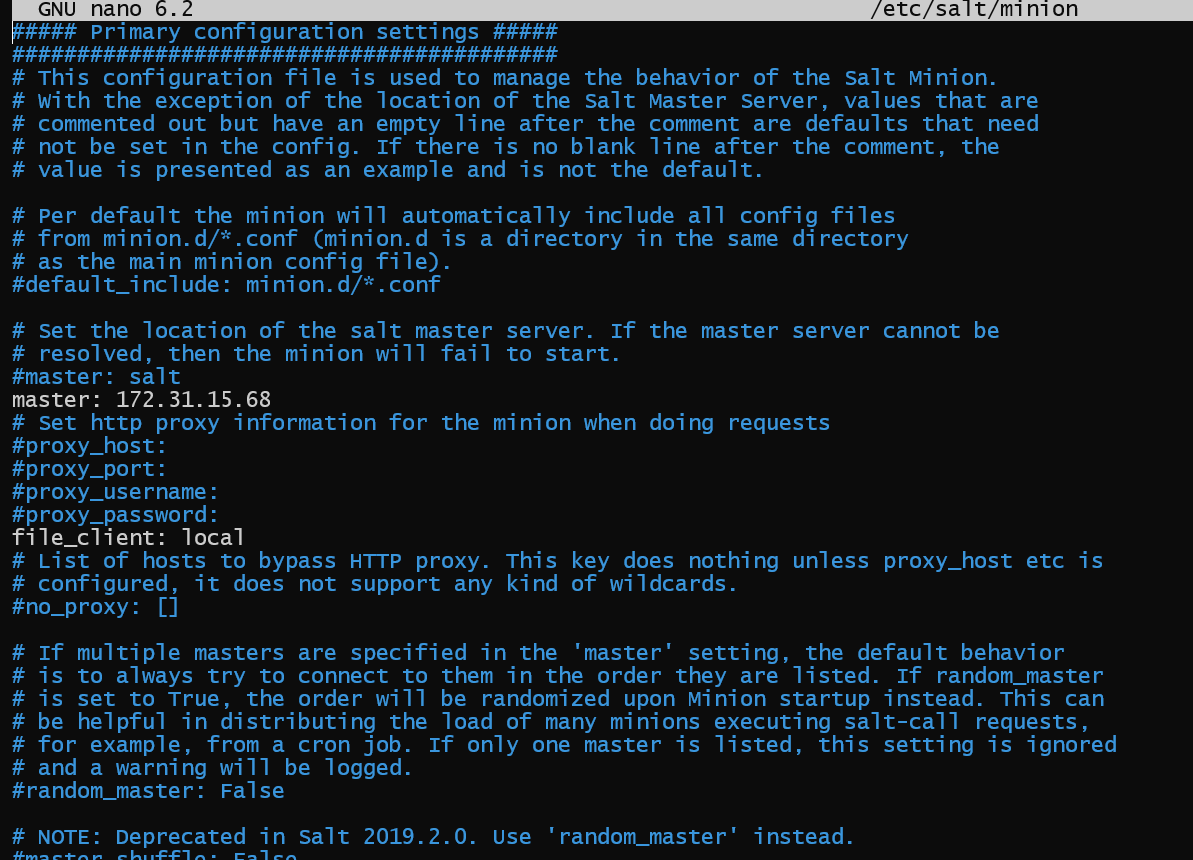
If we wish to run Salt commands in masterless mode, i.e., without a Salt master, only using Minion nodes, we can do so. We must go into the minion config file, present at /etc/salt/minion, and add the following line.

file_client: local


This will tell Salt to look in the local file system instead of the Master server. Let us test it. 

On master, our file roots are set as shown.

file_roots in Master

Our /srv/salt folder has ninja.txt, which has the following data.

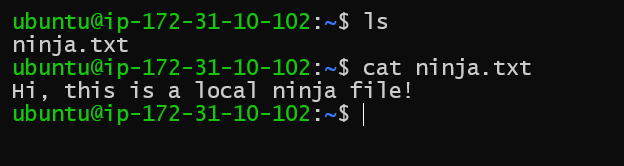
We create the same file on our minion node, in the same folder, at the exact location. However, we change its data.

Create ninja.txt in /srv/salt in Minion, with different data

Now, go into the minion config, and add the line mentioned above.

Add line to minion config

We will restart the salt-minion service to reload the changes. This can be done by using the following command.

sudo systemctl restart salt-minion


No output means salt-minion has been restarted successfully.

Now, we will run the following command on Salt minion.

sudo salt-call cp.get_file salt://ninja.txt ~/ninja.txt


If our changes have worked correctly, the ninja.txt file should be fetched from the local file system (from /srv/salt of the local system). Usually, it would be fetched from the Master node. 

Success message

We see a success message. Let us check the file.

Local file is used

We can see that the file has been copied to the correct destination path, and it is indeed the local file and not the one present on Master.

Check out this article - File System Vs DBMS

Frequently Asked Questions

Can we make Salt use the local file system in just a single command?

We shouldn't edit the configuration file for a single command, as we might forget to undo the changes later. However, we can simply pass the --local flag when running the salt-call command. Hence we would run salt-call --local … followed by the normal command we want to run.

How many environments can I add in Salt?

We can add any number of environments. It is up to us, we can also choose their names. The default environment in salt is named "base."

Is specifying an environment necessary when fetching files?

Specifying an environment is necessary for most Salt commands, including file fetching. However, if we don't specify one - Salt uses the default value for the environment, which is "base."

Conclusion

This blog has explored how we can configure file servers in Salt. Configuring file servers allows us to quickly and efficiently distribute files across our minion nodes. Environments are an added benefit. Since most software development processes already use environments to organize development, configuring environments in Salt allows us to sync our development process with Salt. 

We hope you leave this article with a broader knowledge of Salt, file servers, and configuration management. You should read our other articles about these topics as well, such as

Salt System Architecture.

Job Management in Salt.

Access Control System in Salt.
 

You can practice questions on various problems on Coding Ninjas Studio, and attempt mock tests. You can also go through interview experiences, interview bundle, go along guided paths for preparations, and a lot more!


Keep coding, and keep reading Ninjas. 

Live masterclass