Do you think IIT Guwahati certified course can help you in your career?
Introduction
Folder Explorer is a file management system that browses files and folders from the computer storage with the help of an operating system. It provides a graphical user interface for the end-user to operate and access the files stored in the computer system's storage. It shows the stored data in an organized manner.
The main purpose of the Folder explorer in Java is to allow users to easily work with the files and directories stored on any connected disk in the computer system. In a good folder explorer, when a user selects a file within the folder explorer, users can perform various actions such as renaming, copying-pasting, emailing, printing, moving, or deleting the file. These actions can also be performed with entire folders also. Files can be searched, dragged, and dropped between folders. It can also allow you to create folders under folders.
Example
Let's Understand this scenario with an example:
Suppose a person is hungry and needs to eat food, but he doesn't know where the kitchen is in the house. So even if there is plenty of food but if the person does not know about the food, then the person will remain hungry.
In the same way, if data is available, but there is no perfect system to display it, then we will be unable, or it will be challenging to retrieve the data from our computer. So folder Explorer in Java is an essential software to explore the data stored in the system.
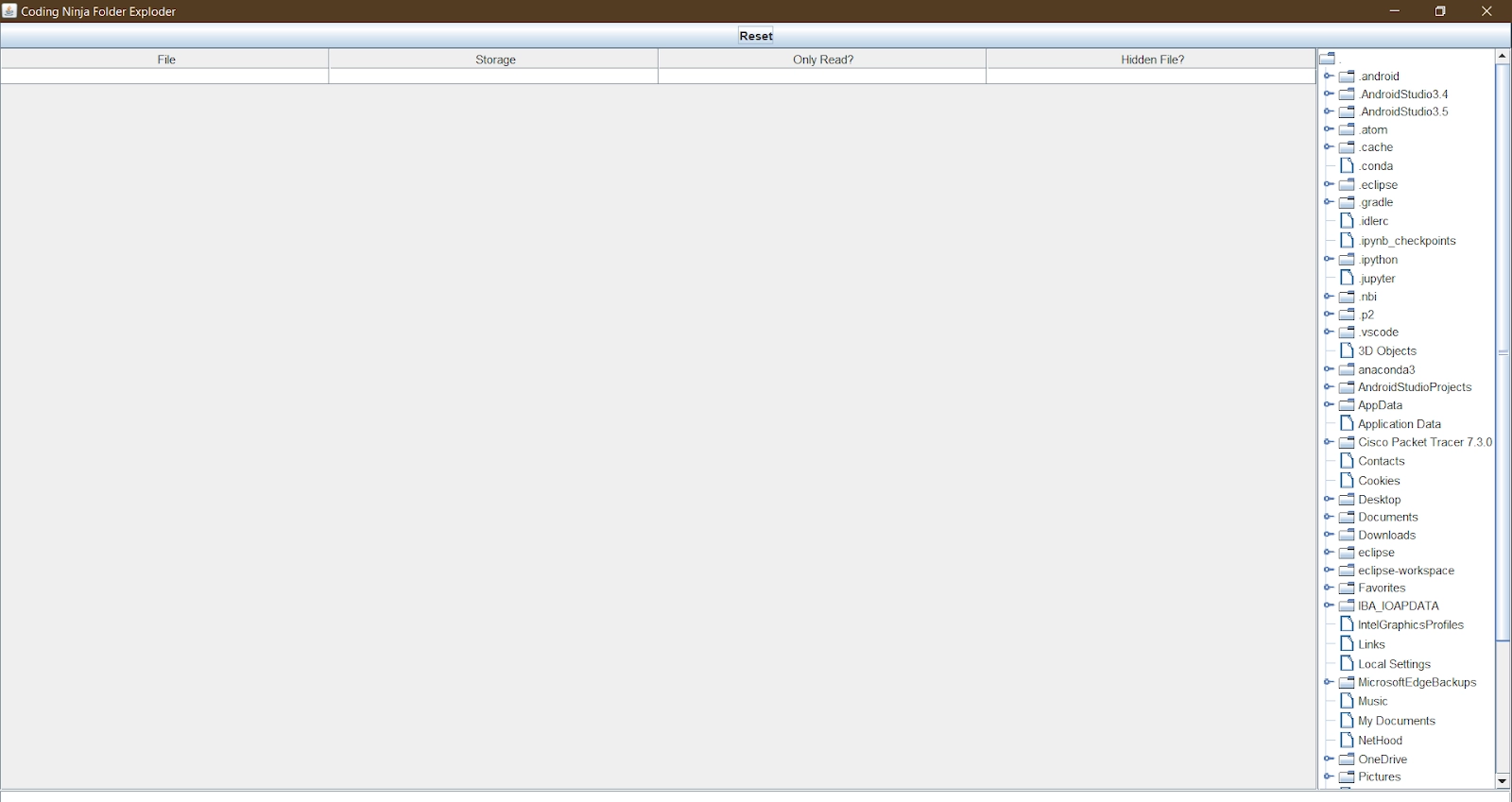
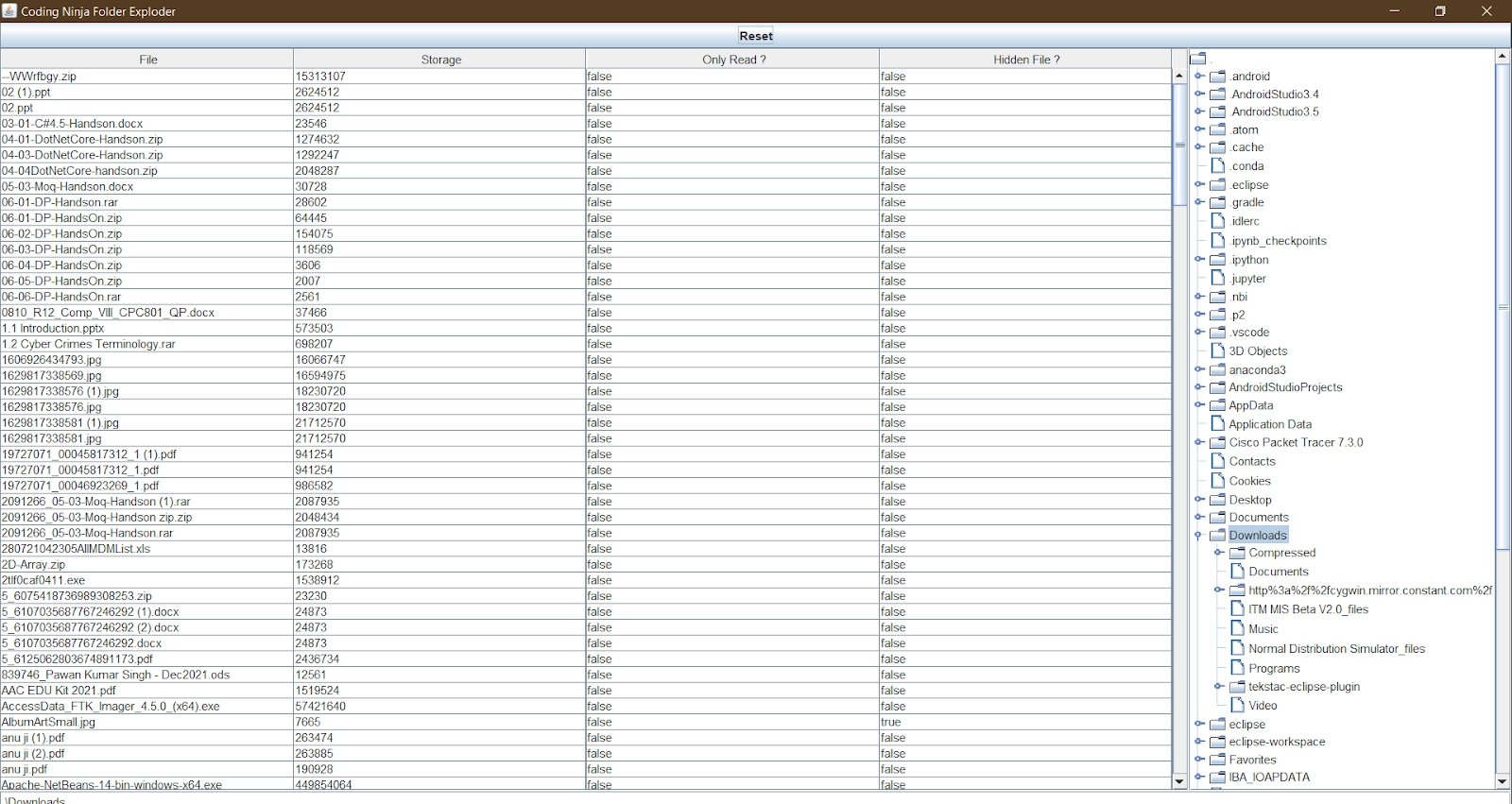
Now in this blog, we will create a folder explorer in Java to import all the required packages like Java Swing, Java.io.*, Java AWT, then we will use a Text field, Buttons, Scroll bar, Scroll Pane, Tree, JScrollPane, JTextField, MouseEvent, etc. Using all these elements we develop the following sections and features of the Folder Explorer in Java :
represent all the folders made on the disk.
There will also be a content section in the middle of the screen which will display all the files available in any folder when a user clicks on the folder in the directory. Content sec will also give information about the file's name, space it captures, type of file, and whether the file is hidden or not.
At last, there will be a reset button that will refresh the central content table.
Implementation
Program to build a folder Explorer in Java
import java.io.*;
import java.awt.*;
import java.awt.event.*;
import javax.swing.*;
import javax.swing.tree.*;

class FolderExplorer extends JPanel implements ActionListener
{
    JTextField jtf;
    JTextArea jta;
    JTable jtb;
    JTree tree;
    JButton refresh;
    JScrollPane jsp, jspTable;

    final String[] colHeads = {"File", "Storage", "Only Read ?", "Hidden File ?"};
    String[][]data = {{"", "", "", "", ""}};

    FolderExplorer(String path)
    {
        jtf = new JTextField();
        jta = new JTextArea(15,50);
        refresh = new JButton("Reset");

        File tmp = new File(path);
        DefaultMutableTreeNode top = createTree(tmp);

        tree = new JTree(top);

        jsp = new JScrollPane(tree);

        final String[] colHeads = {"File","Storage","Only Read?","Hidden File?"};
        String[][]data = {{"", "", "", "", ""}};
        jtb = new JTable(data, colHeads);
        jspTable = new JScrollPane(jtb);

        setLayout(new BorderLayout());
        add(refresh, BorderLayout.NORTH);
        add(jtf, BorderLayout.SOUTH);
        add(jsp, BorderLayout.EAST);
        add(jspTable, BorderLayout.CENTER);

        tree.addMouseListener(
        new MouseAdapter()
        {
        	public void mouseClicked(MouseEvent event)
        	{
            	doMouseClicked(event);
        	}
        });
            jtf.addActionListener(this);
            refresh.addActionListener(this);
    }

    public void actionPerformed(ActionEvent ev)
    {
        File tmp = new File(jtf.getText());
        DefaultMutableTreeNode newTop = createTree(tmp);
        if(newTop != null)
            tree = new JTree(newTop);

        remove(jsp);
        jsp = new JScrollPane(tree);
        setVisible(false);
        add(jsp, BorderLayout.WEST);
        tree.addMouseListener(
        new MouseAdapter()
        {
            public void mouseClicked(MouseEvent event)
            {
                doMouseClicked(event);
            }
        });

        setVisible(true);
    }

    DefaultMutableTreeNode createTree(File tmp)
    {
        DefaultMutableTreeNode top = new DefaultMutableTreeNode(tmp.getPath());
        if(!(tmp.exists() && tmp.isDirectory()))
            return top;

        fillTree(top, tmp.getPath());
        return top;
    }

    void fillTree(DefaultMutableTreeNode root, String fileName)
    {
        File tmp = new File(fileName);

        if(!(tmp.exists() && tmp.isDirectory()))
            return;

        File[] fileList = tmp.listFiles();

        for(int i=0; i<fileList.length; i++)
        {
            if(!fileList[i].isDirectory())
                continue;

            final DefaultMutableTreeNode tmpDmtn = new DefaultMutableTreeNode(fileList[i].getName());
            root.add(tmpDmtn);
            final String newFileName = new String(fileName + "\\" + fileList[i].getName());

            Thread t = new Thread()
            {
                public void run()
                {
                    fillTree(tmpDmtn, newFileName);
                }
            };
            if(t == null)
            {
                System.out.println("no more thread allowed " + newFileName);
                return;
            }
            t.start();
        }
    }

    void doMouseClicked(MouseEvent event)
    {
        TreePath tp = tree.getPathForLocation(event.getX(), event.getY());
        if(tp == null)
            return;

        String s = tp.toString();
        s = s.replace("[", "");
        s = s.replace("]", "");
        s = s.replace(", ", "\\");
        jtf.setText(s);
        showFiles(s);

    }

    void showFiles(String fileName)
    {
        File tmp = new File(fileName);
        data = new String[][]{{"", "", "", ""}};
        remove(jspTable);
        jtb = new JTable(data, colHeads);
        jspTable = new JScrollPane(jtb);
        setVisible(false);
        add(jspTable, BorderLayout.CENTER);
        setVisible(true);

        if(!tmp.exists()) return;
        if(!tmp.isDirectory()) return;

        File[] fileList = tmp.listFiles();
        int fileCounter = 0;
        data = new String[fileList.length][4];

        for(int i = 0; i < fileList.length; i++)
        {
            if(fileList[i].isDirectory())
                continue;

            data[fileCounter][0] = new String(fileList[i].getName());
            data[fileCounter][1] = new String(fileList[i].length() + "");
            data[fileCounter][2] = new String(!fileList[i].canWrite() + "");
            data[fileCounter][3] = new String(fileList[i].isHidden() + "");
            fileCounter++;
        }

        String datatmp[][] = new String[fileCounter][4];

        for(int i = 0; i < fileCounter; i++)
            datatmp[i] = data[i];

        data = datatmp;
        remove(jspTable);
        jtb = new JTable(data, colHeads);
        jspTable = new JScrollPane(jtb);
        setVisible(false);
        add(jspTable, BorderLayout.CENTER);
        setVisible(true);
    }
}


class FolderExplorerDemo extends JFrame
{
    FolderExplorerDemo(String path)
	{
		super("Coding Ninja Folder Exploder");
		add(new FolderExplorer(path), "Center");
		setDefaultCloseOperation(EXIT_ON_CLOSE);
		setSize(500,500);
		setVisible(true);
	}

    public static void main(String[] args)
    {
        new FolderExplorerDemo(".");
    }
}
You can also try this code with Online Java Compiler
Java AWT is known as "Advanced Window Toolkit" it is a platform-dependent API that provides Graphical User Interface.
What is JButton?
It is a graphical element that provides control to the user. It triggers some action when clicked.
What is JDK?
JDK is known as Java Development Kit. It is a software development tool that offers a variety of libraries that are important for software development.
What is the use of MouseEvent?
Mouse event represents those events that occur due to the moving of the cursor by a user into any element or out of any element.
What is Directory?
A directory is a file system that stores files. The Java Directory comes under the java.io package.
Conclusion
In this blog, we learned about Folder Explorer in Java, how it works, and understood it with the help of an example. We also implemented the logic to develop a Folder Explorer in Java using java swing and awt.









 1+ registered

