Do you think IIT Guwahati certified course can help you in your career?
Introduction
A register is made up of flip-flops. In the CPU (Central Processing Unit), a register is a one-of-a-kind, high-speed storage region. Combinational circuits are used to implement data processing. Before processing, the data is always defined in a register. Program implementation is faster thanks to the registers.
The following are two essential functions implemented by registers in CPU operation:
1. It can be used as a temporary data store site. This allows directly implementing applications to have quick access to data when needed.
2. It can record the CPU's condition and information about the currently executing programme.
What is General Register Organization?
General Register Organization, often in the context of computer architecture, refers to the structure and usage of general-purpose registers within a CPU. These registers are used for various computational and data manipulation tasks during program execution. The organization typically defines the number of registers available, their size, and their specific roles, including temporary data storage, addressing, and operand manipulation. The organization of general registers can vary between different CPU architectures and designs, impacting the CPU's performance and capabilities.
Example of General Register Organization
The registers save the address of the next programme instruction, signals from external devices, error messages, and various data.
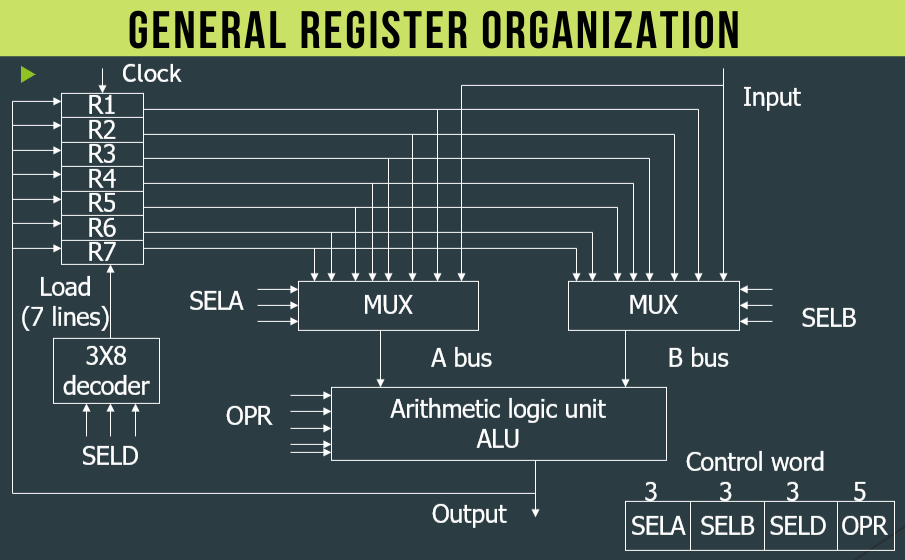
If a CPU has some registers, these registers can be linked by a shared bus. The below image depicts the general organization of seven CPU registers.
The control unit is in charge of the CPU bus system. The control unit specifies the data flow via the ALU by selecting the ALU's function and system components.
Let us consider R1←R2 + R3, and the functions implemented within the CPU are as follows:
Function name
Description
MUX A Selector (SELA)
It can insert R2 into bus A.
MUX B Selector (SELB)
It can insert R3 in bus B.
ALU Operation Selector (OPR)
It can select the arithmetic addition(ADD).
Decoder Destination Selector (SELD)
It can transfer the result into R1.
The buses are used to perform the multiplexers of 3-state gates. The control word is determined by the status of 14 binary selection inputs. The 14-bit control word defines the micro-operation.
Benefits of a General Register Organization
Efficiency: Registers store frequently accessed data, reducing memory access time and improving overall system performance.
Data Sharing: Centralized register organization enables sharing of data among different functional units, facilitating communication and coordination.
Simplicity: Simplifies data access and manipulation, as all data are stored in a single organized location, reducing complexity in system design.
Control: Provides a centralized point for managing data access and manipulation, enhancing system control and security.
Optimization: Allows for optimization techniques such as caching and prefetching to further improve system performance and efficiency.
Scalability: Easily scalable to accommodate increasing data storage needs without significant redesign or overhead.
Parallelism: Supports parallel access to registers, enabling concurrent processing and improving system throughput.
Reduced Overhead: Minimizes overhead associated with data access and manipulation, leading to more efficient resource utilization.
Register Selection Field Encoding
The table specifies the encoding of register selection fields.
The table shows a few of the operations that the ALU performs.
OPR Select
Operation
Symbol
00000
Transfer A
TSFA
00001
Increment A
INCA
00010
Add A + B
ADD
00101
Subtract A - B
SUB
00110
Decrement A
DECA
01000
ADD A and B
AND
01010
OR A and B
OR
01100
XOR A and B
XOR
01110
Complement A
COMA
10000
Shift right A
SHRA
11000
Shift left A
SHLA
ALU Micro-Operations
In the table, certain ALU micro-operations are listed.
Micro-operation
SELA
SELB
SELD
OPR
Control Word
R1 ← R2 – R3
R2
R3
R1
SUB
010 011 001 00101
R4 ← R4 ∨ R5
R4
R5
R4
OR
100 101 100 01010
R6 ← R6 + R1
-
R6
R1
INCA
110 000 110 00001
R7 ← R1
R1
-
R7
TSFA
001 000 111 00000
Output ← R2
R2
-
None
TSFA
010 000 000 00000
Output ← Input
Input
-
None
TSFA
000 000 000 00000
R4 ← shl R4
R4
-
R4
SHLA
100 000 100 11000
R5 ← 0
R5
R5
R5
XOR
101 101 101 01100
Control Word
The control word is determined by the sum of the binary selection inputs. It is divided into four sections. SELA, SELB, and SELD each have three bits, and the OPR field has four bits, for a total of 13 bits in the control word.
Format of Control word
1. The SELA's three bits choose a source register for the ALU's input.
2. The three bits of SELB are used to pick a source register for the ALU's b input.
3. Using the decoder, the three bits of SELD pick a target register.
4. The four bits of OPR determine which operation the ALU will do.
Control word for operation R2 ← R1 + R3.
SELA
SELB
SELD
OPR
001
011
010
0010
Features of a General Register Organization
In computer architecture typically includes the following features:
Register Set: It consists of a fixed number of general-purpose registers (GPRs) used for various computational tasks.
Register Size: Registers can have different sizes, typically ranging from 8 to 64 bits, and are used to store data and addresses.
Data Storage: Registers are used for temporary data storage, which helps in performing arithmetic and logic operations efficiently.
Operand Manipulation: They hold operands for mathematical operations, comparisons, and logical operations.
Addressing: Some registers are used to hold memory addresses for accessing data in RAM or other memory locations.
Special-Purpose Registers: CPU architectures may include special-purpose registers for tasks like program counter (PC), stack pointer (SP), and status flags (e.g., carry, zero, overflow).
Register Renaming: Some modern architectures employ techniques like register renaming to optimize instruction execution.
Context Switching: Registers play a crucial role in context switching when the CPU switches between executing different tasks.
Performance Impact: The organization of registers affects CPU performance, including instruction execution speed and efficiency.
CPU Architecture: Different CPU architectures (e.g., x86, ARM, MIPS) have varying register organizations, influencing their capabilities and efficiency.
The specific register organization can vary greatly between different CPU architectures and designs, but these features collectively contribute to a processor's functionality and performance.
Limited Capacity: Registers have limited storage capacity, which can lead to data overflow or inadequate storage for certain applications.
Contention: Concurrent access to registers by multiple processes can cause contention issues, leading to delays or inconsistent data.
Synchronization: Ensuring data consistency across multiple registers can be challenging, requiring synchronization mechanisms to manage concurrent updates.
Access Latency: Accessing data from registers can introduce latency, especially in systems with deep register hierarchies or slow access times.
Complexity: Managing and coordinating access to a large number of registers can introduce complexity in system design and maintenance.
Security: Registers may be vulnerable to unauthorized access or manipulation if proper security measures are not implemented.
Resource Utilization: Inefficient use of registers, such as storing redundant or unnecessary data, can lead to wastage of valuable system resources.
Advantages of General Register Organization
The advantages of a general register organization are as follows:
The efficiency of the CPU improves as the number of registers used in this organization grows.
Because the instructions are encoded compactly, less memory space is required to hold the programme.
Disadvantages of General Register Organization
The disadvantages of general register organization are as follows:
It's important to avoid using registers in ways that aren't essential. As a result, compilers must be more sophisticated in this regard.
The usage of a high number of registers necessitates additional costs in the organization.
Types of Registers
The register is used in computer organizations to acknowledge, store, and transport information and directions that are used immediately by the CPU. Various types of registers are used for multiple purposes. The following are some examples of commonly used registers:
AC ( accumulator )
DR ( Data registers )
AR ( Address registers )
PC ( Program counter )
MDR ( Memory data registers )
IR ( index registers )
MBR ( Memory buffer registers )
These registers are used to carry out the various procedures. The CPU uses these registers to complete the task when we do specific actions. When we give the system information or input for a particular operation, the information or input is saved in the registers. The registers return the processed data after the ALU arithmetic and logical unit process the output.
The sole purpose of a register is to allow for the speedy retrieval of data that will be processed by the CPU later. The CPU can obtain memory from RAM rather than the hard disc, which is a considerably faster choice, although the speed retrieved from RAM is still insufficient. As a result, catch memory, which is faster than registers, is used. These registers work with CPU memory such as catch and RAM to accomplish the task rapidly.
Here are the operations performed by the registers.
Fetch: The fetch process is used to take the client's instructions. Registers fetch the instructions that are saved in the main memory and will be processed later.
Decode: This operation is used to decipher the instructions, which means that once the instructions have been decoded, the CPU will determine which function should be done on them.
Execute: This procedure is carried out by the CPU. Additionally, the CPU's output is saved in memory before being shown on the client's screen.
In computer organization, there are several sorts of registers, such as:
Name
Symbol
Function
Accumulator
AC
The most often used register is the accumulator, which holds data read from memory.
Memory address registers
MAR
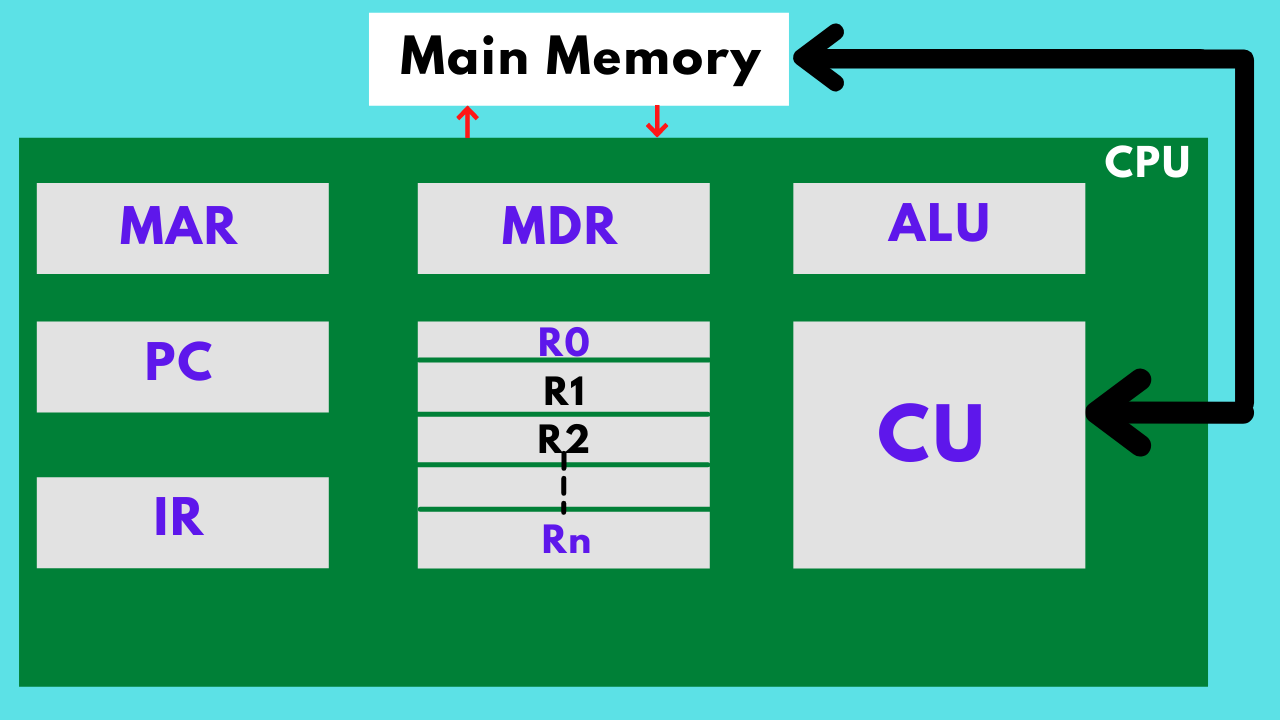
This register stores the memory address location to be retrieved later. Both MAR and MDR are used to call it.
Memory data registers
MDR
This is where all the information expected to be written or read from a specific memory location is saved.
General-purpose register
GPR
It consists of a sequence of registers that generally begin at R0 and end at Rn - 1. These registers are used to hold any type of temporary data supplied to them during the execution of a task.
More GPR enhances processing speed by allowing the register to register addressing.
Program counter
PC
These registers are used to maintain track of a programme that is being performed or is being executed. The memory address of the next instruction to be fetched is stored in these registers.
When the preceding instruction has been successfully performed, PC points to the address of the next instruction to be retrieved from the main memory. The Program Counter (PC) may also count the number of instructions in a program.
The architecture determines the rate of PC advancement in use. When using a 32-bit architecture, the PC increases by 4 each time the next instruction is requested.
Instructions registers
IR
The information is going to be executed stored in instruction registers. These registers are used to fetch and keep the system's direct instructions.
The processor will begin executing the set instructions after the instructions have been put in registers, and the PC will point to the next set of instructions to be performed.
Condition code registers
These have several flags that show the current state of activities. These registers set the flags if the operation resulted in a zero or negative value.
Temporary registers
TR
It stores temporary data.
Input registers
INPR
Contains the input character.
Output registers
OUTR
Contains the output character.
Index registers
BX
This register stores and translates the values and numbers in the address information into effective addresses. Base registers are another name for them.
These are used to alter the operand address during execution and are also referred to as BX.
Memory buffer register
MBR
Memory buffer registers hold data or memory commands used to write to the disk. This primary function is to save the called data from memory.
MBR and MDR are pretty similar.
Stack control registers
SCR
A stack is a collection of memory locations where data is stored and accessed in a predetermined order. Stack control registers are primarily used to manage stacks in the computer, and they are also known as last-in, first-out (LIFO). We can only get a stack at the second place after retrieving the first one, and they are also known as last in first out (LIFO).
Stack control registers are designated by the letters SP - BP. DI, SI, SP, and BP can also be used as 2-byte or 4-byte registers.
EDI, ESI, ESP, and EBP, are all four-byte registers.
Flag register
FR
Flag registers are used to signal a particular situation. The registered flag is 1 to 2 bytes in size, and each registered flag is compounded into 8 bits. Each registered flag defines a condition or a flag.
The data is divided into eight bits for storage.
Flag registers in their most basic form -
Zero flags
Carry flag
Parity flag
Sign flag
Overflow flag
Segment register
SR
It stores the address for the memory.
Data register
DR
It stores memory operand.
Purpose of a General Register Organization
A general register organization (GRO) is like a rulebook for a company or group. It specifies precise regulations that everyone must follow to keep things operating smoothly. It's important because it helps everyone track the proper management, especially when there are laws to obey. Having a GRO puts all the critical details in one spot, simplifies verifying, and ensures accuracy. It is helpful when outside people check everything, like during an audit. People's roles, money transactions, and how things are done are all considered when making a GRO. GRO makes things run better, saves money, and works well for any group.
How to Effectively Use General Register Organization
Understanding and making the most of the general register organization is like having a secret recipe to speed up your computer. It helps manage its resources and boosts performance. Think of registers as super-fast pockets in your computer's brain that handle tasks lightning-fast. They're quicker than regular memory but hold less. Know the types of registers - like general-purpose, address, index, and status ones - and how they merge with memory. Using these prevents overwhelming memory and allows tasks to work together smoothly, like a well-coordinated team. It makes the computer faster and works even better. Just pick the correct instructions for each task, like using the right tools for cooking, to keep things smooth and fast.
Frequently Asked Questions
What do general registers do?
General registers in a CPU are used for various tasks, including temporary data storage, arithmetic and logic operations, memory addressing, and operand manipulation during program execution. They facilitate efficient and fast processing of data and instructions.
What is the register organization of the processor?
The register organization of a processor comprises general-purpose registers for data manipulation, program counter (PC) for instruction addressing, stack pointer (SP) for managing the stack, and status flags for operation outcomes.
What are the three types of CPU organization?
The three types of CPU organization are:
Single Accumulator Organization: Uses one register for most operations.
General Register Organization: Employs multiple general-purpose registers.
Stack Organization: Utilizes a stack for data storage and manipulation.
Conclusion
In this article, we have discussed general register organization. We have also addressed the bus system in which we have seen 7 CPU registers. We have discussed what a control word is and the need for that. In most cases, a CPU contains seven general registers. The register organization diagram depicts how registers are chosen, and the data flow between registers and ALUs.








 7+ registered

