Table of contents
1.
Introduction
2.
List of GWT Charts
3.
Getting started with GWT Charts
3.1.
Requirements
3.2.
Getting the code
3.2.1.
Standalone
3.2.2.
Maven
3.2.3.
Project Setup
4.
Examples
4.1.
Bar Chart
4.2.
Line Chart
5.
Frequently Asked Questions
5.1.
What is GWT?
5.2.
What is Google Chart Java Module?
5.3.
What are the features of the Google Chart Java Module?
5.4.
What kind of charts can be drawn using GWT?
6.
Conclusion 
Last Updated: Mar 27, 2024
Medium

GWT Charts

Career growth poll
Do you think IIT Guwahati certified course can help you in your career?

Introduction

Google Charts is a pure JavaScript-based charting library that adds interactive charting capability to web applications. It can display a wide variety of charts. SVG draws charts in standard browsers such as Chrome, Firefox, Safari, and Internet Explorer (IE). VML is used to draw graphics in legacy IE 6.

Google Chart Java Module is an open-source java-based library that can be used in conjunction with GWT widget libraries to provide elegant and feature-rich Google Charts visualizations within a GWT application. There are chapters that go over all of the basic components of Google Charts and provide appropriate examples within a GWT application.

List of GWT Charts

Google Charts library provides the following types of charts:

Line Charts Used to draw line/spline-based charts.
Area Charts Used to draw area-wise charts
Pie Charts Used to draw pie charts
Sankey Charts, Scatter Charts, Stepped area charts, Table, Timelines, TreeMap, Trendlines Used to draw scattered charts
Bubble Charts Used to draw bubble-based charts
Dynamic Charts Used to draw dynamic charts where users can modify charts
Combinations Used to draw combinations of a variety of charts
3D Charts Used to draw 3D charts
Angular Gauges Used to draw speedometer-type charts
Heat Maps Used to draw heat maps
Tree Maps Used to draw treemaps

Getting started with GWT Charts

Requirements

Following are some requirements to get started with GWT Charts: 

  1. Java 1.7 or above
  2. GWT 2.x (2.6 preferred)

Getting the code

Standalone

Download the latest jar version from the project download page.

Include the jar in your project classpath

Maven

Since version 0.9.8, gwt-charts are available in the Central Repository.

You need to add the following dependency to your pom.xml file:

<dependency> 
	<groupId>com.googlecode.gwt-charts</groupId>
 	<artifactId>gwt-charts</artifactId> 
 	<version>0.9.10</version>
</dependency>

Project Setup

Inherit the module com.googlecode.gwt.charts.Charts in the your XML definition file ```xml

Call the `com.googlecode.gwt.charts.client.ChartLoader` class for loading the appropriate packages into your GWT module, **before** you use any type of chart. 

Checkout the following snippet: java

ChartLoader chartLoader = new ChartLoader(ChartPackage.CORECHART); 
chartLoader.loadApi(new Runnable() 
{ @Override public void run()
 { // call method to create and show the chart } 
}); ```
You can also try this code with Online Java Compiler
Run Code

Examples

Bar Chart

In this code, we implement the Bar chart where bar width is represented by coffee produced in the year.

Source Code

package com.googlecode.gwt.charts.showcase.client.corechart;


import com.google.gwt.dom.client.Style.Unit;
import com.google.gwt.user.client.ui.DockLayoutPanel;
import com.googlecode.gwt.charts.client.ChartLoader;
import com.googlecode.gwt.charts.client.ChartPackage;
import com.googlecode.gwt.charts.client.ColumnType;
import com.googlecode.gwt.charts.client.DataTable;
import com.googlecode.gwt.charts.client.corechart.BarChart;
import com.googlecode.gwt.charts.client.corechart.BarChartOptions;
import com.googlecode.gwt.charts.client.options.HAxis;
import com.googlecode.gwt.charts.client.options.VAxis;


public class BarChartExample extends DockLayoutPanel {
private BarChart chart;


public BarChartExample() {
super(Unit.PX);
initialize();
}


private void initialize() {
ChartLoader chartLoader = new ChartLoader(ChartPackage.CORECHART);
chartLoader.loadApi(new Runnable() {


@Override
public void run() {
// Create and attach the chart
chart = new BarChart();
add(chart);
draw();
}
});
}


private void draw() {
String[] countries = new String[] { "Austria", "Bulgaria", "Denmark", "Greece" };

int[][] values = new int[][] { { 1336060, 1538156, 1576579, 1600652, 1968113, 1901067 },
{ 400361, 366849, 440514, 434552, 393032, 517206 },
{ 1001582, 1119450, 993360, 1004163, 979198, 916965 },
{ 997974, 941795, 930593, 897127, 1080887, 1056036 } };
int[] years = new int[] { 2003, 2004, 2005, 2006, 2007, 2008 };


// Prepare the data
DataTable dataTable = DataTable.create();
dataTable.addColumn(ColumnType.STRING, "Year");
for (int i = 0; i < countries.length; i++) {
dataTable.addColumn(ColumnType.NUMBER, countries[i]);
}
dataTable.addRows(years.length);
for (int i = 0; i < years.length; i++) {
dataTable.setValue(i, 0, String.valueOf(years[i]));
}
for (int col = 0; col < values.length; col++) {
for (int row = 0; row < values[col].length; row++) {
dataTable.setValue(row, col + 1, values[col][row]);
}
}


// Set options
BarChartOptions options = BarChartOptions.create();
options.setFontName("Tahoma");
options.setTitle("Yearly Coffee Consumption by Country");
options.setHAxis(HAxis.create("Cups"));
options.setVAxis(VAxis.create("Year"));


// Draw the chart
chart.draw(dataTable, options);
}
}
You can also try this code with Online Java Compiler
Run Code


Output

Bar line GWT output

Line Chart

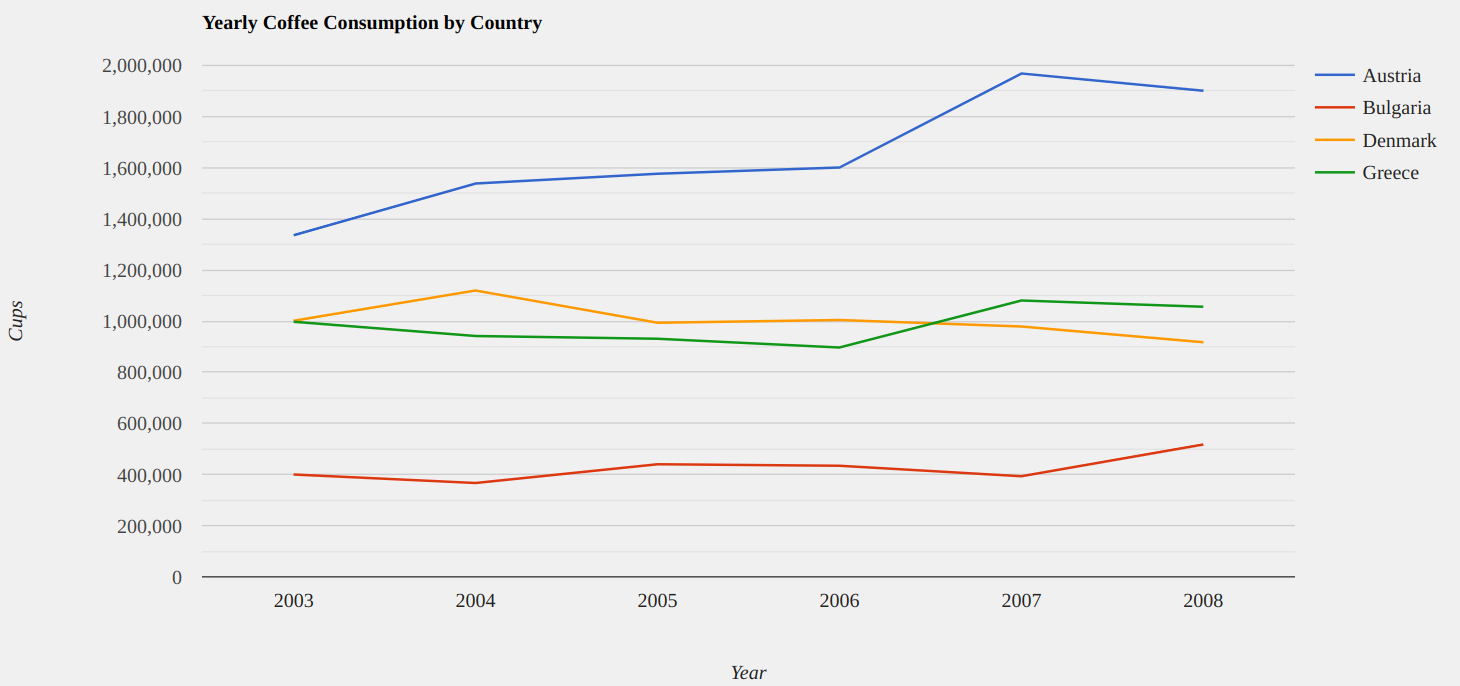
In this code, we implement the Line chart representing Yearly Coffee Consumption by Country.

Source code

package com.googlecode.gwt.charts.showcase.client.corechart;


import com.google.gwt.dom.client.Style.Unit;
import com.google.gwt.user.client.ui.DockLayoutPanel;
import com.googlecode.gwt.charts.client.ChartLoader;
import com.googlecode.gwt.charts.client.ChartPackage;
import com.googlecode.gwt.charts.client.ColumnType;
import com.googlecode.gwt.charts.client.DataTable;
import com.googlecode.gwt.charts.client.corechart.LineChart;
import com.googlecode.gwt.charts.client.corechart.LineChartOptions;
import com.googlecode.gwt.charts.client.options.HAxis;
import com.googlecode.gwt.charts.client.options.VAxis;


public class LineChartExample extends DockLayoutPanel {
private LineChart chart;


public LineChartExample() {
super(Unit.PX);
initialize();
}


private void initialize() {
ChartLoader chartLoader = new ChartLoader(ChartPackage.CORECHART);
chartLoader.loadApi(new Runnable() {


@Override
public void run() {
// Create and attach the chart
chart = new LineChart();
add(chart);
draw();
}
});
}


private void draw() {
String[] countries = new String[] { "Austria", "Bulgaria", "Denmark", "Greece" };

int[][] values = new int[][] { { 1336060, 1538156, 1576579, 1600652, 1968113, 1901067 },
{ 400361, 366849, 440514, 434552, 393032, 517206 },
{ 1001582, 1119450, 993360, 1004163, 979198, 916965 },
{ 997974, 941795, 930593, 897127, 1080887, 1056036 } };
int[] years = new int[] { 2003, 2004, 2005, 2006, 2007, 2008 };


// Prepare the data
DataTable dataTable = DataTable.create();
dataTable.addColumn(ColumnType.STRING, "Year");
for (int i = 0; i < countries.length; i++) {
dataTable.addColumn(ColumnType.NUMBER, countries[i]);
}
dataTable.addRows(years.length);
for (int i = 0; i < years.length; i++) {
dataTable.setValue(i, 0, String.valueOf(years[i]));
}
for (int col = 0; col < values.length; col++) {
for (int row = 0; row < values[col].length; row++) {
dataTable.setValue(row, col + 1, values[col][row]);
}
}


// Set options
LineChartOptions options = LineChartOptions.create();
options.setBackgroundColor("#f0f0f0");
options.setFontName("Tahoma");
options.setTitle("Yearly Coffee Consumption by Country");
options.setHAxis(HAxis.create("Year"));
options.setVAxis(VAxis.create("Cups"));


// Draw the chart
chart.draw(dataTable, options);
}
}
You can also try this code with Online Java Compiler
Run Code


Output

Line Chart GWT output image

Similarly, we can draw various other kinds of charts using GWT. We've learned a lot of new concepts up to this point, so let's look at some Frequently Asked Questions related to them.

Frequently Asked Questions

What is GWT?

An open-source collection of tools known as the Google Web Toolkit (GWT Web Toolkit) enables web developers to build and maintain JavaScript front-end applications.

What is Google Chart Java Module?

Google Chart Java Module is an open-source java-based library that can be used in conjunction with GWT widget libraries to provide elegant and feature-rich Google Charts visualizations within a GWT application. There are chapters that go over all of the basic components of Google Charts and provide appropriate examples within a GWT application.

What are the features of the Google Chart Java Module?

Features of the Google chart java module are compatibility, free-to-use, light-weight, dynamic, multiple axes, simple configurations, and so on.

What kind of charts can be drawn using GWT?

Following charts can be drawn using GWT: Annotation, Area, Bar, Bubble, Calendar, Candlestick, Geo chart, Histogram, Map, Pie chart, etc.

Conclusion 

In this article, we have extensively discussed GWT Charts and learned about them using examples. 

After reading about GWT Charts, are you not feeling excited to read/explore more articles on the topic of GWT? Don't worry; Coding Ninjas has you covered. To learn, see the GWT deck panel widgetGWT tab panel widget, and GWT Composite widget.
Check out this problem - Largest Rectangle in Histogram

Refer to our Guided Path on Coding Ninjas Studio to upskill yourself in Data Structures and AlgorithmsCompetitive ProgrammingJavaScriptSystem Design, and many more! 

Conclusion Image
Live masterclass