Do you think IIT Guwahati certified course can help you in your career?
Introduction
Java and Javascript are both widely used languages in web development. Many times developers want to integrate both these languages into their projects. This poses a dilemma as we do not have many features which complete this requirement. However, GWT JSNI provides a way to integrate Java and Javascript libraries in a clean and efficient way.
In the following article, we will dive deeper into GWT JSNI and explore its functionality, usage, and methods. So let's get started right away.
GWT JSNI is used to address issues like the necessity to combine GWT with manually written JavaScript or a JavaScript library from a third party. Often, we need to access basic browser features that the GWT class APIs do not expose.
The inline assembly code's web equivalent, JSNI, can be used in a variety of ways, including
Directly implementing a Java method in JavaScript.
Wrap existing JavaScript in type-safe Java method signatures.
Java code can call JavaScript code and vice versa.
Throw exceptions between Java and JavaScript.
Java fields can be read and written from JavaScript.
Debug Java source (with a Java debugger) and JavaScript in development mode (with a script debugger).
Declaration of a Native Method
package com.xyz.client;
public class Alert {
public static native void alert(String msg)
}
You can also try this code with Online Java Compiler
The caller is unable to determine if the procedure is native or not. This allows you some flexibility in altering how the approach is applied.
Calling Java from JSNI
It is more difficult than using Java to call JSNI. Consider the scenario when we need to access a field or call a method in an object that we send to a JSNI method. We must understand how the GWT compiler handles the names of Java fields and methods. It is beneficial to use your own JavaScript code to access fields.
Accessing Java fields
Syntax
obj.@class::field
You can also try this code with Online Java Compiler
obj: This is the instance of the object being referred to. Remove the instance expression and the trailing period from static variables.
class: This is the name of the class in which the field is declared, fully qualified (or a subclass thereof).
field: The name of the field being accessed is given here.
Invoking Java methods
Like how fields are accessed, invoking methods require the method signature to be supplied. Java methods can overload, meaning two methods with the same name but different argument lists can exist.
Syntax
obj.@class::method(sig)(args)
You can also try this code with Online Java Compiler
obj: This is the instance of the object being referred to. The instance expression and the trailing period should not be used for static methods.
class: The method is declared in this (or a subclass thereof).
method: This word refers to the name of the method being invoked.
GWT JSNI method signatures
The only difference between JSNI and JNI method signatures is the omission of the method return type. Type signatures are shown in the following table:
GWT JSNI Example
The code explains how to pass Java objects, integers, texts, and booleans into JavaScript. It also demonstrates how a Java object that was provided in can be called by a JavaScript method.
public class CN {
/** Passing a Java numerical primitive */
public static void testingCNNumeric() {
int x = 24;
isNumeric(x);
}

private static native void jsNumeric(int x)
/** Passing a String */

public static void testingCNString() {
String a = "my string";
isString(a);
}

private static native void isString(String s)

/** Passing a boolean */
public static void testingCNBoolean() {
boolean c = true;
jsBoolean(c);
}

private static native void isBoolean(boolean b)

/** Passing an arbitrary Java Object */

public static void testingCNObject() {
MyJavaObject obje = new MyJavaObject();
jsObject(obje);
}

private static native void isObject(MyJavaObject obje)
}
You can also try this code with Online Java Compiler
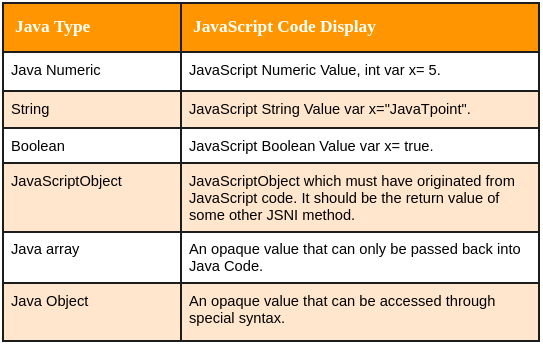
Datatypes and their JSNI code representations are listed in the following table.
Frequently Asked Questions
What is a GWT format?
The ability to switch between several locales for formatting dates and numbers at runtime distinguishes the GWT classes from the common Java classes. Only the logic required for the current locale is loaded into the application in GWT using the deferred binding approach.
What is JSNI?
By enabling you to incorporate JavaScript directly into the Java source code of your application, the JavaScript Native Interface (JSNI) feature of GWT can address both of these issues. Java source is translated into JavaScript via the GWT compiler. Mixing handwritten JavaScript into your Java source code can sometimes be helpful.
What are the features of GWT?
Asynchronous remote procedure calls, history management, bookmarking, UI abstraction, internationalization, and cross-browser portability are just a few of the reusable methods that GWT highlights for basic web development tasks.
Is GWT still supported?
Running the GWT compiler or server-side tools on Java 7 is no longer supported. For this release, the GWT distribution is still compiled to support Java 7, although there are no assurances that this will function. Future iterations will generate Java 8+ bytecode.
What are the advantages of GWT?
If you are a seasoned Java programmer with knowledge of Swing or AWT, selecting GWT should be simple. With this foundation, the learning curve is the shortest. Even if you lack familiarity with Java GUI development, your years spent dealing with server-side Java will be helpful when creating GWT applications.
Conclusion
In this article, we have extensively discussed the GWT JSNI. We began with a brief introduction to the GWT JSNI, followed by its declarations, calls, and examples for a better understanding of the concept.










 7+ registered

