Do you think IIT Guwahati certified course can help you in your career?
Introduction
The process of evaluating and verifying that a software product or application does is known as Software testing. Every product or software needs to go through all phases of testing before launching in order to prevent future glitches and bugs. But, testing, again and again, wastes the time and effort. To overcome this, one can make use of automation testing tools like Katalon Studio.
This article focuses on the Hybrid mobile apps testing overview in Katalon Studio.
What is Katalon Studio
Katalon Studio is a comprehensive tool for automating web and mobile app testing. This tool offers a variety of powerful features that help in overcoming common challenges in web UI test automation, such as pop-up, iFrame, and wait time.
This user-friendly and adaptable solution supports testers in testing better, working faster, and releasing high-quality software.
Key Features of Katalon Studio
Simple deployment: First, It is a single cohesive deployment package that includes everything you need to deploy a powerful test automation tool.
Setup is quick and simple: Second, not only does it provide a simple installation, but Katalon Studio also makes it simple to configure the environment.
Better and Faster Results: Third, it includes built-in templates with clear tutorials to help testers in quickly creating and running automation test scripts. As a result, they can complete every step of the project setup, test creation, execution, report generation, and maintenance with speed and efficiency.
Modes that are adaptable: Fourth, novice testers can use recording and keywords to create automation tests, whereas expert testers have a full IDE to build advanced scripts.
Now that we have walked through the key features of Katalon studio, let us now see how its works.
Excited? 🤯
Let's start:
What is Mobile App Testing?
Mobile application (app) testing is the process of verifying whether an app designed for handheld devices meets certain mobile testing requirements.
“Mobile app" refers to three types of software: native apps, mobile web apps, and hybrid apps.
Mobile app testing is a requirement in all software development processes before an app is made available to the public. This process makes sure that the finished product runs smoothly for the end users.
In this section, we will be focusing on Hybrid Mobile app Testing in Katalon Studio:
Hybrid Mobile App Testing
Before we move forward with the testing, let us first understand what are Hybrid apps.
Hybrid apps combine native and web applications. Hybrid apps have website functionality within a mobile app. Since it is an adapted application, its performance and user interface might not be as good as those of native apps. But it is easily accessible. Mobile hybrid app testing is a little quicker and simpler.
Katalon Studio partially supports hybrid mobile apps.
(**) Here, Katalon studio provides a few workarounds:
Capture elements in hybrid Android apps.
Flutter-based application testing with custom SetText keyword.
In this article, we will be discussing Capture elements in hybrid Android apps.
Capture Elements in Hybrid Android Apps
Using Appium and Chrome Devtools, this section demonstrates how to capture Android hybrid mobile elements in WebView.
1: Enable WebView debugging for hybrid Android apps
To make this possible, set the android.webkit.WebView element's setWebContentsDebuggingEnabled property to true.
2: Install ChromeDriver for Appium.
Appium installation includes the most recent version of ChromeDriver by default. However, if your testing devices are running a different version of the Chrome browser, you should download the compatible version with Chrome on your testing devices. ChromeDriver can be downloaded from the Chromium website: ChromeDriver.
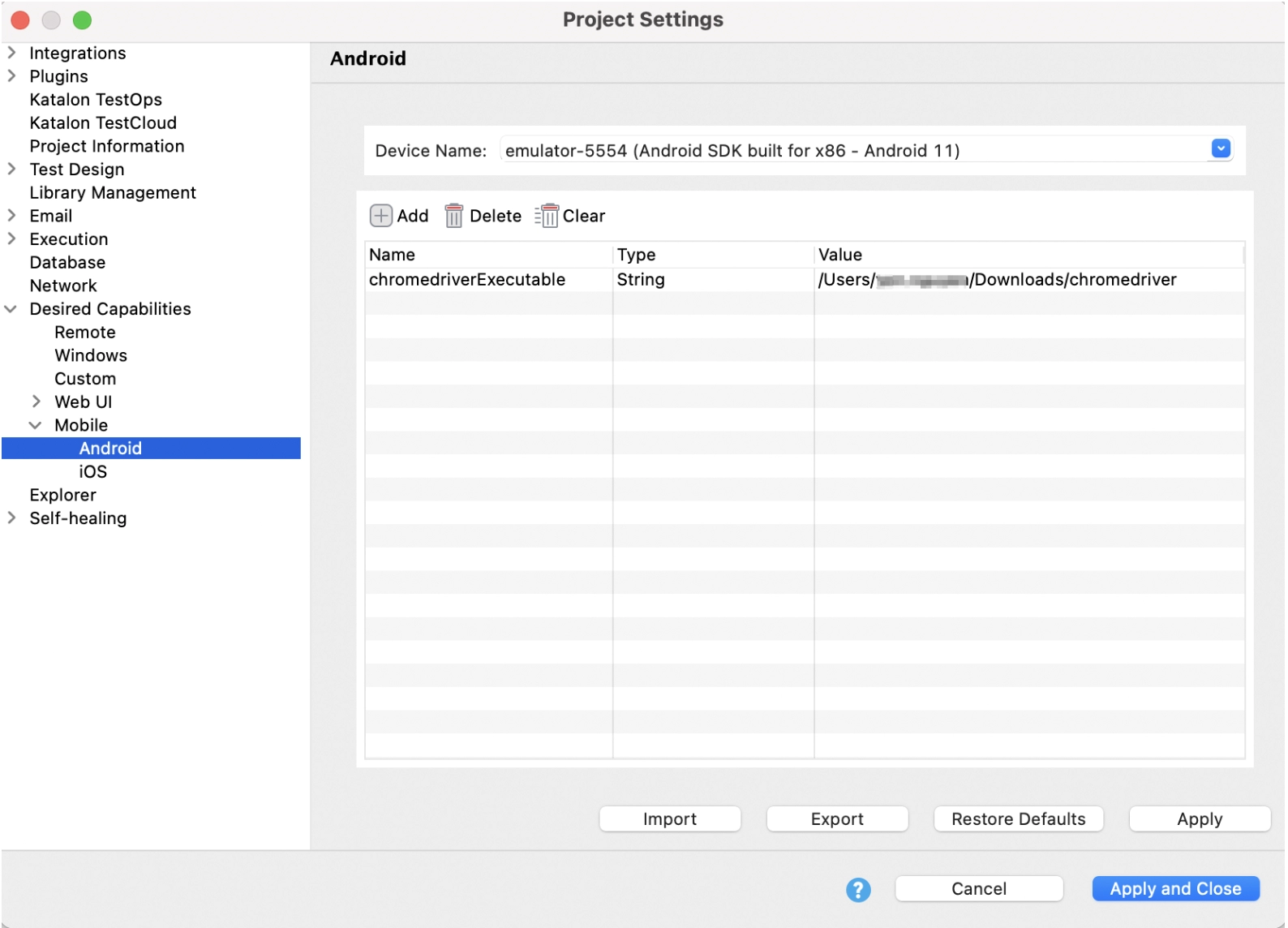
=> In the session, specify the ChromeDriver version. Add the following property to Project > Settings > Desired Capabilities > Mobile > Android:
Name
Type
Value
chromedriverExecutable
String
<path-to-your-chromedriver> (**)
CREDIT: www.katalon.com
Now that we have done with the installation of the required tools, let us now quickly jump to the Capture part.
For that, we have mentioned a step-by-step explanation that you can follow to capture elements in Hybrid Android apps.
Step 1: Create a new test case. Go to File > New > Test Case.
Step 2: In the blank test case page's main toolbar, click Record Mobile and then select Android Devices.
CREDIT: www.katalon.com
Step 3: Configure the information in the Configuration section of the pop-up Mobile Recorder dialogue, then click Start to begin recording the application under test (AUT).
CREDIT: www.katalon.com
Note: If your application starts in a WebView and you don't want the AUT to open in the NATIVE APP context, go to Project > Settings > Desired Capabilities > Mobile > Android and set autoWebview to true.
With this option enabled, the AUT automatically enters the WEBVIEW context when the session begins.
Step 4: Then, launch Chrome and navigate to chrome:/inspect/#devices. The chrome:/inspect page shows the following:
Your Android testing device's name.
The Chrome version on the device, with the version number in parentheses.
A list of WebViews on your device that is debug-enabled.
To open a Chrome Devtools instance, click Inspect. Examine WebView elements with Chrome Devtools.
CREDIT: www.katalon.com
Step 5: Back to Katalon Studio. Using the inspected elements from Step 4, create and automate objects in your test.
And, that’s all! 😃
Frequently Asked Questions
Which is better among Katalon Studio and Selenium-based Frameworks?
Katalon Studio hides all the technical complexities. It offers a user-friendly UI in manual mode (users can drag-drop, select keywords, and create test steps using test objects). It also keeps the essential tools for more technical users. With Selenium, users have to go through technical guidelines for their API and integrate them into with an IDE and a preferred programming language.
Is Katalon challenging to comprehend?
Katalon Studio is a straightforward automation testing tool that does not require advanced programming skills to write automated tests. It also includes a scripting mode for more advanced users and test cases.
Is Katalon suitable for API testing?
Yes, It supports various types of testing, including API, Web UI, and mobile. It is cross-platform and works with a variety of mobile devices. It is compatible with the majority of popular operating systems and browsers.
Why Katalon?
Due to its various features such as Business Results, Speed, Scalability & Flexibility, Visibility, AI and innovation, ROI and affordability, and so forth, katalon is the best choice for automation testing.
Conclusion
To conclude the article, we’ve discussed the Katalon Studio and its key features. We’ve explored the Hybrid Mobile apps testing overview. We have looked at how katalon studio capture elements in hybrid android apps.
It’s time for you to play and test your hybrid apps and do some amazing stuff. Till that time, you can have a look at our other amazing articles on Katalon Studio.








 1+ registered

