Do you think IIT Guwahati certified course can help you in your career?
Introduction
Input-Output Interface is a method of transferring information between the internal storage devices. i.e. memory and the external peripheral device. A peripheral device is a device that provides both input/output for the computer, it is also known as an Input-Output device. This input-output interface in a computer system exists in a particular hardware component between the system's bus and peripherals. This component is known as the "interface unit".
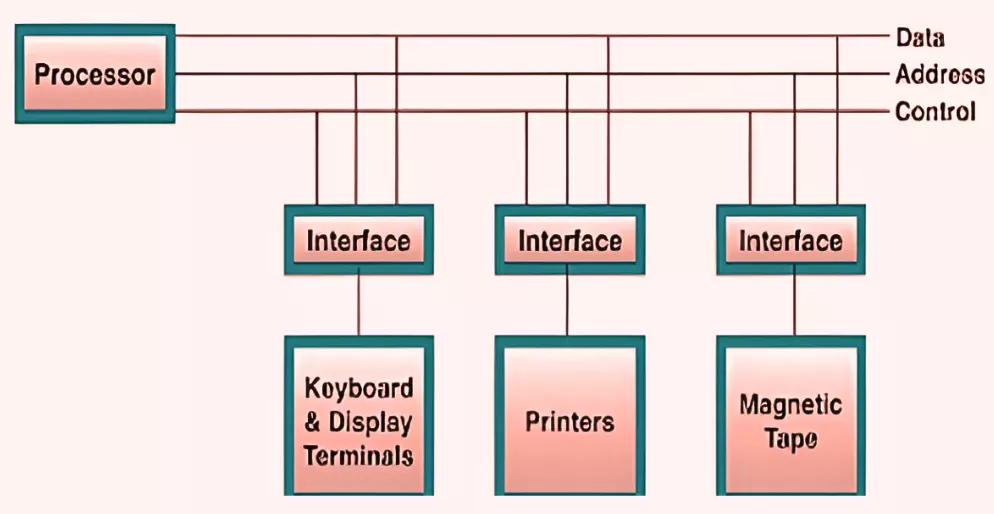
The below figure shows a typical input-output interface between the processor and different peripherals:
In the above figure, we see that every peripheral device has an interface unit associated with it.
For example, A mouse or keyboard that provides input to the computer is called an input device, while a printer or monitor that provides output to the computer is called an output device.
An Input-Output (I/O) Interface is a hardware or software system that allows communication between the CPU and external devices like a keyboard, printer, or disk. It plays a key role in managing the data flow between internal system components and peripheral devices.
Acts as a bridge between the CPU and peripherals by translating CPU commands into signals that devices can understand.
Uses I/O buses, including:
Data Bus – carries actual data.
Control Bus – carries control signals (read/write).
Address Bus – carries the address of the I/O device involved.
Performs address decoding to identify which device the CPU is trying to communicate with. Each device is assigned a unique address.
Manages control signals like read, write, and interrupt. These signals ensure the correct operation is triggered at the right time.
Ensures only the selected device is activated using a combination of control lines and address decoding.
Handles data transfer efficiently by coordinating timing between the CPU and the peripheral devices.
This interface is vital in computer architecture as it allows multiple devices to interact with the CPU smoothly and without conflict.
Why Input-Output Interface?
We require the input-output Interface because many differences exist between each peripheral and the central computer while transferring data. Some significant differences between the peripheral and the CPU are:
The nature of the CPU is electronic, and that of the peripheral device is electro-mechanical and electromagnetic. So, we can see many differences in the mode of operation of both the CPU and peripheral devices.
We have a synchronization mechanism because the data transfer rate is slower in peripheral devices than CPU.
In peripheral devices, data codes and formats differ from the format in the CPU.
The operating modes of peripheral devices are different, and each can be controlled so as not to disturb the operation of any other peripheral devices connected to the CPU.
The primary functions of the input-output Interface are listed below:
It can synchronize the operating speed of the CPU to peripherals.
It selects the peripheral appropriate for the interpretation of the input-output devices.
It provides signals like timing and control signals.
In this, data buffering may be possible through the data bus.
It has various error detectors.
It can convert serial data into parallel and vice versa.
It can convert digital data into analog signals and vice versa.
Types of Input-Output Interfaces with Examples
Programmed I/O
In programmed I/O, the CPU is fully responsible for handling all input and output operations. It constantly checks the status of an I/O device and transfers data when the device is ready.
This method wastes CPU time because the processor stays busy in checking, even if the device is not ready.
Example: A keyboard input system where the CPU keeps checking if a key is pressed before reading it.
Interrupt-Driven I/O
In Interrupt-Driven I/O, the CPU performs other tasks and waits for a signal (interrupt) from an I/O device when it's ready to transfer data. This reduces CPU idle time.
Once the device sends an interrupt, the CPU pauses its current task, handles the I/O, and then resumes.
Example: USB devices like a mouse or external keyboard send interrupts to notify the CPU when action is needed.
Direct Memory Access (DMA)
DMA allows peripherals to transfer data directly to/from memory without involving the CPU in each byte of transfer. This speeds up data transfer and reduces CPU load.
The CPU only sets up the transfer; after that, the DMA controller takes over and completes the process.
Example: File transfers between a hard drive and RAM happen through DMA for faster performance.
Input-Output Bus and Interface Modules
I/O buses are the routes used for peripheral devices to interact with the processor. A typical connection of the I/O buses to I/O devices is displayed in the figure.
The I/O buses include control lines, address lines, and data lines. In any general computer, the printer, keyboard, magnetic disk, and display terminal are commonly connected. Every peripheral unit has an interface associated with it. Every interface decodes the address and control received from the I/O bus.
It can describe the control and address received from the computer peripheral and supports signals for the computer peripheral controller. It can also conduct the transfer of information or data between peripheral and processor and can also integrate the data flow.
The I/O buses are linked to all the peripheral interfaces from the computer processor. The processor locates a device address on the address line for interaction with a specific device. Every interface contains an address decoder that monitors the address lines, attached to the I/O bus.
When the interface recognizes the address, it activates the direction between the bus and the device that it controls. The interface will disable the peripherals whose address is not equivalent to the address in the bus.
Input-output (I/O) interfaces play a key role in improving system performance by managing how data moves between the CPU and external devices. They help reduce the CPU’s workload and keep the system running smoothly.
Efficient Data Flow Management: I/O interfaces control how data is transferred between the processor and peripherals. This ensures that data moves at the right time and in the correct format, reducing delays and improving speed.
Reduced CPU Load Using DMA: Direct Memory Access (DMA) allows devices to transfer data directly to memory without involving the CPU. This frees up the processor to perform other tasks, which improves the overall system performance.
Support for Multitasking: I/O interfaces allow multiple devices to work at the same time. For example, you can download a file while typing a document. The CPU doesn’t need to switch constantly between devices, making multitasking more efficient.
Buffering and Temporary Storage: Interfaces often use buffers to hold data temporarily during transfer. This helps prevent data loss when devices operate at different speeds and ensures smooth communication.
Device Synchronization and Error Handling: I/O interfaces help coordinate communication between the CPU and devices. They manage timing issues and detect transfer errors to keep the system stable and error-free.
Frequently Asked Questions
How can we resolve the differences between the CPU and the peripheral?
We have already seen the differences between the peripherals and the CPU. We can resolve these differences with an input-output interface. It contains various components that perform some vital functions for smooth data transformation between CPU and Peripherals.
How does an input-output Interface exists in a computer system?
The input-output interface in a computer system exists in a particular hardware component between the system's bus and peripherals.
What are the commands that an interface receives?
An interface can receive any of the following commands:
Control − Command control is given to activate the computer peripheral and to inform its next task.
Status − The status command may test multiple test conditions in the peripheral and the interface.
Data Output − Data output command can create the interface counter.
Data Input − Data input command is opposite to the data output command.
What are I/O standard for I/O interface?
The interface signals can be bidirectional or unidirectional, single-ended or differential, and can follow one of the following I/O standards:
GTL (gunning transceiver logic).
HSTL (high-speed transceiver logic).
LVCMOS (low-voltage CMOS).
LVTTL (low-voltage transistor-transistor logic).
Conclusion
In this article, we have extensively discussed the Input-output interface, its function, and usage. I/O Bus and Interface Modules were also discussed.







 1+ registered

