Do you think IIT Guwahati certified course can help you in your career?
Introduction
An intersection is an area where two or more objects cross each other or intersect. In JavaFX, we tend to work with 2d objects more often, so today we are going to learn about how can we apply intersection operations to 2d objects in JavaFX.
JavaFX Intersection Operation
Intersection operation takes two or more objects as input and returns the region where they intersect.
We can use the intersect() method to perform an intersection operation on the objects. We have to provide the class name while calling it because it is a static method.
Syntax
Shape result = Shape.intersect(shape1, shape2);
Where shape1 and shape2 are being performed intersection operation and the output is stored in result shape.
Example
Let’s look at an example to have a better understanding.
import javafx.application.Application;
import javafx.scene.Scene;
import javafx.stage.Stage;
import javafx.scene.Group;
import javafx.scene.paint.Color;
import javafx.scene.shape.Circle;
import javafx.scene.shape.Shape;


public class ExampleIntersection extends Application {
    @Override
    public void start(Stage stage) {
        //Creating Circle 1
        Circle circle1 = new Circle();
        circle1.setCenterX(250.0f);
        circle1.setCenterY(125.0f);
        circle1.setRadius(100.0f);


        //Creating Circle 2
        Circle circle2 = new Circle();
        circle2.setCenterX(350.0f);
        circle2.setCenterY(125.0f);
        circle2.setRadius(100.0f);


        //Creating Circle 3
        Circle circle3 = new Circle();
        circle3.setCenterX(300.0f);
        circle3.setCenterY(225.0f);
        circle3.setRadius(100.0f);


        // Performing intersection operation on all the three circles
        Shape temp = Shape.intersect(circle1, circle2);
        Shape shape=Shape.intersect(circle3,temp);


        // Setting the fill color to the result
        shape.setFill(Color.LIGHTCORAL);


        // Creating a Group object
        Group root = new Group(shape);


        // Creating a scene object
        Scene scene = new Scene(root, 600, 300);


        // Setting title to the Stage
        stage.setTitle("Intersection Example");


        // Adding scene to the stage
        stage.setScene(scene);


        // Displaying the contents of the stage
        stage.show();
    }


    public static void main(String args[]) {
        launch(args);
    }
}
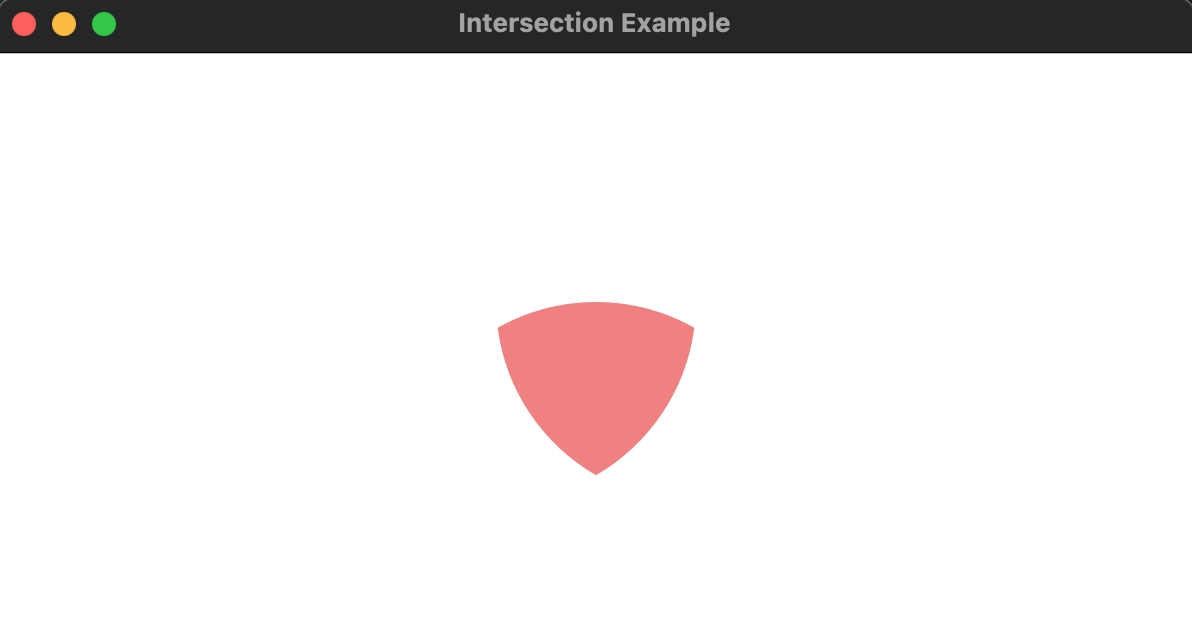
Output:
Here, we have created three circles and taken their intersection.
Frequently Asked Questions
What is the main purpose of JavaFX?
JavaFX is a set of graphics and media packages that enable developers to design, test, debug, and deploy sophisticated client applications that perform consistently across several platforms.
Which method is used to launch the JavaFX program?
launch() method is used to launch the JavaFX application.
Which class contains the intersect() method in JavaFx?
The shape class in JavaFX contains the intersect() method to take the intersection of shapes/2d objects in JavaFX.
Conclusion
In this article, we have extensively discussed the JavaFX Intersection operation with the help of an example. We hope that this blog has helped you enhance your knowledge of java and JavaFX and if you would like to learn more about java, check out our articles, java archives, JavaFX - Coding Ninjas Coding Ninjas Studio.
If you think you are ready for the tech giants company, check out the mock test series on code studio.
You can also refer to our Guided Path on Coding Ninjas Studio to upskill yourself in domains like Data Structures and Algorithms, Competitive Programming, Aptitude, and many more!. You can also prepare for tech giants companies like Amazon, Microsoft, Uber, etc., by looking for the questions asked by them in recent interviews. If you want to prepare for placements, refer to the interview bundle. If you are nervous about your interviews, you can see interview experiences to get the ideas about these companies' questions.
Nevertheless, you may consider our premium courses to give your career an edge over others!
Do upvote our blogs if you find them helpful and engaging!








 7+ registered

