Do you think IIT Guwahati certified course can help you in your career?
Introduction
The Union Operation returns the combined area of two or more shapes. Union operations can be performed on shapes using the union() method. In this article, we will learn about the Union Operation for 2D shapes in detail. Let us dive into the topic.
Union Operation
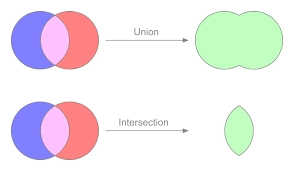
As we read in the previous section, the Union operation returns the combined region of two or more shapes, as shown in the figure below. In comparison, the intersection operation takes two or more shapes as inputs and returns the intersection area between them, as shown below.
The union() method performs the Union operation. Because this is a static method, you must call it by its class name (Shape or its subclasses).
Shape shape = Shape.subtract(circle1, circle2);
Example
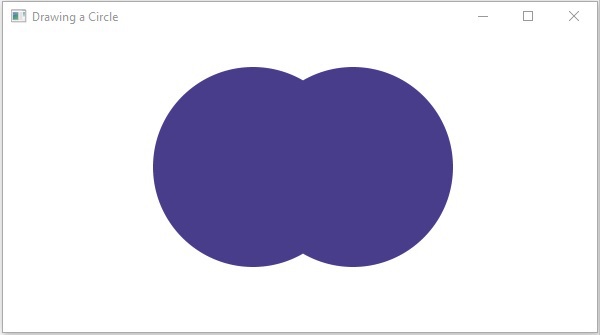
The following is an example code of the union operation. In the following code, we will draw two circles and perform a union operation on them. Save the code in a file with the name unionExample.java.
Code:
import javafx.application.Application;
import javafx.scene.Group;
import javafx.scene.Scene;
import javafx.scene.paint.Color;
import javafx.stage.Stage;
import javafx.scene.shape.Circle;
import javafx.scene.shape.Shape;

public class UnionExample extends Application {
   @Override
   public void start(Stage stage) {


      Circle circle1 = new Circle(); //Drawing Circle1
      //Setting its position
      circle1.setCenterX(250.0f);
      circle1.setCenterY(135.0f);
      circle1.setRadius(100.0f); //Setting radius of the circle
      circle1.setFill(Color.DARKSLATEBLUE); //Setting its color

      Circle circle2 = new Circle(); //Drawing Circle2
      //Setting its position
      circle2.setCenterX(350.0f);
      circle2.setCenterY(135.0f);
      circle2.setRadius(100.0f); //Setting radius of the circle
      circle2.setFill(Color.BLUE); //Setting its color

      //Performing union operation on the circle
      Shape shape = Shape.union(circle1, circle2);

      //Setting the fill color to the result
      shape.setFill(Color.DARKSLATEBLUE);

      //Creating a Group object
      Group root = new Group(shape);

      //Creating a scene object
      Scene scene = new Scene(root, 600, 300);

      //Setting title to the Stage
      stage.setTitle("Union Example");

      //Adding scene to the stage
      stage.setScene(scene);

      //Displaying the contents of the stage
      stage.show();
   }
   public static void main(String args[]){
      launch(args);
   }
}
Using the following commands, you can compile and execute the saved java file from the command prompt.
javac UnionExample.java
java UnionExample
Output:
Frequently Asked Questions
How does a Union operator work?
The Union operator combines the results of two or more queries into a single result set that includes all the rows that belong to all queries in the Union.
What is the difference between union and intersection operation?
The union function of two sets has all the elements or objects present in two sets or either of the two sets, whereas, the intersection function of two sets is when all the elements present in the both sets are present.
What does union operation mean in DBMS?
The Union is a binary set operator in DBMS used to combine the result set of two selected queries.
Conclusion
In this article, we have extensively discussed the Union Operation for 2D shapes with an example code. Having gone through this article, I am sure you must be excited to read similar blogs. Coding Ninjas has got you covered. Here are some similar blogs to redirect: Disjoint Set Union, Introduction to Union and Union find Algorithm. We hope this blog has helped you enhance your knowledge, and if you wish to learn more, check out our Coding Ninjas Blog site and visit our Library. Here are some courses provided by Coding Ninjas: Basics of C++ with DSA, Competitive Programming, and MERN Stack Web Development. Do upvote our blog to help other ninjas grow. Happy Learning!








 7+ registered

