Steps to Apply the Effect to a Node
A node object is required to call the setEffect() method provided by JavaFX. The effect class object must be passed into this method. The procedures below should be followed to apply any effect to the node.
- Create the node.
- Create an instance of the appropriate effect class which should be applied.
- Set the properties of the effect.
- Use the node object to call the setEffect() function and pass the Effect class object as an argument.
Effects in JavaFX
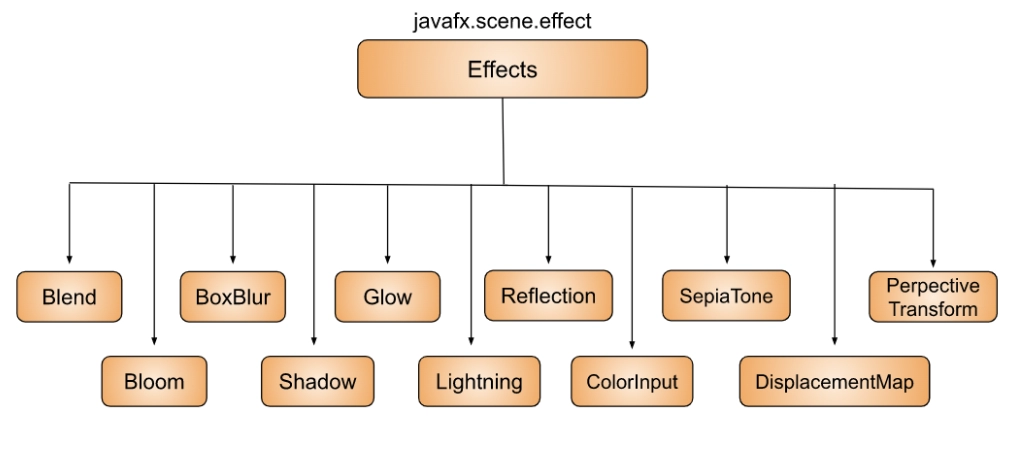
There are many Effects available in JavaFX. Some of them are discussed below with their implementation:
DropShadow
DropShadow is a high-level effect that creates a shadow with the chosen color, radius, and offset behind the content.
Implementation
import javafx.application.Application;
import javafx.scene.Scene;
import javafx.scene.effect.DropShadow;
import javafx.scene.layout.StackPane;
import javafx.scene.paint.Color;
import javafx.scene.shape.Rectangle;
import javafx.stage.Stage;

public class DropShadowExample extends Application {

   @Override
   public void start(Stage stage) {

       initUI(stage);
   }

   private void initUI(Stage stage) {

       var root = new StackPane();

       var rect = new Rectangle(0, 0, 100, 100);
       rect.setFill(Color.YELLOW);

       var ds = new DropShadow(25, Color.DARKGREEN);

       rect.setEffect(ds);

       root.getChildren().add(rect);

       var scene = new Scene(root, 250, 200, Color.WHITESMOKE);

       stage.setTitle("DropShadow");
       stage.setScene(scene);
       stage.show();
   }

   public static void main(String[] args) {
       launch(args);
   }
}

You can also try this code with Online Java Compiler
Output

Reflection
Reflection is a visual effect that displays a mirror image of the input content below the original input content.
Implementation
import javafx.application.Application;
import javafx.scene.Scene;
import javafx.scene.effect.Reflection;
import javafx.scene.layout.StackPane;
import javafx.scene.paint.Color;
import javafx.scene.text.Font;
import javafx.scene.text.FontWeight;
import javafx.scene.text.Text;
import javafx.stage.Stage;

public class ReflectionExample extends Application {

   @Override
   public void start(Stage stage) {

       initUI(stage);
   }

   private void initUI(Stage stage) {

       var root = new StackPane();

       var text = new Text();
       text.setText("CodingNinjas");
       text.setFill(Color.STEELBLUE);
       text.setFont(Font.font("Serif", FontWeight.BOLD, 65));

       var ref = new Reflection();
       text.setEffect(ref);

       root.getChildren().add(text);

       var scene = new Scene(root, 400, 300, Color.WHITESMOKE);

       stage.setTitle("Reflection");
       stage.setScene(scene);
       stage.show();
   }

   public static void main(String[] args) {
       launch(args);
   }
}
You can also try this code with Online Java Compiler
Output

GaussianBlur
An adjustable-radius Gaussian convolution kernel is used in the blur effect known as GaussianBlur. The GaussianBlur effect's radius property is controlled using the Slider control.
Implementation
import javafx.application.Application;
import javafx.beans.property.SimpleDoubleProperty;
import javafx.geometry.Insets;
import javafx.scene.Scene;
import javafx.scene.control.Slider;
import javafx.scene.effect.GaussianBlur;
import javafx.scene.layout.VBox;
import javafx.scene.paint.Color;
import javafx.scene.text.Font;
import javafx.scene.text.Text;
import javafx.stage.Stage;

public class GaussianBlurExample extends Application {

   @Override
   public void start(Stage stage) {

       initUI(stage);
   }

   private void initUI(Stage stage) {

       var root = new VBox(30);
       root.setPadding(new Insets(10));

       var radius = new SimpleDoubleProperty(0);

       var blurredText = new Text("Hey Ninjas!");
       blurredText.setFont(Font.font(38));

       var slider = new Slider(1, 20, 1);
       radius.bind(slider.valueProperty());

       slider.valueProperty().addListener(event -> {
           blurredText.setEffect(new GaussianBlur(radius.get()));
       });

       root.getChildren().addAll(slider, blurredText);

       var scene = new Scene(root, 300, 260, Color.WHITESMOKE);

       stage.setTitle("Blur effect");
       stage.setScene(scene);
       stage.show();
   }

   public static void main(String[] args) {
       launch(args);
   }
}
You can also try this code with Online Java Compiler
Output

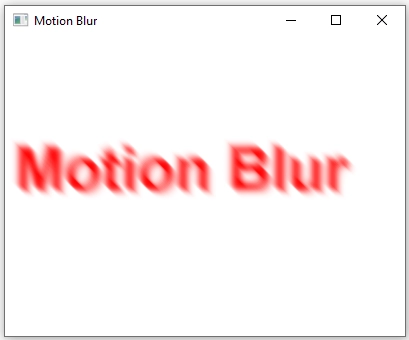
Motion Blur
The JavaFX Motion Blur effect blurs the nodes. Additionally, a Gaussian Convolution Kernel is used, which helps in creating the blurring effect. The Gaussian Convolution Kernel is applied with a predetermined angle, the only difference between the Gaussian Effect and Motion Blur.
Implementation
import javafx.application.Application;
import javafx.scene.Scene;
import javafx.scene.effect.MotionBlur;
import javafx.scene.layout.HBox;
import javafx.scene.paint.Color;
import javafx.scene.text.Font;
import javafx.scene.text.FontWeight;
import javafx.scene.text.Text;
import javafx.stage.Stage;

public class MotionBlurExample extends Application {
   public static void main(String[] args) throws Exception {
       launch(args);
   }
   @Override
   public void start(final Stage stage) throws Exception {

       Text t = new Text();
       t.setX(20.0f);
       t.setY(50.0f);
       t.setText("Motion Blur");
       t.setFill(Color.RED);
       t.setFont(Font.font("Arial", FontWeight.BOLD, 60));

       MotionBlur mb = new MotionBlur();
       mb.setRadius(15.0f);
       mb.setAngle(45.0f);

       t.setEffect(mb);

       t.setTranslateX(10);
       t.setTranslateY(100);

       HBox box = new HBox();
       box.getChildren().add(t);

       Scene scene = new Scene(box, 400, 300);
       stage.setTitle("Motion Blur");
       stage.setScene(scene);
       stage.show();
   }
}
You can also try this code with Online Java Compiler
Output
Bloom Effect
Based on a configurable threshold, the bloom effect gives brighter portions the appearance of glowing. The range for the threshold is 0.0 to 1.0. The threshold is usually set to 0.3.
Implementation
import javafx.application.Application;
import javafx.scene.Group;
import javafx.scene.Scene;
import javafx.scene.effect.Bloom;
import javafx.scene.paint.Color;
import javafx.scene.shape.Rectangle;
import javafx.scene.text.Font;
import javafx.scene.text.FontWeight;
import javafx.scene.text.Text;
import javafx.stage.Stage;

public class BloomEffectExample extends Application {
   public static void main(String[] args) {
       Application.launch(args);
   }
   @Override
   public void start(Stage primaryStage) {
       primaryStage.setTitle("Bloom Effect");

       Group g = new Group();
       Scene scene = new Scene(g, 400, 250);

       Rectangle r = new Rectangle();
       r.setX(10);
       r.setY(10);
       r.setWidth(160);
       r.setHeight(80);
       r.setFill(Color.GREEN);

       Text t = new Text();
       t.setText("Bloom!");
       t.setFill(Color.BLUE);
       t.setFont(Font.font(null, FontWeight.BOLD, 35));
       t.setX(25);
       t.setY(65);

       g.setCache(true);
       g.setEffect(new Bloom());
       g.getChildren().add(r);
       g.getChildren().add(t);

       primaryStage.setScene(scene);
       primaryStage.show();
   }
}
You can also try this code with Online Java Compiler
Output

Frequently Asked Questions
Why do we use JavaFX in Java?
A Java library, JavaFX, is used to create Rich Internet Applications. Applications built with this library can function consistently on various platforms like TVs, tablets, mobile phones, desktop computers, and more.
Does JavaFX have a future?
It is worth learning if you need to make a desktop application. Java + JavaFX is a very strong platform for application development.
Can JavaFX run in a browser?
Yes, JavaFX applications can be set up to execute on an HTML page hosted by a web browser. The Java Plugin is the type of technology that makes this possible.
Can Android run JavaFX?
The open-source project, JavaFXPorts, enables Java and JavaFX on mobile and embedded hardware, such as the iPhone, iPad, Android phones, and Raspberry Pi. Although JavaFXPorts can be used independently, it performs best when paired with Gluon Mobile.
Conclusion
This article extensively discussed the topic of Effects Class present inside JavaFX Framework. We have seen steps to apply the effect to a node and some important examples of JavaFX effects along with their implementations.
We hope this blog has helped you enhance your knowledge of JavaFX Effects. If you want to learn more, check out our articles JavaFX FlowPane, JavaFX StackPane, JavaFX GridPane, JavaFX Fill Transition, and many more on our platform Coding Ninjas Studio.
Refer to our Guided Path on Coding Ninjas Studio to upskill yourself in Data Structures and Algorithms, Competitive Programming, JavaScript, System Design, and many more! If you want to test your competency in coding, you may check out the mock test series and participate in the contests hosted on Coding Ninjas Studio! But suppose you have just started your learning process and are looking for questions from tech giants like Amazon, Microsoft, Uber, etc. In that case, you must look at the problems, interview experiences, and interview bundle for placement preparations.
Nevertheless, you may consider our paid courses to give your career an edge over others!
Happy Learning!








 7+ registered

