Do you think IIT Guwahati certified course can help you in your career?
Introduction
We can create three-dimensional shapes using JavaFX. There are classes defined in the javafx.scene.shape package that provide all methods for dealing with 3D shapes. Box, cylinder, and sphere are examples of such classes. The Shape3D class in the package javafx.scene.shape is the base class for all 3D shape classes in javafx.
A three-dimensional Shape is a solid geometrical object that must be drawn on the XYZ coordinate system. 3D shapes differ from 2D shapes in that they always require an additional coordinate value Z in order to be drawn on a coordinate system.
JavaFX GridPane
JavaFX GridPane is a container that arranges its children in a grid pattern. GridPane has specific rules regarding cell size. All cells in a row are of the same height, whereas all cells in a column will be the same width. The class javafx.scene.layout can be used to instantiate a Java GridPane. The components added to this pane will determine the number of columns and rows. Let's look at the GridPane syntax now.
JavaFX GridPane Syntax
GridPane's syntax is shown below.
GridPane gp = new GridPane();
Constructor
The JavaFX GridPane function Object() { [native code] } is as follows:
GridPane(): A GridPane layout with TOP LEFT alignment and a hgap or vgap of 0 will be created.
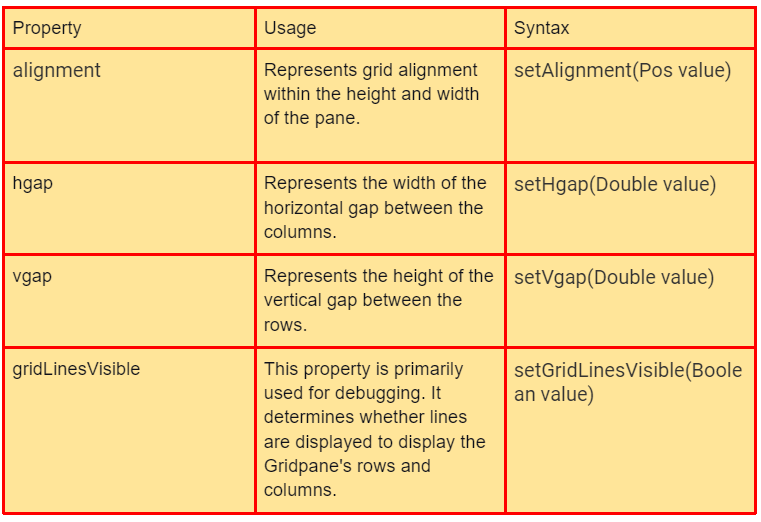
JavaFX GridPane properties
Java GridPane has several properties. They are as follows:
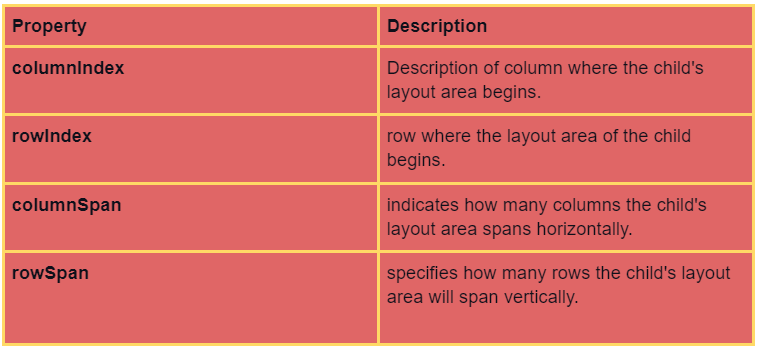
Children of the GridPane
A child can be placed anywhere within the GridPane and can span multiple rows/columns (the default span is 1), and its position within the grid is determined by its layout constraints:
The total number of rows or columns does not need to be specified at the outset because the gridpane will automatically expand/contract to accommodate the content.
JavaFX GridPane Methods
Java GridPane has several methods that perform various functions.
Some of them are-
JavaFX GridPane Implementation
Let us now look at some JavaFX programs to get a clear idea about how JavaFX GridPane is working.
A Java program demonstrating a grid pane
import javafx.application.Application;
import javafx.scene.Scene;
import javafx.scene.control.Button;
import javafx.scene.layout.GridPane;
import javafx.stage.Stage;
import javafx.scene.control.Label;
import javafx.scene.control.TextField;
public
class JavaFXGridPaneExample extends Application
{
    // application starts at this point
    @Override public void start(Stage s) throws Exception
    {
        // create label 1
        Label lbl1 = new Label("Guardian Name");
        // create label 2
        Label lbl2 = new Label("Your name ");
        // create textfield 1
        TextField t1 = new TextField();
        // create textfield 2
        TextField t2 = new TextField();
        // create a button
        Button b = new Button("Click here! !");
        // create gridpane
        GridPane gp = new GridPane();
        // create scene
        Scene sc = new Scene(gp, 500, 300);
        // first row
        gp.addRow(0, lbl1, t1);
        // second row
        gp.addRow(1, lbl2, t2);
        // third row
        gp.addRow(2, b);
        // set scene
        s.setScene(sc);
        // display result
        s.show();
    }
    // main method
public
    static void main(String[] args)
    {
        launch(args);
    }
}
Output
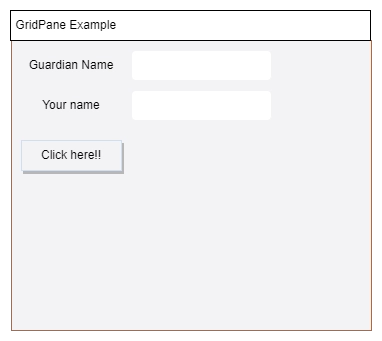
When the code is executed, two text fields with two labels and a button are displayed. These text fields and buttons are located in separate rows.
A Java program that shows a grid pane with rows and columns
import javafx.application.Application;
import javafx.scene.Scene;
import javafx.scene.control.Button;
import javafx.scene.layout.GridPane;
import javafx.stage.Stage;
// class that extends application class
public
class JavaFXGridPaneExample extends Application
{
    // application starts at this point
    @Override public void start(Stage s) throws Exception
    {
        // set title
        s.setTitle("GridPane Example");
        // create buttons
        Button b1 = new Button("Button A");
        Button b2 = new Button("Button B");
        Button b3 = new Button("Button C");
        Button b4 = new Button("Button D");
        Button b5 = new Button("Button E");
        Button b6 = new Button("Button F");
        // create grid pane
        GridPane gp = new GridPane();
        // add rows and columns to the pane
        gp.add(b1, 0, 0, 1, 1);
        gp.add(b4, 0, 1, 1, 1);
        gp.add(b2, 2, 0, 1, 1);
        gp.add(b6, 1, 1, 1, 1);
        gp.add(b3, 1, 0, 1, 1);
        gp.add(b5, 2, 1, 1, 1);
        // create scene
        Scene sc = new Scene(gp, 700, 100);
        // set scene
        s.setScene(sc);
        // display the result
        s.show();
    }
    // main method
public
    static void main(String[] args)
    {
        Application.launch(args);
    }
}
Output
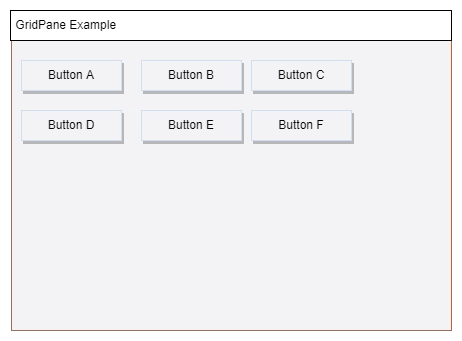
A grid pane with six buttons in a 2x3 matrix form is created. 6 buttons are arranged in 2 rows and 3 columns in a 2x3 matrix form.
Grid pane demonstration in Java
import java.awt.Color;
import javafx.application.Application;
import javafx.event.ActionEvent;
import javafx.event.EventHandler;
import javafx.geometry.Pos;
import javafx.scene.Scene;
import javafx.scene.control.Button;
import javafx.scene.layout.GridPane;
import javafx.scene.layout.HBox;
import javafx.scene.text.Text;
import javafx.stage.Stage;
import javafx.scene.control.Label;
import javafx.scene.control.TextField;
// class that extends Application class
public
class JavaFXGridPaneExample extends Application
{
    // application starts at this point
    @Override public void start(Stage s) throws Exception
    {
        // create label 1
        Label lbl1 = new Label("Guardian name");
        // create label 2
        Label lbl2 = new Label("Your name");
        // create textfield 1
        TextField t1 = new TextField();
        // create textfield 2
        TextField t2 = new TextField();
        // create a button
        Button b = new Button("Click here ! !");
        // create gridpane
        GridPane gp = new GridPane();
        // create hbox
        HBox hb = new HBox(10);
        // set alignment for hbox
        hb.setAlignment(Pos.BOTTOM_RIGHT);
        // add the children
        hb.getChildren().add(b);
        gp.add(hb, 1, 4);
        // create text
        final Text actn = new Text();
        gp.add(actn, 1, 6);
        // on clicking the button
        b.setOnAction(new EventHandler<ActionEvent>() {
            // event that has to be triggered
            @Override public void handle(ActionEvent ev)
            {
                // display text when the button is clicked
                actn.setText("Click me button pressed");
            }
        });
        // create scene
        Scene sc = new Scene(gp, 500, 300);
        // first row
        gp.addRow(0, lbl1, t1);
        // second row
        gp.addRow(1, lbl2, t2);
        // third row
        gp.addRow(2, b);
        // set scene
        s.setScene(sc);
        // display result
        s.show();
    }
    // main method
public
    static void main(String[] args)
    {
        launch(args);
    }
}
Output
A dialogue box will appear with two text fields, one button, and two labels.
In contrast to the preceding programs, an event handler is present to handle action when the button on the third row is clicked.
It can be seen that when the button is pressed, a text message is displayed.
ColumnConstraints is a public class that extends ConstraintsBase, which Defines optional layout constraints for a GridPane column. If a ColumnConstraints object is added to a gridpane column, the gridpane will use the constraint values to calculate the column's width and layout.
What is a pane in JavaFX?
A Pane is a user interface element ("Node") that contains other UI elements ("child nodes") and manages their layout within the pane. There are several predefined Pane types (subclasses of the pane) that differ in how their child nodes are displayed.
Which interface should we use with the JavaFX application's controller class?
The JavaFX controller is based on MVC (Model-View-Controller) . FXML can achieve JavaFX MVC (EFF-ects eXtended Markup Language). FXML, like HTML, is an XML-based language used to create graphical user interfaces for JavaFX applications.
Conclusion
In this article, we have extensively discussed the concepts of JavaFX GridPane. We started with introducing the JavaFx GridPane, constructors of JavaFX GridPane, children of the JavaFX GridPane, and methods of GridPane then concluded with JavaFX GridPane implementation.








 7+ registered

