Do you think IIT Guwahati certified course can help you in your career?
Introduction
Hello and Welcome, readers! We hope that you are doing well.
JavaFX is a Java library consisting of graphics and media packages for creating, designing, debugging, testing and deploying rich client applications that can operate across multiple platforms.
If you want to learn more about JavaFX, follow the article, JavaFX.
Today, this article will focus on the JavaFX CheckBox with proper explanations and examples.
So, follow this article till the end.
JavaFX CheckBox
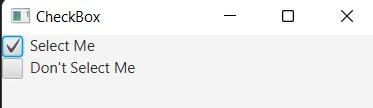
A checkbox in JavaFX is a squared shape box in which you can put a tick mark. It is a type of selection control. A checkbox is said to be selected if a tick exists in it. Otherwise, it is considered not selected, as shown below.
Though it is similar to the radio buttons in JavaFX, unlike the radio button, it can’t be grouped using a toggle button.
The Checkbox in JavaFX is under the package of javafx.scene.control, represented by javafx.scene.control.CheckBox class.
The CheckBox class has three boolean properties: allowIndeterminate, indeterminate and selected.
CheckBox States
The JavaFX CheckBox has three states. These are as follows:
Checked: If the tick mark is present in the checkbox, it is considered to be in the Checked state. Here, the value of the selected property is true.
Unchecked: If the tick mark is not present in the checkbox, it is considered to be in the Unchecked state. Here, the value of the selected property is false.
Undefined: It is an optional state. You can have this state by setting the allowIndeterminate property value to true. Here, the indeterminate value is true, indicating that the checkbox is undefined.
CheckBox Constructors
The JavaFX CheckBox has two constructors:
CheckBox(): This will create a checkbox with an empty string for its label.
CheckBox(String s): This will create a checkbox with a string for its label.
CheckBox Methods
The JavaFX CheckBox methods are as follows:
isSelected(): It returns the value of the selected property.
setSelected(boolean x): It sets the selected property’s values.
selectedProperty(): It returns whether the CheckBox is checked or not.
isIndeterminate(): It returns the value of the Indeterminate property.
setIndeterminate(boolean x): It sets the value of the Indeterminate property.
JavaFX CheckBox Example
Let’s now see some of the examples:
Example1
Here we will see an example where we will create a simple checkbox in JavaFX.
Code
import javafx.application.Application;
import javafx.scene.Scene;
import javafx.scene.control.CheckBox;
import javafx.scene.layout.VBox;
import javafx.stage.Stage;

//Sample class extending the base class Application

public class App extends Application {

    @Override
    public void start(Stage s) {
        // set the title of the stage created
        s.setTitle("CheckBox Example");

        // Create a checkbox with the empty string as its label
        CheckBox cb1 = new CheckBox();

        // Create Some Checkbox with some string labels
        CheckBox cb2 = new CheckBox("Coding Ninjas");
        CheckBox cb3 = new CheckBox("Coding Ninjas Studio");

        // create a vertical box
        VBox vb = new VBox();

        // add all the checkbox in the vertical box
        vb.getChildren().addAll(cb1 , cb2, cb3);

        // set the spacing in the vertical box

        vb.setSpacing(5);

        // create a scene
        Scene sc = new Scene(vb, 500, 500);

        // set the scene
        s.setScene(sc);

        // display the result
        s.show();
    }

    // main method
    public static void main(String[] args) {
        // starting the application
        Application.launch(args);
    }
}
You can also try this code with Online Java Compiler
Here in this section, we will see one example where we will create multiple checkboxes with the help of event handlers.
Code
import javafx.application.Application;
import javafx.scene.Scene;
import javafx.stage.Stage;
import javafx.scene.layout.VBox;
import javafx.scene.layout.HBox;
import javafx.event.ActionEvent;
import javafx.event.EventHandler;
import javafx.scene.control.*;

// extending the application class

public class App extends Application {

    // launch application
    public void start(Stage s) {

        // set the title of the stage created
        s.setTitle("CheckBox Example with Event Handler");

        // Vertical box is created
        VBox vb = new VBox();

        // label is created
        Label lb1 = new Label("Get the Fruits of your choice");

        // Fruits array
        String fruits[] = { "Apple", "Mango", "Orange", "Banana", "lemon"};

        // add label
        vb.getChildren().add(lb1);

        for (int i = 0; i < fruits.length; i++) {

            // create a horizontal box
            HBox hb = new HBox();

            // create a checkbox
            CheckBox cb = new CheckBox(fruits[i]);

            // add the checkbox into horizontal box
            hb.getChildren().add(cb);

            // create a new lable
            Label lb2 = new Label(" (" + fruits[i] + " not taken)");

            String fr = fruits[i];

            // create an event handler
            EventHandler<ActionEvent> ev = new EventHandler<ActionEvent>() {
                public void handle(ActionEvent e) {
                    if (cb.isSelected())
                        lb2.setText(" (" + fr + " taken)");
                    else
                        lb2.setText(" (" + fr + " not taken)");
                }
            };

            // Setting the event in the checkbox
            cb.setOnAction(ev);

            // add the handler messgae
            hb.getChildren().add(lb2);

            // set spacing in the horizontal box
            hb.setSpacing(5);

            // finally add the horizontal box into the vertical box
            vb.getChildren().add(hb);
        }

        // set the spacing in the vertical box
        vb.setSpacing(5);

        // Create a scene
        Scene sc = new Scene(vb, 500, 500);

        // set the scene
        s.setScene(sc);

        // display the result
        s.show();
    }

    public static void main(String args[]) {
        // launch the application
        launch(args);
    }
}
You can also try this code with Online Java Compiler
JavaFX is the Java library consisting of graphics and media packages for developing desktop applications and rich client applications that can operate across multiple platforms.
What are the Rich Client Applications?
The Rich Client Applications are web applications that provide similar features and applications to desktop applications. Compared to the normal web application, it provides a better visual experience.
What is the use of JavaFX?
The JavaFX consists of graphics and media packages that can create, debug, test and deploy rich client applications.
What are the main components of the JavaFX Application?
A JavaFX application consists of three major components: Stage, Scene and Nodes.
Conclusion
In this article, we have extensively discussed the JavaFX CheckBox.
We started with the basic introduction. Then we discussed JavaFX CheckBox, the different states of JavaFX CheckBox, JavaFX CheckBox Constructors, and JavaFX CheckBox Methods. Finally, we showed two examples.










 7+ registered

