Do you think IIT Guwahati certified course can help you in your career?
Introduction
For developing and delivering desktop and web applications that can be operated on a variety of devices we can use JavaFX. It is a framework and is compatible with Microsoft Windows, Linux, macOS desktop PCs, Android, and iOS devices.
In this blog, we'll talk about the HBox class from the JavaFX framework. We will discuss the many methods found inside the HBox class. We'll also go through how to implement these various methods into our code.
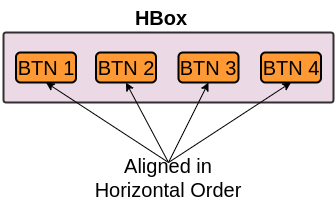
Hbox is a part of the JavaFX framework and is present inside the javafx.scene.layout package. Hbox is used as the layout in the JavaFx applications and the children or the nodes of hbox are arranged in the horizontal column.
Constructor
There are 4 different types of constructor available in hbox.
HBox(): It is used to create a hbox layout having the spacing of 0 and aligned at TOP_LEFT.
HBox(double spacing): Creates a HBox layout with the specified child spacing.
HBox(double spacing, Node... children): Creates a new HBox with the provided number of nodes and space between them.
HBox(Node... children): Creates a hbox layout with 0 spacing.
Commonly used methods
Usage
After seeing the above definition we got some idea about HBox class and the different functions and constructors available in it. But where do we actually use HBox class in our JavaFX application?. The answer to this question is really simple whenever we want to organize the nodes present in our application in Horizontal order we use HBox class. Hbox is used as the layout in JavaFX applications.
Now, we know why we use HBox. let’s see the implementation.
Implementation
Now let’s see the actual implementation of the hbox. We will have a look at two different programs.
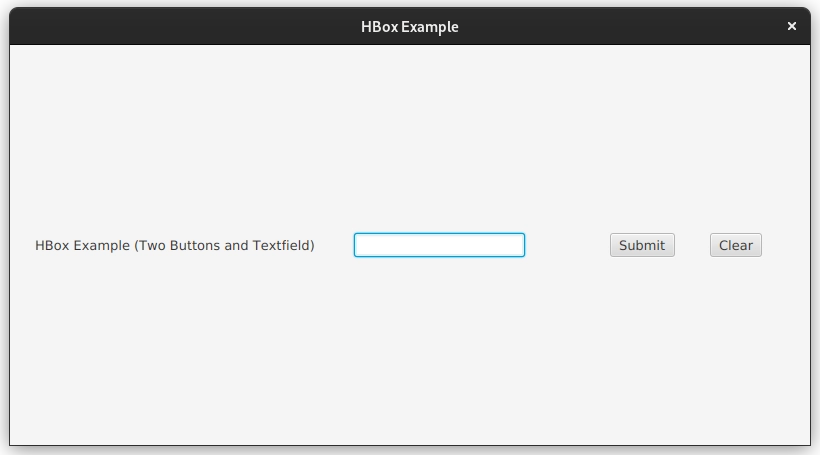
In the first program, we’ll create a basic JavaFX application in which we’ll add two different buttons and a label. Then we’ll use HBox to organize these buttons and label in horizontal form.
In the second program, we’ll update the program by adding a text field to our application. We’ll also add the margin using the inbuilt functions available in HBox class.
Program 1
import javafx.application.Application;
import javafx.scene.Scene;
import javafx.scene.control.*;
import javafx.scene.layout.*;
import javafx.stage.Stage;
import javafx.geometry.Pos;

public class HBox_Example extends Application {

   @Override
   public void start(Stage stage) {

        try{

            // setting the title
            stage.setTitle("HBox Example");

            // creating Hbox
            HBox hbox = new HBox(10);

            // creating a scene
            Scene scene = new Scene(hbox, 800, 400);

            // creating two buttons
            Button submit = new Button("Button 1");
            Button clear = new Button("Button 2");

            // creating label
            Label label = new Label("HBox Example ( Two Buttons )");

            // adding label to hbox
            hbox.getChildren().add(label);

            // adding two buttons
            hbox.getChildren().add(submit);
            hbox.getChildren().add(clear);

            // setting alignment
            hbox.setAlignment(Pos.CENTER_LEFT);

            // setting the scene
            stage.setScene(scene);

            stage.show();

        } catch (Exception e){
            e.printStackTrace();
        }

   }

   public static void main(String args[]){
        // launching the application
        launch(args);
   }
}
You can also try this code with Online Java Compiler
The display panes In JavaFX 2.0, HBox and VBox are without a doubt the most fundamental layout containers. As implied by their name, their goal is to arrange all of their children in a single vertical column (VBox) or horizontal row (HBox ).
Which method is used to create JavaFX application?
To create a javaFX application start() method is used. The primary entry point for all JavaFX applications is the start() function.
Which method is used to launch JavaFX application?
Launch() method is used to launch the JavaFX application.
Conclusion
In this article, we have extensively discussed the HBox Class present inside JavaFx Framework. We have seen different constructors to initialize the HBox object. Also, we have seen different methods available inside the class along with their implementation.









 7+ registered

