Table of contents
1.
Introduction
2.
JavaFX 
3.
JavaFX ID Selector
3.1.
Syntax 
4.
 Example
4.1.
Customer Information form
4.2.
Output
4.3.
Student Information form
4.4.
Output
5.
Frequently Asked Question 
5.1.
What is JavaFX?
5.2.
What is the package?
5.3.
What is a CSS tag selector?
5.4.
What is a label in HTML?
6.
Conclusion
Last Updated: Mar 27, 2024
Medium

JavaFX ID Selector

Author Muskan Sharma
0 upvote
Career growth poll
Do you think IIT Guwahati certified course can help you in your career?

Introduction

While working on a web application, a programmer needs to enhance its appearance to make it more interactive. So JavaFX provides different classes to apply different CSS effects to the web application. So, in this blog, we will be learning one of the classes, JavaFX ID Selectors. Let's explore more about it.

But before that, let's have a look at JavaFX.

JavaFX 

JavaFX is a GUI toolkit and Java framework created to support the creation of desktop, online, and Rich Internet Application (RIA) software. The main benefit of utilizing JavaFX is that programs created with it may run on various platforms, including desktops, the web, mobile phones, TVs, tablets, and operating systems like Windows, Linux, iOS, and Android. Due to its ability to run across various platforms and operating systems, the JavaFX library possesses this feature.

JavaFX ID Selector

In JavaFX, a CSS ID selector is used to change the appearance of a web application by changing the color, size, shape, font style, etc. The setId() method is used to specify the ID name, and the # symbol is used in the CSS file to specify the CSS properties. A distinct string assigned to a scene node serves as the CSS ID selector. The ID styles allow you to give individual CSS styles to scene graph nodes.

Syntax 

#node {
//CSS properties for node
}

Using CSS style on a button using the ID selector 

#button1 {
    -fx-background-color:White;   
    -fx-text-fill:black;   
    -fx-font-size:13;  
    -fx-border-color: Black;  
    -fx-border-radius: 9;  
}

 Example

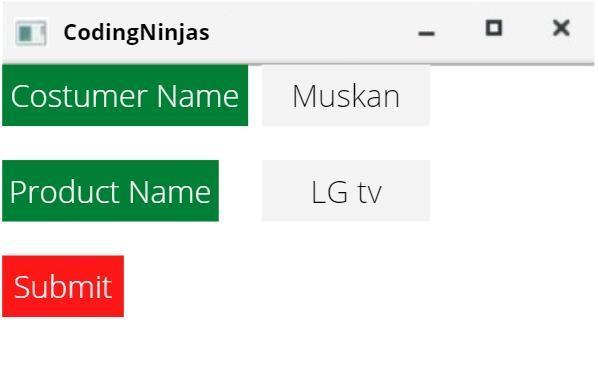
Customer Information form


 Style.css

#label1  
{  
    -fx-background-color:Green;   
    -fx-text-fill:white;   
    -fx-font-size:16;  
    -fx-border-color: Black;  
    -fx-border-radius: 7;  
}  
#label2  
{  
    -fx-background-color:Orange;   
    -fx-font-family:courier_new;   
    -fx-text-fill:White;  
    -fx-border-color: Wheat;  
    -fx-border-radius: 5;  
    -fx-font-size:16;  
}


Ninjas.java

import javafx.application.Application;    
import javafx.scene.Scene;    
import javafx.scene.control.Button;    
import javafx.scene.control.Label;    
import javafx.scene.control.TextField;    
import javafx.scene.layout.GridPane;    
import javafx.stage.Stage;    

public class Ninjas extends Application {   
@Override  
public void start(Stage primaryStage) throws Exception {    
Label prog=new Label(“Customer Name");    
Label editor=new Label("Product Name”);    
TextField tf1=new TextField();    
TextField tf2=new TextField();    
prog.setId("label1");
editor.setId("label2");

Button Submit=new Button ("Submit");     
GridPane root=new GridPane();    
root.setHgap(10);  
root.setVgap(15);  
Scene scene = new Scene(root,400,200);    
root.addRow(0, Cust,tf1);    
root.addRow(1, prod,tf2);    
root.addRow(2, Submit);    
root.getStylesheets().add("style.css");  
primaryStage.setScene(scene);    
primaryStage.setTitle("Coding Ninjas”);
primaryStage.show();    
}    

public static void main(String[] args) {    
launch(args);    
}    
  
}

Output

Student Information form


Style.css

#label1  
{  
    -fx-background-color:Green;   
    -fx-text-fill:white;   
    -fx-font-size:16;  
    -fx-border-color: Black;  
    -fx-border-radius: 7;  
}  
#label2  
{  
    -fx-background-color:Green;   
    -fx-font-family:courier_new;   
    -fx-text-fill:White;  
    -fx-border-color: Wheat;  
    -fx-border-radius: 5;  
    -fx-font-size:16;  
}
#btn  
{  
    -fx-background-color:Orange;   
    -fx-font-family:courier_new;   
    -fx-text-fill:White;  
    -fx-border-color: Wheat;  
    -fx-border-radius: 5;  
    -fx-font-size:16;  
}


Ninjas.java

import javafx.application.Application;    
import javafx.scene.Scene;    
import javafx.scene.control.Button;    
import javafx.scene.control.Label;    
import javafx.scene.control.TextField;    
import javafx.scene.layout.GridPane;    
import javafx.stage.Stage;
    
public class Ninjas extends application {   
  
@Override  
public void start(Stage primaryStage) throws Exception {    

Label country=new Label("Student Name");    
Label lang=new Label("Board");    
TextField tf1=new TextField();    
TextField tf2=new TextField();    
country.setId("label1");
lang.setId("label2");

Button Submit=new Button ("Submit");    
Submit.setId("btn");
GridPane root=new GridPane();    
root.setHgap(10);  
root.setVgap(15);  
Scene scene = new Scene(root,400,200);    
root.addRow(0, Student,tf1);    
root.addRow(1, board,tf2);    
root.addRow(2, Submit);    
root.getStylesheets().add("style.css");  
primaryStage.setScene(scene);    
primaryStage.setTitle("Coding Ninjas");
primaryStage.show();    
}    

public static void main(String[] args) {    
launch(args);    
}    
  
}

Output

Frequently Asked Question 

What is JavaFX?

A collection of graphics and media packages called JavaFX gives programmers the tools they need to create sophisticated client apps that work consistently on various platforms.

What is the package?

A Java package is a collection of sub-packages, interfaces, and classes of a common type.

What is a CSS tag selector?

It is a set of phrases and elements that instruct the browser which HTML elements to pick so that the CSS property values in the rule are applied to them.

What is a label in HTML?

The caption for a form control element in an HTML form is defined using the <label> tag. Each label corresponds to a certain form element.

Conclusion

Finally, you've concluded this article. 

Congratulations!! You learned about JavaFX ID Selector in this blog. You studied the different CSS effects we can apply to the web application. After reading this, are you eager to read more articles on JavaFX? Don't worry; Coding Ninjas will take care of everything. 

Check out this problem - Smallest Distinct Window .

Check out the awesome content on the Coding Ninjas Website:

JavaFX Inline Styles

JavaFX Menu

Please see our Code studio guided routes to learn more about Java, Competitive Programming, JavaScript, System Design, and other topics. Also, enroll in our courses and use the accessible sample tests and problems. For placement preparations, have a look at the interview experiences and interview bundle.

Do upvote our blog to help other ninjas grow. Happy Coding!


Live masterclass