Table of contents
1.
Introduction
2.
JavaFX Menu
3.
Implementation
3.1.
Example
3.1.1.
Output
4.
Frequently Asked Question 
4.1.
Which root control contains all the menus and Menuitems?
4.2.
What are JavaFX controls?
4.3.
Is JavaFX different from Java?
4.4.
What is the basic structure of JavaFX?
5.
Conclusion
Last Updated: Aug 13, 2025
Medium

JavaFX Menu

Career growth poll
Do you think IIT Guwahati certified course can help you in your career?

Introduction

JavaFX is a handy tool if you are interested in creating rich web applications or need to deliver desktop applications. In simple words, JavaFX is a set of graphics and media packages enabling developers to design, create, test, debug, and deploy rich web and desktop applications that operate consistently across diverse platforms. If you are not familiar with JavaFX, don't worry! We've got you covered. Check out JavaFX on coding ninjas and then carry on forward in this article.

Here we will introduce the core concept, usage, and implementation of the JavaFX Menu with the help of an example. 

So without further ado, let’s get going!

JavaFX Menu

The menu is a vital component of any application, Duh! We need to select stuff. JavaFX provides us with a Menu class that implements menus. The javafx.scene.control.Menu class represents a menu in JavaFX, and instantiating this class will create a menu for you. 

Menu MenuName = new Menu("Menu Name");  //creates Menu 
You can also try this code with Online Java Compiler
Run Code


You must be wondering, what about the menu elements, the title, the bar, and the items. So while you instantiate this class, you can pass the menu title as a parameter to its constructor. The Menu class also contains an observable list holding the menu item, i.e., the menu's contents.


The javafx.scene.control.MenuItem class, a superclass of the mentioned Menu class, represents the menu items. You can display text or graphics as menu items and add the desired cation to them. 

MenuItem MenuItem1 = new MenuItem("Menu Item 1 ");   //creates Menu Item  
MenuName.getItems().add(MenuItem1);     //adds Menu Item to the Menu 
You can also try this code with Online Java Compiler
Run Code


Whereas, the javafx.scene.control.MenuBar class represents a menu bar holding all the menus in a UI application.

ManuBar menubar = new MenuBar();    //creates MenuBar 
menubar.getMenus().add(MenuName);   //adds Menu to the Menu Bar  
You can also try this code with Online Java Compiler
Run Code

Implementation

Now that we have read and hopefully understood all there is to know about the JavaFX Menu, let's not wait any more time and get to the nitty-gritty of it all.

We will now create a JavaFX menu of our own. Below are the fundamental steps we will follow to obtain the desired menu.

  • We will Instantiate the Menu class.
  • Then we will create the required number of menu items by instantiating the MenuItem class.
  • Finally, we will add the menu items we just created items to the observable list of the menu.


Let's see it all unfold with an example. We will use the more specific codes as the sample codes from JavaFX Menu that we saw with different arguments.

Example

import javafx.application.Application;
import javafx.scene.Group;
import javafx.scene.Scene;
import javafx.scene.control.Menu;
import javafx.scene.control.MenuBar;
import javafx.scene.control.MenuItem;
import javafx.scene.paint.Color;
import javafx.stage.Stage;
public class MenuExample extends Application {
   public void start(Stage stage) {
      //Creating the menu
      Menu fileMenu = new Menu("Ninja Menu");
      
      //Creating our menu Items
      MenuItem item1 = new MenuItem("Coder");
      MenuItem item2 = new MenuItem("Junior Ninja Coder");
      MenuItem item3 = new MenuItem("Ninja Coder");
      MenuItem item4 = new MenuItem("Coding Ninja");
      MenuItem item5 = new MenuItem("Exit");
      
      //Adding all the defined menu items to the menu
      fileMenu.getItems().addAll(item1, item2, item3, item4, item5);
      
      //Creating a menu bar and adding our menu to it.
      MenuBar menuBar = new MenuBar(fileMenu);
      menuBar.setTranslateX(200);
      menuBar.setTranslateY(20);
      
      //Setting the stage of the application
      Group root = new Group(menuBar);
      Scene scene = new Scene(root, 595, 200, Color.ORANGE);
      stage.setTitle("Menu Example");
      stage.setScene(scene);
      stage.show();
   }
   public static void main(String args[]){
      launch(args);
   }
}
You can also try this code with Online Java Compiler
Run Code


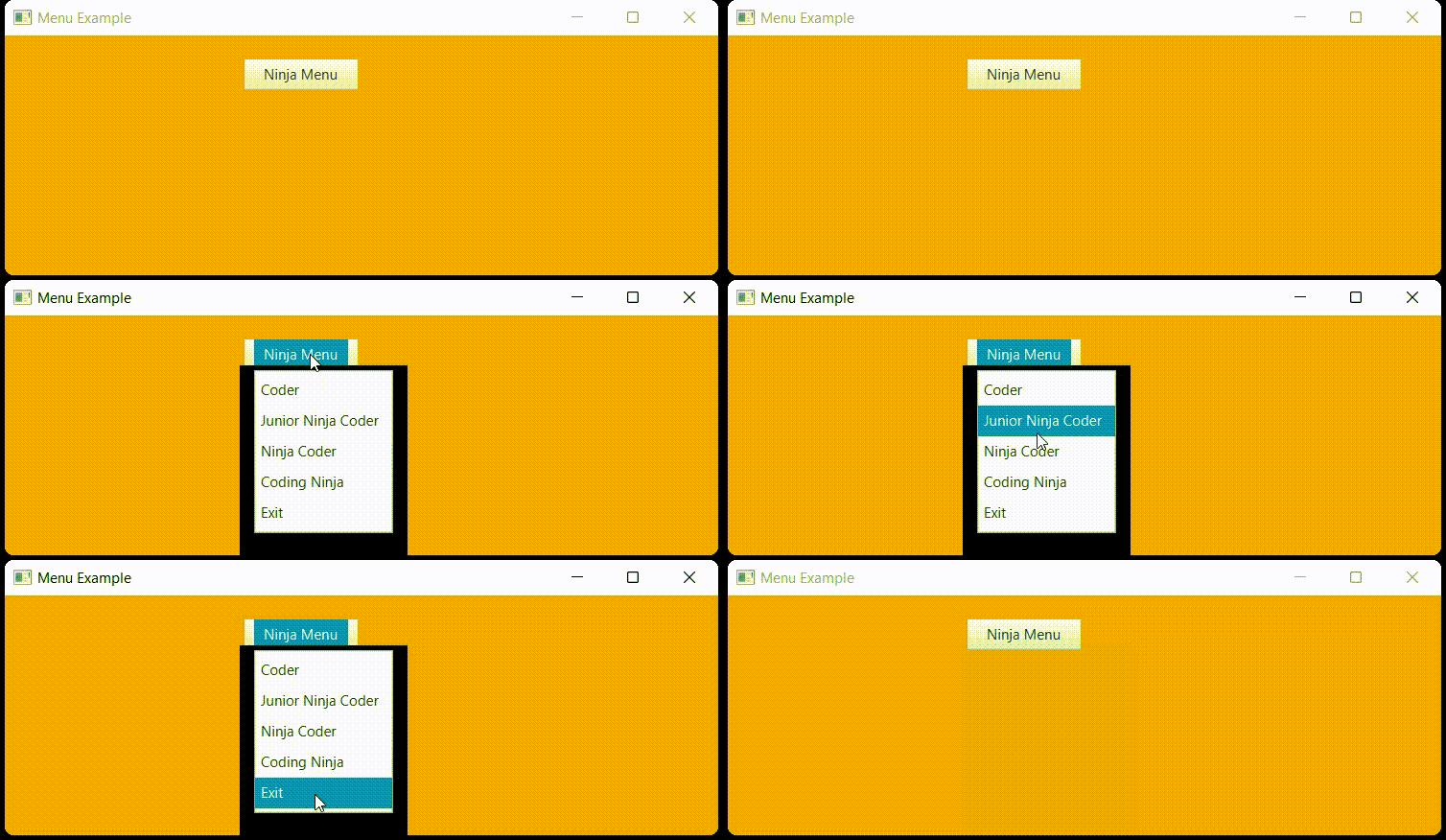
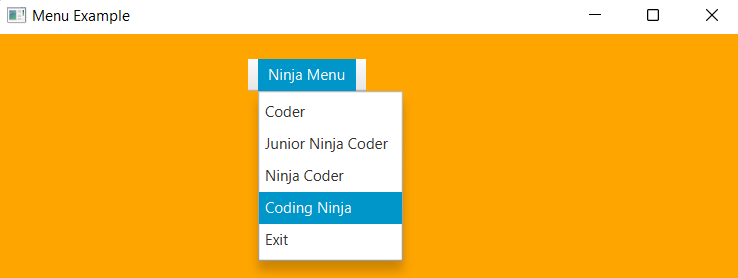
Output


Frequently Asked Question 

Which root control contains all the menus and Menuitems?

control.Menu class provides us with all the methods to deal with menus. You need to instantiate this class to create a Menu.

What are JavaFX controls?

Following are the controls JavaFX contains

  • Button.
  • Accordion.
  • ChoiceBox.
  • CheckBox.
  • ComboBox.    
  • ColorPicker.
  • Label.    
  • DatePicker.


Is JavaFX different from Java?

JavaFX and Java are different languages having different syntax. But JavaFX runs on a JVM and can use Java classes. They are mainly developed for Rich Internet Applications (RIA) across various devices.

What is the basic structure of JavaFX?

JavaFX application is hierarchically divided into three main components known as StageScene, and Nodes.

Conclusion

This article is all you need to know about JavaFX Menus and its implementations.

This is the end. Sike! We are only getting started. We have a lot more in store for you. So please don't stop here; check out our articles on Basics Of JavaBasics of Java with Data Structures and Algorithms, and many more on Coding Ninjas

Please see our Code studio guided routes to learn more about DSA, Competitive Programming, JavaScript, System Design, and other topics. Also, enroll in our courses and use the accessible sample tests and problems. For placement preparations, have a look at the interview experiences and interview bundle.

Happy Learning!

Live masterclass