

Table of contents
1.
Introduction
2.
Video Player In JFX
2.1.
Steps to play video files in JavaFX
3.
Example Application
3.1.
Implementation
3.1.1.
Output
4.
Frequently Asked Questions
4.1.
Which is the open-source media engine of JavaFX?
4.2.
How can I play mp4 in JavaFX?
4.3.
Can JavaFX run in a browser?
5.
Conclusion
Last Updated: Mar 27, 2024
Medium

JavaFX Playing Video

Career growth poll
Do you think IIT Guwahati certified course can help you in your career?

Introduction

JavaFX is the next-generation client application platform for Java-based desktop, mobile, and embedded computers. It results from a cooperative effort between numerous people and businesses to create a cutting-edge, practical, and feature-rich toolkit for creating rich client applications. It is quite simple to play videos with JavaFX. We must employ the same API that we did while playing audio files. 

In the case of video playback, we must utilise the MediaView node to display the video on the scene. To accomplish this, we must instantiate the MediaView class by supplying the Mediaplayer object to its function Object() { [native code] }. Because MediaView is a JavaFX node, we will be able to apply effects to it. This article describes the JavaFX Playing Video, beginning with the most straightforward statements and progressing to the most significant modules.

Video Player In JFX

This JavaFX library is used to create feature-rich web applications (they offer similar experience and features as that desktop apps). The products created on this library, like other Java libraries, are platform-neutral, meaning they can run on devices such as mobile phones, televisions, computers, and so on.

Other JVM-based technologies such as Groovy, JRuby, and others can be used alongside JavaFX, however, this is rarely necessary because JavaFX provides the majority of the capabilities. It is very compatible with Java Swing, and its content may be effortlessly incorporated into JavaFX applications.

We would have three distinct classes for the media player application. The Main class launches our programme, followed by the Player class, which plays back our music and video files, and the MediaBar class, which manages our media.

Steps to play video files in JavaFX

  • The location of the audio file must be sent to the function Object() { [native code] } of the JavaFX.scene.media.Media class when it is being instantiated. For this, use the following line of code.
Media media = new Media("http://path/file_name.mp3");  


  • Give the new instance of the JavaFX.scene.media.MediaPlayer object is the Media class object.
Mediaplayer mediaPlayer = new MediaPlayer(media);


  • When the onReady event occurs, call the play() function of the MediaPlayer object.
mediaPlayer.setAutoPlay(true);  


  • Create an instance of the MediaView class and pass a Mediaplayer object to it.
MediaView mediaView = new MediaView (mediaPlayer);  


  • Configure the scene and add the MediaView Node to the Group.
Group root = new Group();  
root.getChildren().add(mediaView)  
Scene scene = new Scene(root,500,300);  
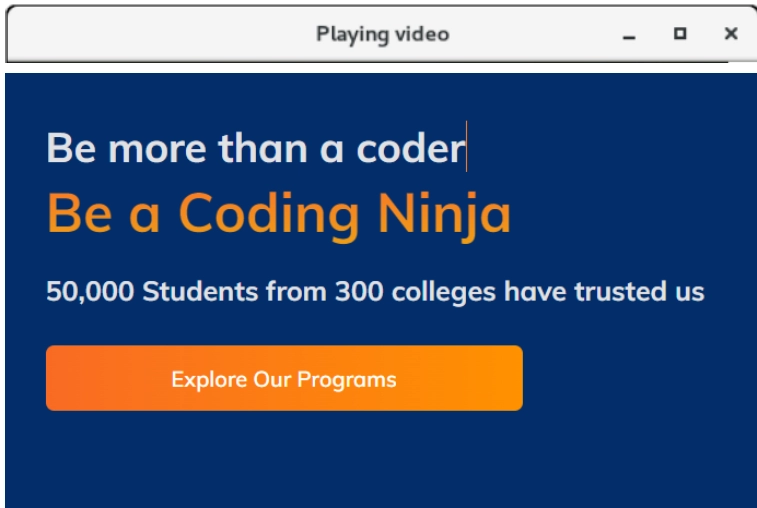
primaryStage.setTitle("Play Video");  
primaryStage.show();
Example Application

We would have three distinct classes for the media player application. The Main class launches our programme, followed by the Player class, which plays back our music and video files, and the MediaBar class, which manages our media.

Implementation

Code:

package application;  
import java.io.File;  
import javafx.application.Application;  
import javafx.scene.Group;  
import javafx.scene.Scene;  
import javafx.scene.media.Media;  
import javafx.scene.media.MediaPlayer;  
import javafx.scene.media.MediaView;  
import javafx.stage.Stage;  
public class JavaFX_VideoPlayer extends Application  
{  
    publicvoid start(Stage primaryStage) throws Exception {  
        //Initializing media file path; change this to your file path  
        String path = "/home/codingNinjas/Downloads/test.mp4";  
         
        //creating the Media class  
        Media media = new Media(new File(path).toURI().toString());  
         
        //creating the MediaPlayer class  
        MediaPlayer mediaPlayer = new MediaPlayer(media);  
         
        //creating the MediaView class    
        MediaView mediaView = new MediaView(mediaPlayer);  
         
        //When this parameter is true, the video will start playing.  
        mediaPlayer.setAutoPlay(true);
        Group root = new Group();  
        root.getChildren().add(mediaView);  
        Scene scene = new Scene(root,500,300);  
        primaryStage.setScene(scene);  
        primaryStage.setTitle("Play video");  
        primaryStage.show();  
    }  
    publicstaticvoid main(String[] args) {  
        launch(args);  
    }      
}  

Output


Frequently Asked Questions

Which is the open-source media engine of JavaFX?

The Web component is a brand-new JavaFX UI control built on Webkit that offers a full web browser and viewer through its API. This Web Engine component is based on WebKit, an open-source web browser engine that supports HTML5, CSS, JavaScript, DOM, and SVG. 

How can I play mp4 in JavaFX?

Create the JavaFX object.

Pass the Media class object to the new JavaFX instance.

When the onReady event is triggered, call the play() function of the MediaPlayer object.

Create an instance of the MediaView class and feed a Mediaplayer object into its function Object() { [native code] }.

Can JavaFX run in a browser?

The Deployment Toolkit library is recommended for embedding a JavaFX application into a web page or launching it from within a web browser. The Deployment Toolkit includes a JavaScript API for web deployment of JavaFX applications, which improves the end-user experience when launching the application.

Conclusion

In this blog, we have extensively discussed the JavaFX Playing Video. We hope that this article has helped all of you with additional information about the JFX Media Player. And to learn in-depth about Structure-execution, check out the course on our JavaFX on the Coding Ninjas website. For more information about JavaFX, you can check out JavaFX-CodingNinjas and JavaFX

Also, take a look at the Coding Ninjas website for some great information, Android DevelopmentCoding Ninjas Studio ProblemsCoding Ninjas Studio Interview BundleCoding Ninjas Studio Interview ExperiencesCoding Ninjas CoursesCoding Ninjas Studio Contests, and Coding Ninjas Studio Test Series. Do upvote our blog to help other ninjas grow.

Delighted Programming!

Live masterclass


