




Introduction
One of the essential user interface components offered by JavaServer Faces (JSF 2) is an h:outputText component. It covers the majority of frequent requirements. The component known as outputText displays a value to the user that may have been obtained from a model tier bean via an expression. The user cannot directly modify the rendered value; it is just for display purposes.
In this article, we will understand a very vital concept in JSF for web development. While developing any web interface, you will probably need an outputText to access or display some information or set of data. Here we will introduce the implementations and attributes of the h:outputText tag in JSF that will allow you to achieve such a text.
h:outputText
JSF provides a lot of sophisticated APIs and tag libraries. Tag libraries make it easier to add components on web pages and relate them to backend objects. It has handles for applying component tags.
We use the h:outputText tag in JSF to render plain text. Render a "span" element if the following properties are present: styleClass, style, dir, or lang. If the "class" attribute is present, render its value as the value of the "styleClass" attribute.
JSF Tag Example 1
<h:outputText value="Hello Ninjas!"></h:outputText>
Rendered Output
Hello Ninjas!JSF Tag Example 2
<h:outputText value="Hello Ninjas!" lang="en" style="color: blue"></h:outputText> JSF renders it as a span tag in HTML
<span style="color: blue" lang="en">Hello Ninjas!</span>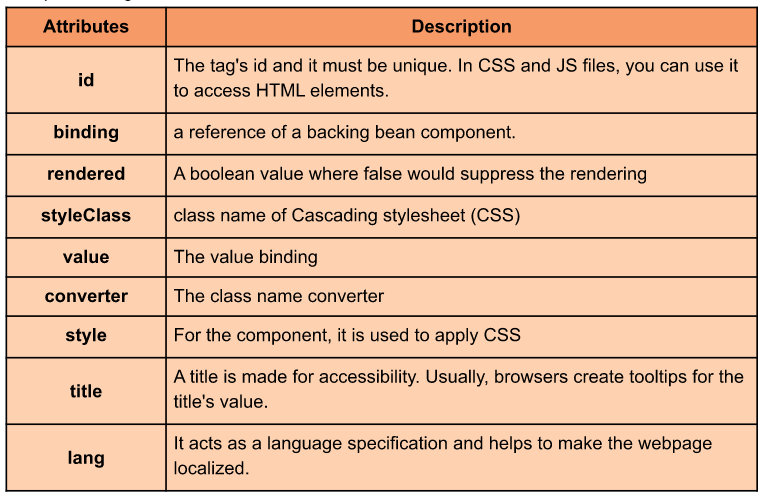




 7+ registered

