Table of contents
1.
Introduction
2.
JSF Spring Integration
2.1.
Delegating Variable Resolver
3.
Implementation 
3.1.
Java classes for Spring JSF
3.2.
View Page in JSF
3.3.
Output 
4.
Frequently Asked Questions
4.1.
Why should we use Java Server Faces?
4.2.
Define the JSF Spring framework?
4.3.
Can Spring be used with JSF?
4.4.
What is the use of the Spring integration?
4.5.
Define Spring Boot?
5.
Conclusion
Last Updated: Aug 13, 2025
Hard

JSF Spring Integration

Author Ishita mishra
0 upvote
Career growth poll
Do you think IIT Guwahati certified course can help you in your career?

Introduction

Welcome back, coders! We bring you another article on JSF and its features that lets you enhance your knowledge of this topic further. In this article, we will learn some fantastic concepts of JSF and how it can be incorporated with the Spring framework for advanced coding.  

JavaServer Faces Introduction

JSF Spring Integration

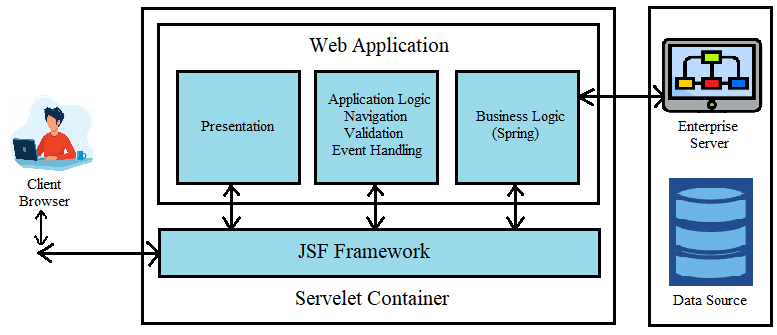
A component-based framework, JSF places a strong emphasis on user interfaces. Contrarily, Dependency Injection is the underlying principle of the Spring framework. Therefore, combining JSF and Spring framework makes sense, with Spring framework used for backend server-side business logic and JSF used for user interfaces. 

JSF Spring Integration Framework

JSF integration is offered by Spring Web Flow, making it easier to use JSF with Spring. It enables you to use Spring MVC and Spring Web Flow controllers with the JSF UI Component Model. To learn more about Spring MVC visit Spring Vs Spring Boot Vs Spring MVC.

In addition to the JSF integration, Spring Web Flow offers a little Facelets component library (named Spring Faces) for use in JSF 1.2 settings and a Spring Security tag library in JSF 1.2 and JSF 2.0 environments.

Delegating Variable Resolver

You can use JSF and Spring together because Spring offers a unique JSF VariableResolver implementation that expands the built-in JSF managed beans mechanism. This particular variable resolver is known as a DelegatingVariableResolver. Value lookups are initially delegated by DelegatingVariableResolver to the JSF's default resolver and then to Spring's WebApplicationContext. Because of this, it is simple to add spring-based dependencies to JSF-managed beans.

Implementation 

DelegatingVariableResolver enables the integration of Springs with JSF. Using an example, let's look at how to integrate Spring JSF frameworks.

Along with the typical JSF dependencies, include the following spring dependencies in your pom.xml file. 
 

<dependency>
	<groupId>org.springframework</groupId>
	<artifactId>spring-core</artifactId>
	<version>4.1.4.RELEASE</version>
</dependency>

<dependency>
	<groupId>org.springframework</groupId>
	<artifactId>spring-web</artifactId>
	<version>4.1.4.RELEASE</version>
</dependency>

<dependency>
	<groupId>javax.inject</groupId>
	<artifactId>javax.inject</artifactId>
	<version>1</version>
</dependency>


As demonstrated below, add the DelegatingVariableResolver to the faces-config.xml file. The delegating variable resolver, in this case, is the el-resolver.
A pluggable resolver mechanism provided by JSF defines the Custom EL resolvers.  In addition to the current resolvers, these resolvers are utilized when looking up properties. All we need to do is to develop a Java class that will act as the resolver to implement a custom EL resolver. The simplest solution is to inherit from javax.el. However, developers can override six abstract methods for the same using ELResolver.
 

<application>
    <el-resolver>
        org.springframework.web.jsf.el.SpringBeanFacesELResolver
    </el-resolver>
</application>


To add listeners from the spring framework, add the following line to web.xml:
 

<listener>
	<listener-class>
		org.springframework.web.context.ContextLoaderListener
	</listener-class>
</listener>

<listener>
	<listener-class>
		org.springframework.web.context.request.RequestContextListener
	</listener-class>
</listener>

Java classes for Spring JSF

We've finished setting up our configuration files; now, let's look at the Java classes for our Spring JSF sample project.

The managed bean class MobileBean.java should be created as:
 

package com.codingninjas.jsfspring;

import java.util.List;
import javax.faces.bean.ManagedBean;
import javax.faces.bean.SessionScoped;
import org.springframework.beans.factory.annotation.Autowired;
import org.springframework.stereotype.Component;

@Component
@ManagedBean
@SessionScoped
public class CarBean {
	@Autowired
	MoblileDao MobileDao;
	
	public void setCarDao(CarDao carDao) {
		this.MobileDao = MobileDao;
	}
	
	public List<String> fetchMobileBrands() {
		return MobileDao.getMobileBrands();
	}
}


Make the MobileDao.java interface as follows:
 

package com.codingninjas.jsfspring;

import java.util.List;

public interface MobileDao {
	public List<String> getMobileBrands();
}


Create the MobileImpl.java implementation class as:
 

package com.codingninjas.jsfspring;

import java.util.ArrayList;
import java.util.List;
import org.springframework.stereotype.Service;
@Service
public class MobileImpl implements MobileDao {
	@Override
	public List<String> getMobileBrands() {
		List<String> Mobile = new ArrayList<String>();
		Mobile.add(0, "Samsung");
		Mobile.add(1, "Apple");
		Mobile.add(2, "Realme");
		Mobile.add(3, "Oppo");
		Mobile.add(4, "Redmi");
		for (String c : Mobile) {
			System.out.println(c);
		}
	return Mobile;
	}
}

View Page in JSF

Let's build the JSF view page.

Create the Mobile.xhtml page in JSF as:
 

<?xml version="1.0" encoding="UTF-8"?>
<!DOCTYPE html PUBLIC "-//W3C//DTD XHTML 1.0 Transitional//EN" 
"https://www.w3.org/TR/xhtml1/DTD/xhtml1-transitional.dtd">

<html xmlns="https://www.w3.org/1999/xhtml"
	  xmlns:h="https://java.sun.com/jsf/html"
	  xmlns:ui="https://java.sun.com/jsf/facelets">
	  
<h:head>
	<title>JSF Spring Integration Example</title>
</h:head>

<h:body>
	<h2>Mobile Brand Name List</h2>
	<ul>
		<ui:repeat var="Mobile" value="#{MobileBean.fetchMobileBrands()}">
			<li><h3>#{Mobile}</h3></li>
		</ui:repeat>
	</ul>
</h:body>
</html>


Search for service classes includes the base package information in applicationContext.xml.
 

<beans xmlns="https://www.springframework.org/schema/beans"
	xmlns:xsi="https://www.w3.org/2001/XMLSchema-instance" 
	xmlns:context="https://www.springframework.org/schema/context"
	xsi:schemaLocation="https://www.springframework.org/schema/beans
	https://www.springframework.org/schema/beans/spring-beans-3.1.xsd
	https://www.springframework.org/schema/context
	https://www.springframework.org/schema/context/spring-context-3.1.xsd">
	<context:component-scan base-package="com.codingninjas.jsfspring" />
	<!-- 
	<bean class="com.codingninjas.jsfspring.MobileImpl" id="MobileDAO" />
	<bean class="com.codingninjas.jsfspring.MobileBean" id="MobileBean">
	<property name="MobileDao" ref="MobileDAO"></property>
	</bean>
	-->
</beans>

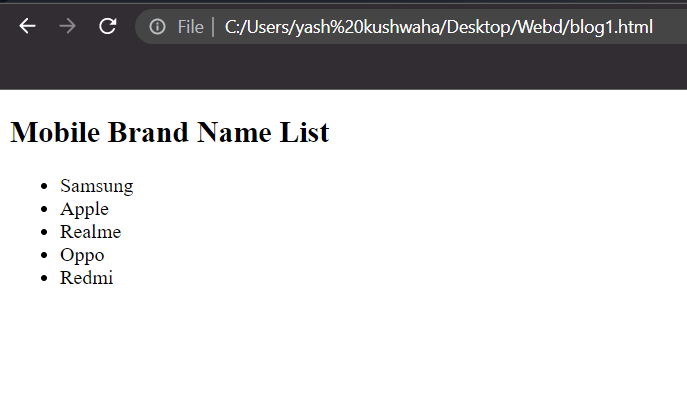
Output
 

Output

Frequently Asked Questions

Why should we use Java Server Faces?

The Java standard technology for creating component-based, event-oriented web interfaces is called Java Server Faces (JSF). SF permits server-side data and functionality access, just like the Java Server Pages (JSP).

Define the JSF Spring framework?

A component-based framework, JSF places a strong emphasis on user interfaces. Contrarily, Dependency Injection is the underlying principle of the Spring framework. Therefore, combining JSF and Spring framework makes sense, with Spring framework used for backend server-side business logic and JSF used for user interfaces.

Can Spring be used with JSF?

The JSF integration offered by Spring Web Flow enables you to use the JSF UI Component Model with Spring Web Flow controllers. Web Flow provides a Spring Security tag library for use in JSF settings.

What is the use of the Spring integration?

Lightweight messaging is made possible by Spring Integration within Spring-based applications, and declarative adapters are used to provide integration with external systems. JSF integration is offered by Spring Web Flow, making it easier to use JSF with Spring.

Define Spring Boot?

Spring Boot is one of the modules of the Spring Framework. A micro Service can be created using the free and open-source Spring Boot framework. The Pivotal Team made it and used it to develop standalone, production-ready spring apps.

Conclusion

In this blog, we extensively discussed the integration of JSF with the Spring framework and also worked out an example.


We hope this blog has helped you enhance your knowledge regarding JSF Spring integration. Check out the excellent content on the Coding Ninjas Website, Android DevelopmentCoding Ninjas Studio ProblemsCoding Ninjas Studio Interview BundleCoding Ninjas Studio Interview ExperiencesCoding Ninjas CoursesCoding Ninjas Studio Contests, and Coding Ninjas Studio Test Series.

Recommended Readings:

You can also consider our Spring Boot Course to give your career an edge over others.

Do upvote our blog to help other ninjas grow. 

Thank You

Happy learning, ninjas!

Live masterclass