




Introduction
When software requires resources, the Operating System allocates them. When a program comes to an end, the resources are de-allocated and redistributed to other programs in need.
Now comes how the operating system allocates these resources to user programs.
There are two Resource allocation techniques:
Resource partitioning approach
The operating system selects which resources should be allotted to which user software in this technique ahead of time.
It splits the system's resources into multiple resource partitions, each of which may contain various resources, such as 1 MB of RAM, disc blocks, and a printer.
Then, prior to the start of each user application, it assigns one resource partition to it.
The resource division and its current allocation state are recorded in a resource table (Allocated or Free).
Example:
A resource table serves as the core data structure in a simple resource allocation strategy [see Table].
Each item in the table comprises the name and address of a resource unit, as well as its current state, i.e., whether it is free or assigned to a program.
The boot method generates this table by sensing the existence of I/O devices in the system.

The table above depicts a collection of partitions defined at boot time.
The resource table contains entries for resource partitions rather than individual resources.
Before a program's execution begins, a free partition is assigned to it.
Advantages:
- Simple implementation
- Low overhead
Disadvantages
- Lacks flexibility - If a resource partition has more resources than a given process requires, the excess resources are thrown away.
- If a program requires more resources than are available in a single resource partition, it will not run (Though free resources are present in other partitions).
Also see, Resource Allocation Graph, Multiprogramming vs Multitasking
Pool based approach
There is a shared pool of resources in this strategy.
When an application requests a resource, the operating system verifies the allocation status in the resource table.
If the resource is available, it is assigned to the program.
Example:
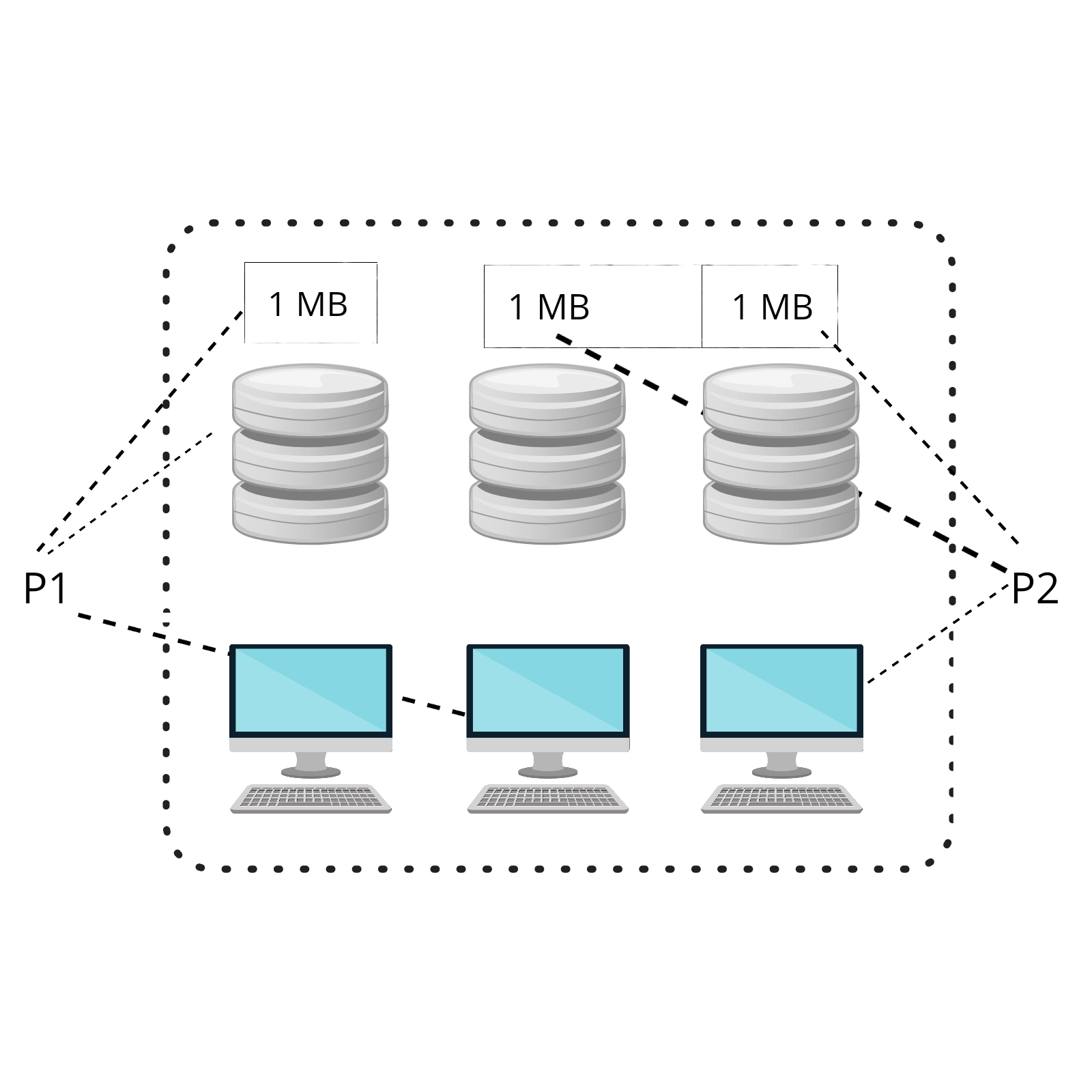
The above figure depicts pool-based allocation.
P1 is given a monitor, a disc space of 2000 blocks, and 1 MB of RAM.
P2 is assigned a monitor and 2 MB of RAM; the disc is not assigned because P2 did not request it.
As a result, pool-based allocation avoids allocating resources that are not required by a program.
The operating system can handle programs with significant or unique needs as long as the necessary resources are available in the system.

Advantages:
- The resources that have been allocated are not wasted.
- If a resource is available, it may be used to meet any demand (unlike the Partitioning approach)
Disadvantages:
- Overhead of allocating and de-allocating the resources on every request and release.
Memory Allocation Using the above Approaches
Memory fragments can be viewed as separate resources.
The memory may be managed via both partitioning and pool-based allocation.
Partitioning is easy to set up and simplifies memory protection.
Pool-based allocation, on the other hand, makes better use of memory.
The memory may be reclaimed from idle applications and utilized to support active programs.
Memory preemption is referred to as swapping.
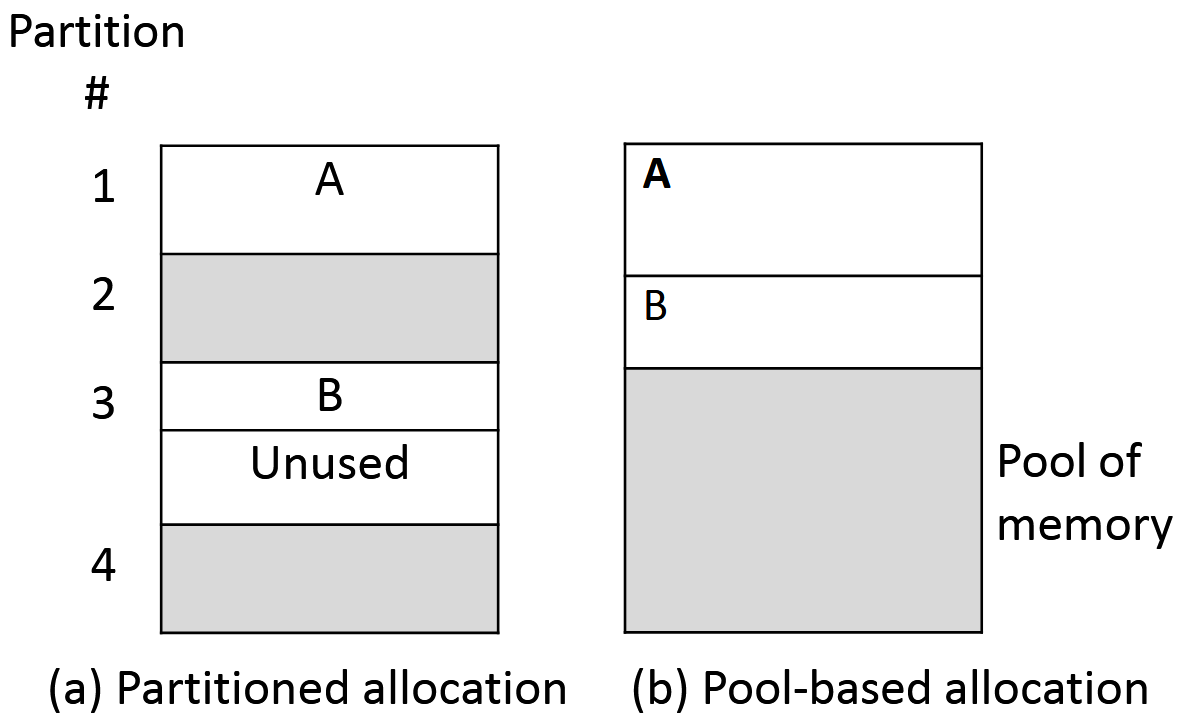
The strategy for memory allocation is depicted in the image.
Figure (a) depicts the scenario where memory is partitioned into equal-sized partitions, two of which are assigned to programs A and B.
There are currently two free partitions.
Because the size of B is less than the size of the partition, some of the RAM assigned to it goes idle.
The pool-based strategy is depicted in Figure (b).
Each application receives only the amount of memory it requests, ensuring that allocated memory is not squandered.
You can also read about the memory hierarchy and Open Source Operating System.
Frequently Asked Questions
How does the operating system manage the allocation of resources?
When an application requests a resource, the operating system verifies the allocation status in the resource table. If the resource is available, it is assigned to the program.
Why does the operating system need to properly allocate resources to applications?
Resource allocation is required in computing for any program to execute on the system. When a user launches software, it is classified as a process, which necessitates the computer allocating resources to allow it to execute.
What is resource allocation in terms of the operating system?
When software requires resources, the Operating System allocates them. When a program comes to an end, the resources are de-allocated and redistributed to other programs in need.


 7+ registered

