The RecycleView Widget
The RecycleView widget is a view that allows users to scroll through large lists of items and view a selected portion of a large dataset. Its goal is to avoid performance deterioration while creating many widgets to display a large number of data items. We can use the RecycleView widget to create a list of products, images, videos, etc. The idea behind RecycleView is that we can reuse views instead of creating them repeatedly.
The RecycleView widget displays lists of items that we can use to scroll through. It works well for displaying data lists where each item has a unique identifier (such as a string). This widget uses a scroll view to allow scrolling through the list of items.
Syntax
To use the RecycleView widget in Kivy, we need to import it from the “kivy.uix.recycleview” package below.
from kivy.uix.recycleview import RecycleView

You can also try this code with Online Python Compiler
Implementation
The basic steps involved in creating a RecycleView are as follows:
- Step 1: From kivy.uix.recycleview, import RecycleView.
- Step 2: From kivy.lang, import Builder to define the layout view class of the recycler view.
- Step 3: Create a recycling view class in which we will use the Builder layout and view classes and provide the data to be seen.
- Step 4: Create a new class in which the Program will be executed.
Below is the sample implementation of the kivy RecycleView widget in python. Here, we have shown multiple buttons using the RecycleView widget.
Code
#example of recycleview widget in kivy
#importing packages for demonstrating recycleview widget
from kivy.app import App
from kivy.lang import Builder
from kivy.uix.recycleview import RecycleView

#builder for recycleview
Builder = Builder.load_string(
    """
<RV>:
    viewclass: 'Button'
    spacing: 10
    padding: 10, 10
    space_x: self.width
    RecycleBoxLayout:
        default_size: (dp(100), dp(100))
        default_size_hint: (None, None)
        size_hint_y: None
        height: self.minimum_height
        orientation: 'vertical'
        RecycleBoxLayout:
            orientation: 'vertical'
            color: 0,0.4,0,0.8
            default_size: (dp(100), dp(100))
            default_size_hint: (0.4, None)
            size_hint_y: None
            height: self.minimum_height
        """)

#class for recycleview
class RV(RecycleView):
    def __init__(self, **kwargs):
        #superclass for recycleview
        super(RV, self).__init__(**kwargs)
        self.data = [{'text': str(i)} for i in range(20)]

#class for app
class MyApp(App):
    def build(self):
        return RV()

#run app
if __name__ == '__main__':
    MyApp().run()
You can also try this code with Online Python Compiler
Output
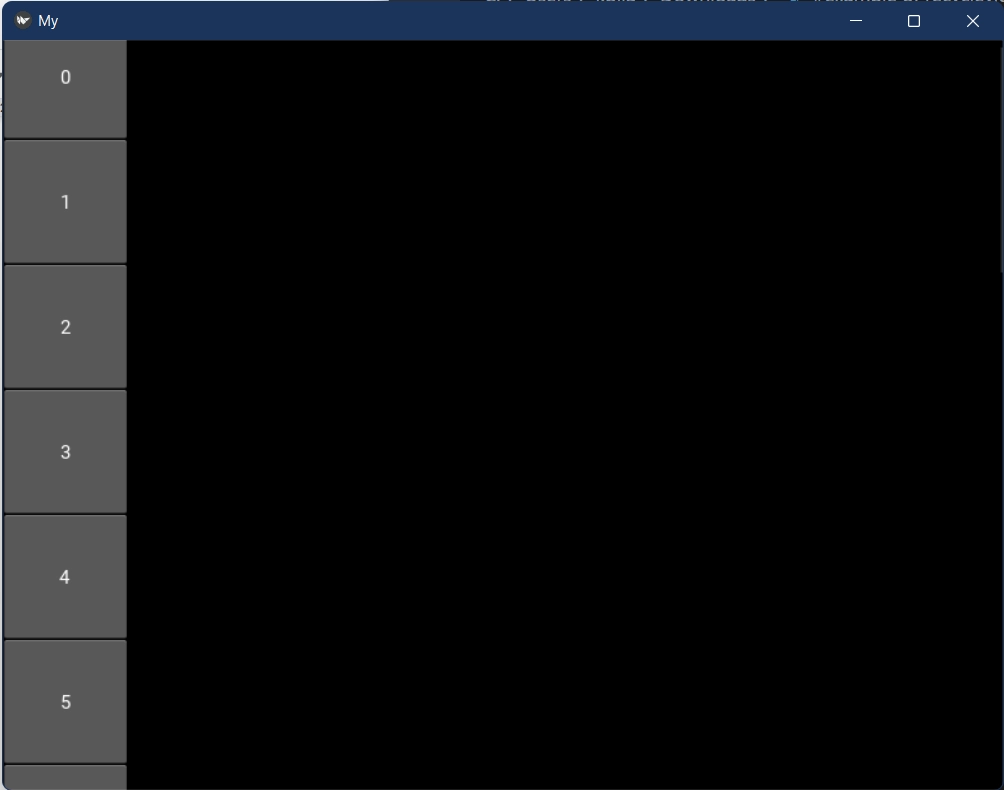
In the above example, we have got 20 buttons one after another. This is the sample implementation of the RecycleView widget in kivy.
Frequently Asked Questions
Django or Kivy: which is better?
Kivy is an open-source Python framework, while Django is a high-level Python Web framework that emphasises rapid development and clean, pragmatic design. It's an open-source Python toolkit for quickly developing applications with novel user interfaces, such as multi-touch apps.
Is Pygame compatible with Android?
The Pygame Subset for Android allows Pygame programmes to run on Android phones and tablets. Android supports sound, vibration, a keyboard, and an accelerometer. Pygame applications are not presently supported on iOS.
Is Kivy a language?
The KV language, also known as kvlang or the kivy language, allows you to design a declarative widget tree and naturally connect widget properties and callbacks. It enables rapid prototypes and UI adjustments.
Is Kivy good for iOS?
Kivy is an intriguing GUI framework that we can use to construct desktop user interfaces and mobile apps for iOS and Android. Kivy applications on any platform will not look like native apps. This can be advantageous if you want your application to stand out from the crowd!
Conclusion
This article discussed the RecycleView model in Kivy and how to implement it in the Kivy Toolkit for Python. The key points covered in this article are “Overview of Kivy”, “Basic Features”, “The RecycleView Widget”, “Syntax”, and its “Implementation in Python.”
We hope that this blog has helped you enhance your knowledge regarding the RecycleView widget in kivy and if you would like to learn more, check out our articles on ‘Scroll View Widget in Kivy,’ ‘Dropdown list in Kivy,’ ‘Button action in kivy,’ ‘Button color in kivy,’ and ‘Kivy float layout.’ Do upvote our blog to help other ninjas grow.
Head over to our practice platform Coding Ninjas Studio to practice top problems, attempt mock tests, read interview experiences, and much more.!
Happy Reading!








 1+ registered

